Garden / Electric Fencing
User Manual for Horizont farmer AS140 Electric Fencer
Quick guide for the Horizont farmer AS140 electric fencer. Includes setup, operation, battery maintenance, charging instructions, and troubleshooting.
Table of contents
Manual images
Click an image to enlargeQuick guide from the manual
The Horizont farmer AS140 is a solar-powered electric fencer. For optimal performance, ensure the solar panel is oriented towards the south. The device must be turned off before any maintenance or intervention. Always recharge the battery in the sun for at least one day before and after use. Proper grounding is essential for effective operation.
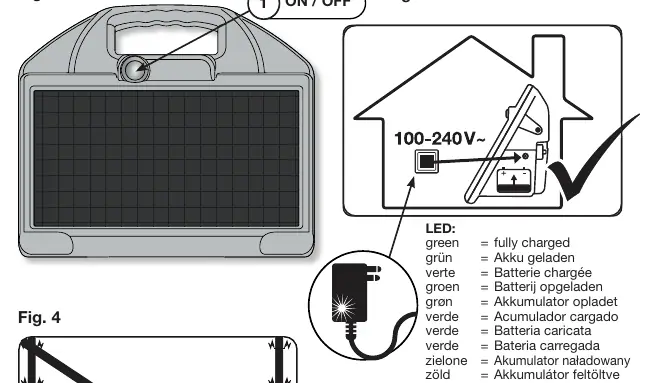
Operation and control
To turn the device on, press the on/off button (1). After a few seconds, a green LED will flash in rhythm with the pulses, indicating the device is active. If the LED does not flash, the battery may be flat, or there may be a fault in the controller.
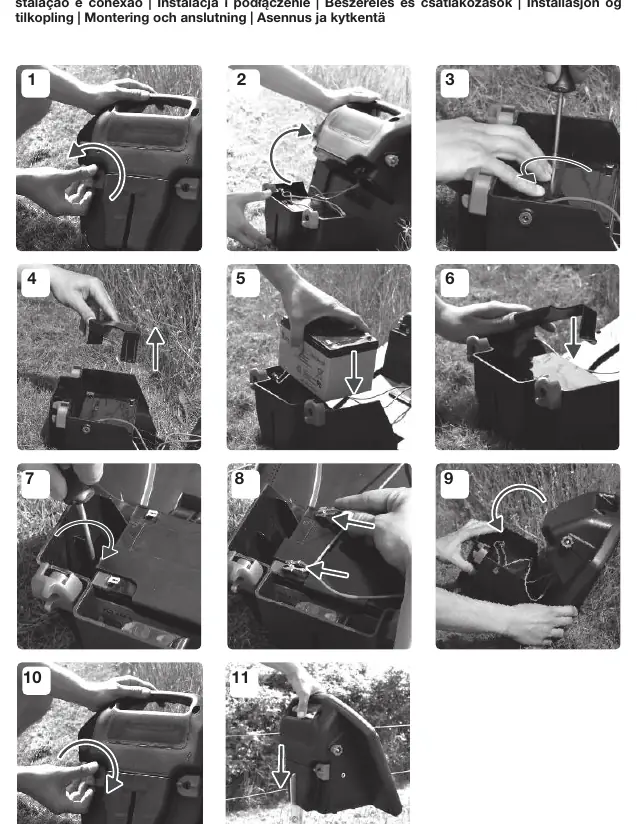
Storage, recharge, and mounting
When not in use, store the unit in a well-lit area, such as a south-facing window, especially during winter, to prevent deep discharge of the accumulator. Check the battery voltage monthly. Recharge the battery using the included charging unit if necessary. During charging, the device must be disconnected from the fence and turned off. Use only rechargeable 12V lead batteries. Ensure the device is mounted with the ground rod in moist soil and the panel oriented south.

Battery indicator
Check the battery status only at daybreak (without direct sunlight). The battery must be recharged when it is 80% discharged (20% capacity remaining) to prevent deep discharge. The LED indicator provides the following status:
- Flashing green: 40-100% capacity (good battery).
- Flashing red/green: 20-40% capacity (charge the battery).
- Continuous red: 0-20% capacity (low battery).
Note that these values may vary based on temperature and measurement deviations.
Grounding
Good grounding is critical for faultless operation. Install the ground rod in a moist and overgrown area. Use at least one 1m earth stake, or additional stakes if necessary. The system earth must be at least 10m away from the protective system earth of the supply network.
Technical data
The device features an integrated energy-saving function that adapts energy usage to the condition of the fence. It provides a maximum voltage of 10,000V and an output of 1.4J.
Manufacturer information
horizont group gmbh
Practical help
Common problems
Green LED does not flash after turning on
The battery is likely flat or there is a fault in the controller. Check battery charge or contact service.
Battery indicator shows continuous red light
Battery is low (0-20% capacity). Recharge the battery immediately using the external charger.
Insufficient battery charge in winter
The solar panel may not provide enough power during winter months (October-February). Recharge the battery externally in time.
Before use
- Charge the device in the sun for at least 1 day before first use.
- Ensure the solar panel is oriented towards the south.
- Drive the ground rod into moist ground.
- Check that the battery voltage is sufficient.
- Ensure the device is disconnected from the fence during charging.
Specs in practice
- 12V Lead Battery
- The required battery type for the device.
Images and diagrams
- Fig 2: Shows the ON/OFF button location.
- Fig 3: Illustrates the charging process (do not connect to fence).
- Fig 4: Illustrates the operational setup (connected to fence).
Model compatibility
- Use only rechargeable 12V lead batteries.
- Do not connect to mains-operated equipment including battery chargers.
- Grounding must be separated from the farm's protective earth by at least 10m.

Manual page author
Michael Turner
Technical manual editor
Reviews PDF manuals for structure, safety notes, and practical product details so readers can find the right information quickly.