Garden / Electric Fencing
User Manual for Horizont fence scout II 14151C Fault Finder
Quick guide for the Horizont fence scout II 14151C fault finder. Learn how to operate the device, connect the internal battery, and use the fault finder to locate short circuits and leaks in your electric fence system.
Table of contents
Quick Guide
Before using the Horizont fence scout II, you must connect the internal battery. During operation, you must hold the power button and touch the contact surface on the back of the unit to establish a conductive connection to the earth through your body.
Device Overview
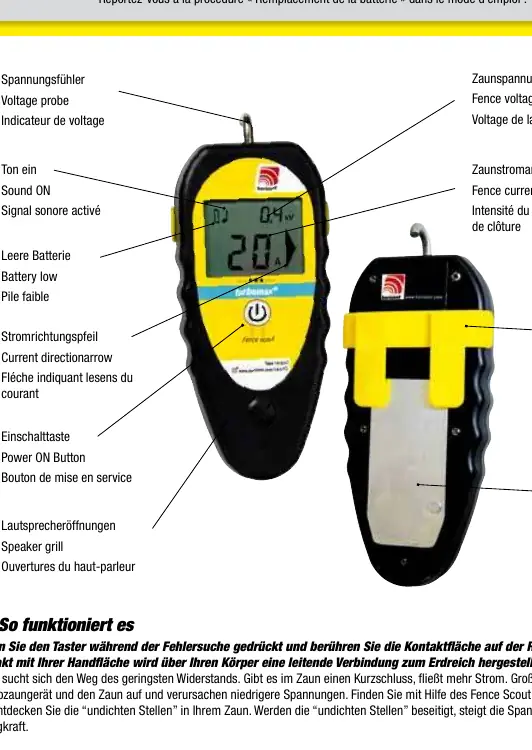
The device features a voltage probe at the top, a display showing fence voltage and current readings, a power button, and a speaker grill. On the back, there is a contact surface and a detachable belt clip.
How it Works
The fence scout II helps you locate faults in your electric fence system. Current flows through the path of least resistance. If there is a short circuit, more current flows. By using the device to detect where the current is flowing, you can locate leaks in the fence system. Fixing these leaks will increase the voltage and shock power of the fence.
Operation
To troubleshoot your fence:
- Press and hold the power button.
- Touch the contact surface on the back of the unit with your palm.
- This contact establishes an earth connection via your body.
- Move along the fence line to detect current flow and identify the location of the fault.
Manufacturer information
horizont group gmbh
Practical help
Common problems
Low voltage readings on the fence
This indicates a short circuit or leak. Use the device to trace the current flow to the source of the leak.
Device does not power on
Ensure the internal battery is properly connected as per the battery replacement procedure.
Before use
- Connect the internal battery before first use.
- Ensure the device is held correctly with palm contact on the rear surface.
Specs in practice
- Fence voltage
- The electrical potential measured on the fence line.
- Fence current reading
- The amount of current flowing, used to identify short circuits.
- Contact surface
- The area on the back of the device that must be touched to ground the unit.
Images and diagrams
- Voltage probe: Used to measure the fence voltage.
- Current direction arrow: Indicates the direction of the current flow.
- Power ON Button: Press and hold to activate the device during troubleshooting.
Model compatibility
- Designed for use with electric fencing systems.

Manual page author
David Miller
Documentation analyst
Organizes user manual content into clear summaries, with attention to model details, product context, and everyday usability.