Home Appliances / Ovens
Hyundai Elantra ECM Update Service Bulletin 14-FL-006
Quick guide for performing the ECM software update on 2011-2013 Hyundai Elantra vehicles to address P2096 and misfire diagnostic trouble codes.
Table of contents
Manual images
Jump to the sectionQuick guide from the manual
This technical service bulletin provides instructions for updating the Engine Control Module (ECM) software on 2011-2013 Hyundai Elantra (MD/UD) vehicles. The update addresses diagnostic trouble codes (DTC) P2096 (Post Catalyst Fuel Trim System too Lean) and P0301-P0304 (Misfire detected). Technicians must verify the vehicle's current ROM ID against the provided tables before proceeding with the update.
General precautions
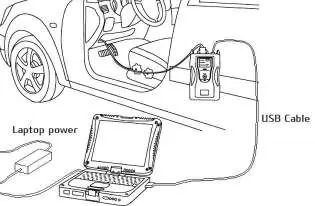
- Ensure the GDS laptop battery is charged to at least 50%.
- Turn off all vehicle lights and accessories (heater, AC, audio, etc.) to prevent battery discharge.
- Perform the update with the ignition in the ON position.
- Do not disconnect any cables or turn off the ignition during the update process.
- Confirm the GDS software is updated to the latest version.
GDS auto mode ECM update procedure

- Connect the GDS to the VCI via USB and connect the 16-pin DLC connector to the vehicle.
- From the GDS home page, select ECU Upgrade and select the VIN if necessary.
- Select Engine as the system and click OK.
- Select Auto Mode and click Next.
- The system will read the ROM ID; confirm it matches the applicable ROM ID in the provided tables.
- Select the update event 330. UD/MD 1.8MPI ENGINE DTC P2096 IMPROVEMENT and click Upgrade.
- If the voltage is above 12V, proceed. If not, cancel and charge the battery.
- Follow on-screen prompts; turn the ignition OFF for 10 seconds when prompted, then turn it back ON.
- Once finished, erase all DTCs stored during the update process.
GDS manual mode ECM update procedure
Use this procedure only if the Auto Mode fails. Ensure the ECM connectors are disconnected for 15 minutes to reset the module before attempting the manual update.
- Follow the same initial steps as Auto Mode but select Manual Mode.
- Select the exact ECU for the vehicle and enter the specific password provided in the manual's password table based on the vehicle's part number and key type.
- Proceed with the update as described in the Auto Mode steps.
Technical support
If you encounter GDS-related problems, contact the GIT Helpline at 888-437-0308.
Manufacturer information
Hyundai
Practical help
Common problems
Voltage is below 12V during update
Select CANCEL, run the engine for 10 minutes to charge the battery, then restart the update.
Auto Mode update fails
Disconnect ECM connectors for 15 minutes to reset, then attempt the Manual Mode procedure using the correct password from the table.
DTCs remain after update
Erase all DTCs in all systems that were stored due to loss of CAN communication during the update.
Before use
- Verify vehicle model year (2011-2013) and emission type (SULEV/ULEV).
- Check current ROM ID against the provided ROM ID Information Table.
- Ensure GDS laptop battery is at least 50% charged.
- Turn off all lights and accessories.
- Confirm GDS software is updated to the latest version.
Images and diagrams
- The GDS connection diagram shows the USB cable linking the GDS laptop to the VCI, and the 16-pin DLC connector linking the VCI to the vehicle's diagnostic port under the driver's side dash.
- The GDS software screen shows the ECU Upgrade interface where the user selects the event 330 to begin the reprogramming process.
Model compatibility
- Applicable only to 2011-2013 Hyundai Elantra (MD/UD) models.
- Manual mode requires specific passwords based on the vehicle's ECM part number and ignition type (Start-Stop Button vs Key Start).

Manual page author
Emily Carter
User documentation editor
Prepares concise manual descriptions and highlights the most useful setup, operation, and maintenance information for readers.