Home Appliances / Vacuum Cleaners
Hyundai HHE213308 3-in-1 Stick Vacuum Cleaner and Aqua Mop User Manual
Quick start guide for the Hyundai HHE213308 3-in-1 vacuum and mop. Includes assembly, charging instructions, cleaning procedures, and troubleshooting tips.
Table of contents
Manual images
Jump to the sectionQuick guide from the manual
This document provides essential instructions for the Hyundai HHE213308 3-in-1 Stick Vacuum Cleaner and Aqua Mop. Key operations include initial assembly, charging procedures, and maintenance steps to ensure optimal performance. Always ensure the device is turned off before performing any maintenance.
Assembly
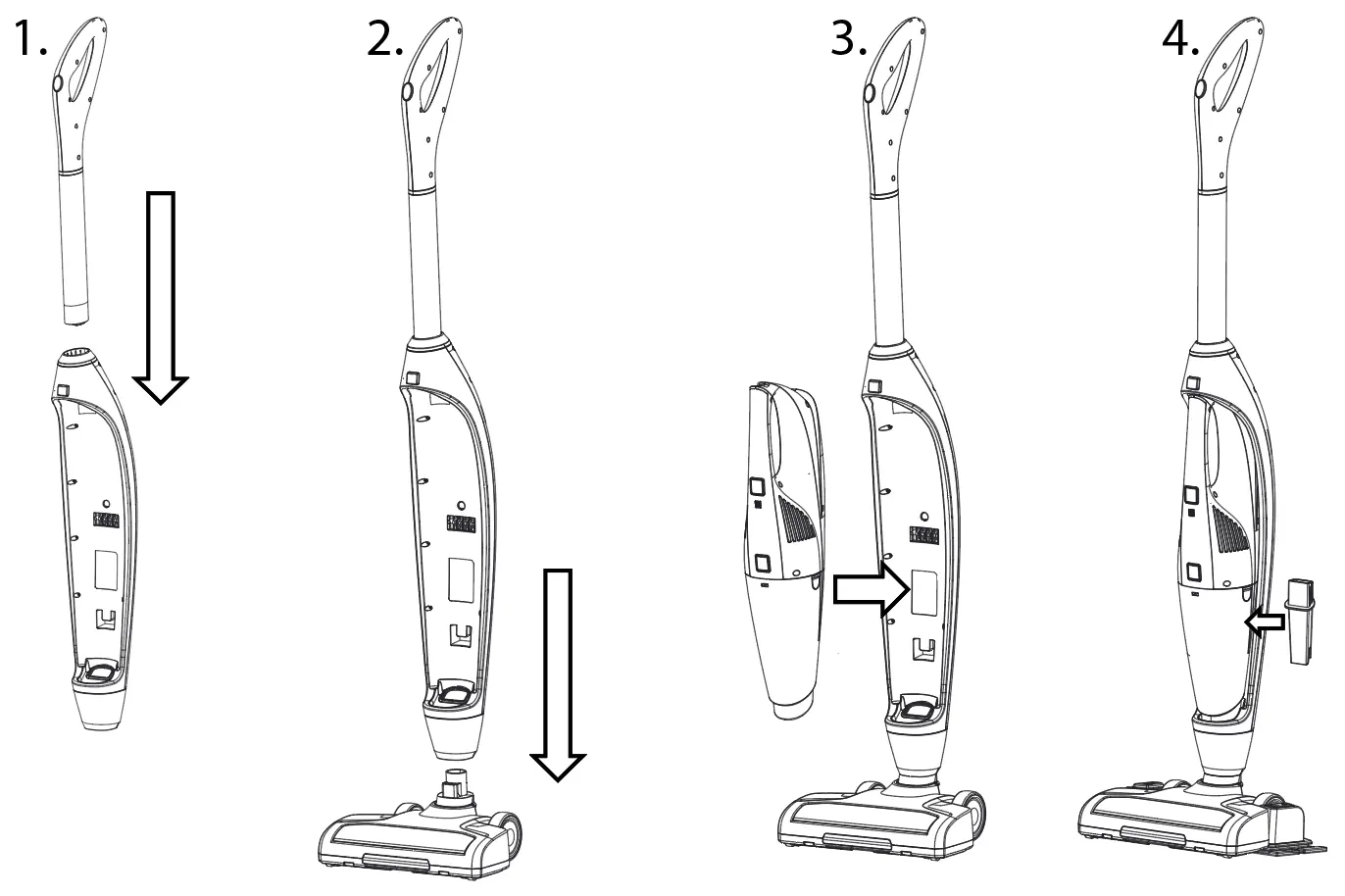
- Insert the hand grip into the main body.
- Attach the main body to the sweeper base.
- Insert the handheld vacuum unit into the main body.
- Attach the crevice tool to the main body.
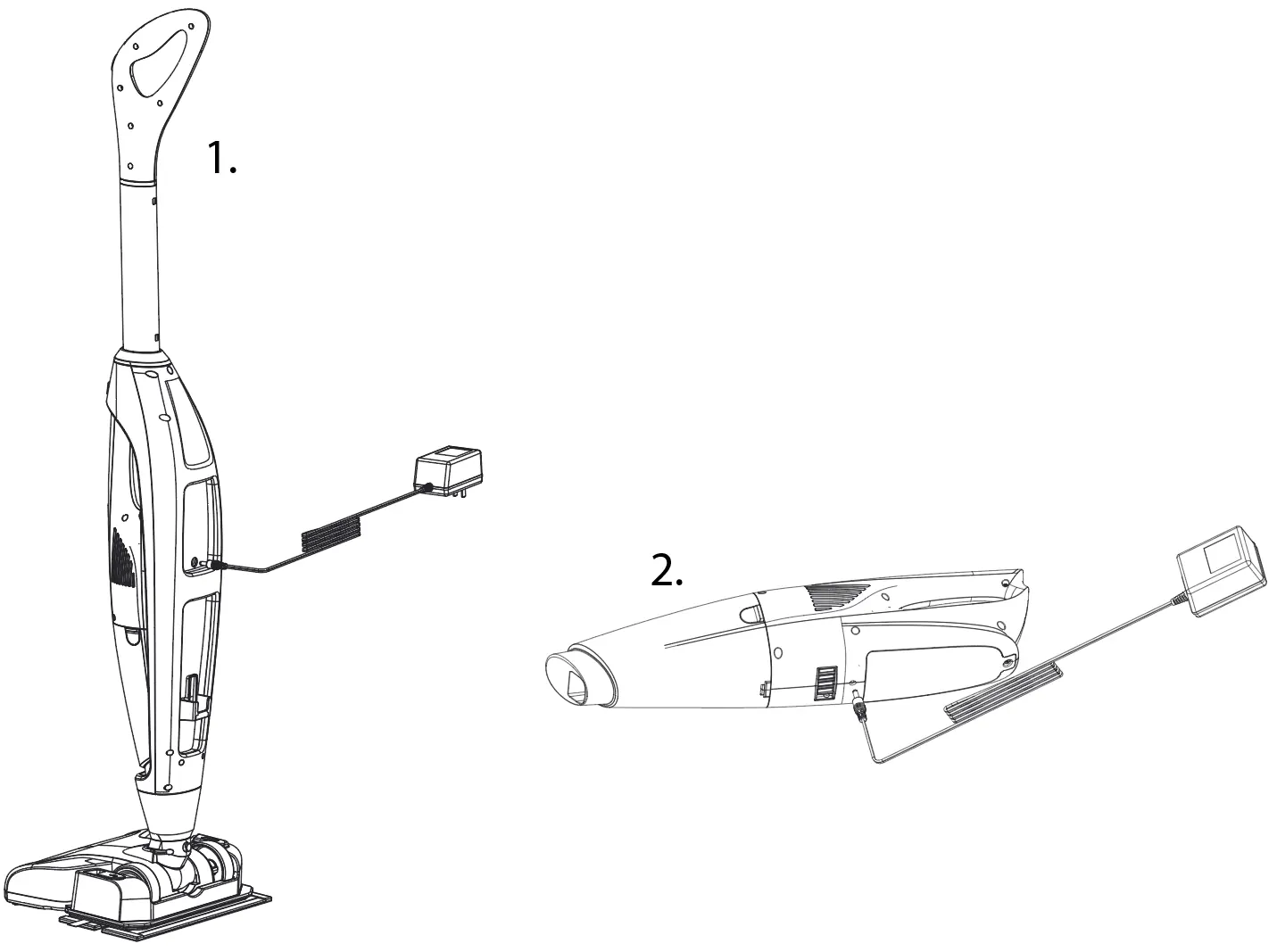
Charging
The device can be charged while the handheld unit is inside the main body or separately. Connect the charger to the DC hole on the battery pack. A blinking blue light (1 Hz) indicates normal charging, while a solid blue light indicates a full charge. Do not charge or store the product below 0°C or above 40°C.
Operation
Handheld Vacuum: Press the release button to remove the handheld unit from the main body. Use the power button to turn it on or off.
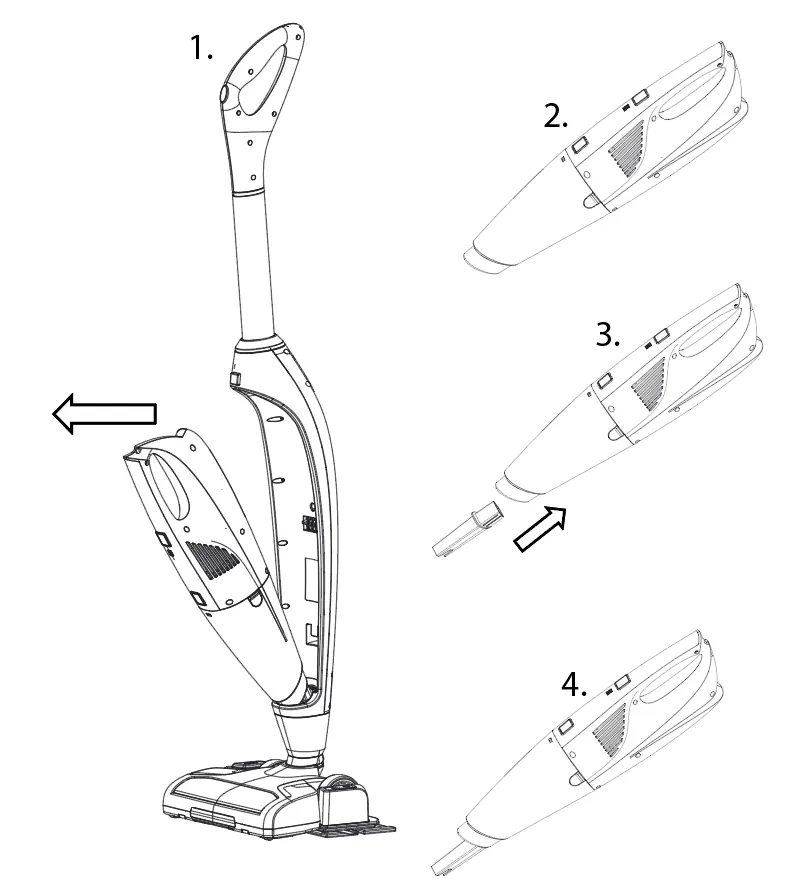
Mop Function: Press the power button once to turn on the product and the sweeper light. Press twice to activate the LED light and the sweeper motor. Attach the water tank to the machine and step on the button to moisten the mop pad.
Maintenance and Cleaning
- Dirt Container: Press the release button, remove the container, take out the filter, and empty the debris.
- Filter and Brush: The filter and support are washable. Remove the brush wheel to clean it; if hair is tangled, use a knife to cut through the groove.
- Battery Replacement: Unscrew the bottom cap of the machine to access and remove the battery.
Safety and Storage
Use only for dry pick-up on flat hard floors or short-hair carpets. Do not vacuum flammable materials or liquids. Store in a cool, dry place. If the product is not used for over 6 months, discharge and recharge it. For support, contact the manufacturer via email at [email protected] or [email protected].
Manufacturer information
Hyundai
Practical help
Common problems
Working hours getting shorter
Battery capacity may have deteriorated; contact your dealer to replace the battery.
Blue light blinks at 3Hz for 30 seconds during use
Battery power is low; recharge the device.
Blue light flashes at 5Hz during charging
Recharging malfunction; contact your dealer.
Before use
- Ensure the hand grip is fully inserted into the body.
- Verify the handheld vacuum is correctly seated in the main body.
- Check that the filter is clean and properly installed.
- Ensure the mop pad is clean and attached if using the mop function.
- Confirm the battery is charged before first use.
Specs in practice
- Charging time
- 2-2.5 hours for a full charge.
- Suction power
- 3.0 KPA, suitable for dry dust up to 10mm.
- Dust capacity
- 0.6L container volume.
Images and diagrams
- Page 1 shows the step-by-step assembly of the vacuum components.
- Page 1 illustrates the two methods for charging the battery.
- Page 2 details the process for emptying the dirt container and cleaning the filter/brush.
- Page 2 shows how to use the mop function and add water to the tank.
Model compatibility
- Designed for indoor use only.
- Suitable for flat hard floors and short-hair carpets.
- Not suitable for uneven surfaces.
- For dry pick-up only; do not vacuum liquids or flammable materials.

Manual page author
Michael Turner
Technical manual editor
Reviews PDF manuals for structure, safety notes, and practical product details so readers can find the right information quickly.