Home Appliances / Vacuum Cleaners
User Manual for Hyundai 100W Flexible Cordless Vacuum HHA322418
Quick guide for the Hyundai 100W Flexible Cordless Vacuum (HHA322418). Includes assembly, battery charging, maintenance, and troubleshooting steps.
Table of contents
Manual images
Click an image to enlargeQuick guide from the manual
This manual provides essential instructions for the Hyundai 100W Flexible Cordless Vacuum. Before first use, ensure the unit is mounted to the wall bracket and the battery is fully charged. If the vacuum stops suddenly, the thermal safety cut-out may have been activated; switch off the device, disconnect accessories, and allow it to cool for at least 30 minutes before restarting. Always check for blockages in the extension tube, floor head, and accessories if suction performance drops.
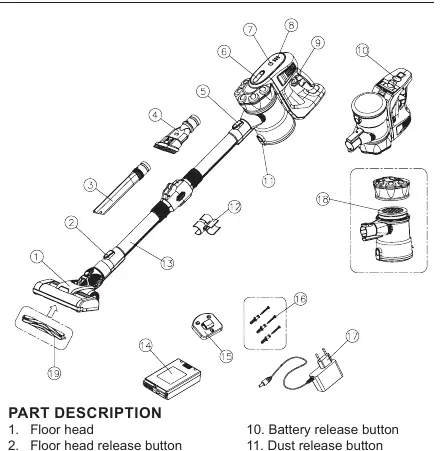
Assembly
Assembling the Main Body:
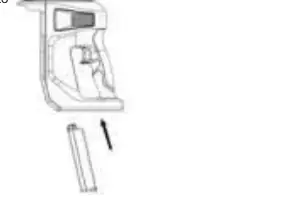
- Install the battery into the housing by sliding it into the slot until it clicks.
- Attach the dust container by inserting the clip into the main body and twisting until it clicks.
Assembling with the Motor-Driven Floor Head:
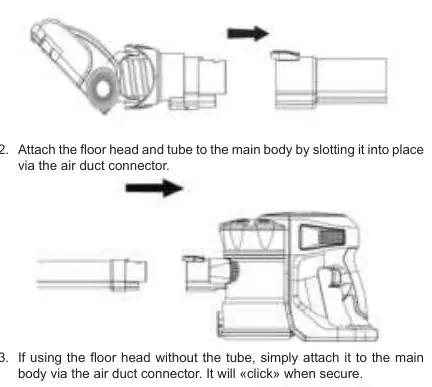
- Insert the floor head connector into the base of the extension tube until it clicks.
- Attach the floor head and tube to the main body via the air duct connector.
- For handheld use, attach the floor head or accessories directly to the main body.
Operating the Vacuum
- Remove the vacuum from the wall mount.
- Press the ON/OFF button to start.
- Use the power adjustment key to increase suction strength, which is ideal for high-pile carpets.
- Press the ON/OFF button again to turn off the unit.
Battery Charging
- The battery can be charged while attached to the main body or removed.
- Connect the charger cable to the power inlet on the battery.
- The indicator light will be RED while charging and turn GREEN when fully charged.
- The three lights on top of the main body indicate battery status.
Maintenance
Cleaning the Dust Container:
- Press the dust container release button and detach it from the main body.
- Press the dust release button over a waste bin to empty debris.
- Wipe clean; do not submerge in water.
Cleaning the Filter:
- Remove the dust container and twist the lid counter-clockwise.
- Remove the sponge inlet filter.
- Rinse under clean fresh water. Do not use soap or cleaning agents.
- Allow to dry naturally. Do not use a hair dryer or radiators.
Cleaning the Brush Roll:
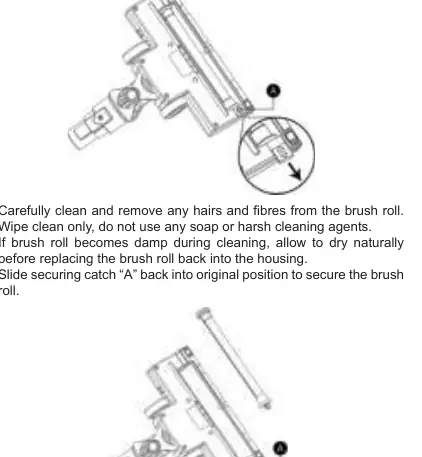
- Slide the securing catch 'A' away from the brush.
- Remove the brush roll and clean away hairs and fibers.
- Wipe clean only; do not use soap.
- Allow to dry naturally if damp before reinserting.
Troubleshooting
- Vacuum won't power on: Battery may be flat; charge fully.
- Vacuum stopped suddenly: Thermal safety cut-out activated; let cool for 30 minutes and check for blockages.
- Reduced suction: Check for blockages in the filter, air duct, tube, or floor head.
- Brush roll not rotating: Too many fibers wrapped around; clean the brush roll.
Technical Specifications
- Power: 100W (Brush motor)
- Battery: 22.2V 2200mAh Lithium Ion
- Charge time: Approx. 3 hours
- Suction modes: 4000Pa (40 min) / 7500Pa (25 min)
- Dust capacity: 0.5 Liter
Manufacturer information
Hyundai
Practical help
Common problems
Vacuum will not power on
Battery is flat. Connect to the charger and allow a full charging cycle to complete.
Vacuum stopped suddenly
Safety cut-out activated due to overheating. Switch off, disconnect accessories, and let cool for at least 30 minutes.
Reduced suction
Check for and remove blockages in the dustbin filter, air duct, extension tube, floor head, and accessories.
Motorised floor head not rotating
Too many fibers wrapped around the brush roll. Clean the brush roll according to the maintenance section.
Before use
- Mount the unit to the wall bracket.
- Ensure air vent and suction pipe are free of blockages.
- Remove large or sharp objects from the floor.
- Ensure the battery is fully charged.
- Check that hands are dry before handling the plug.
Specs in practice
- Suction modes
- 4000Pa (40 min runtime) or 7500Pa (25 min runtime).
- Dust capacity
- 0.5 Liter.
Images and diagrams
- Assembly diagrams show how to click the battery, dust container, and floor head into place.
- Maintenance diagrams illustrate how to open the dust container and remove the filter and brush roll.
Model compatibility
- Use only the battery provided with the supplied charger.

Manual page author
Emily Carter
User documentation editor
Prepares concise manual descriptions and highlights the most useful setup, operation, and maintenance information for readers.