Home Appliances / Cooktops Hobs
User Manual for iBELL IBL Crown 202P Induction Cooktop
Quick guide for the iBELL IBL Crown 202P induction cooktop. Learn how to operate, clean, troubleshoot error codes, and select compatible cookware.
Quick answers from the manual
Quick answer
- The iBELL IBL Crown 202P is an induction cooktop. To operate, plug it into a 220V outlet, place compatible magnetic cookware (12-20cm) on the center, and use the control panel to select your cooking function. p. 1
Key actions
- Turn on the cooktop p. 1
First start
- Plug into 220V outlet, place pot on center, press ON/OFF, select function. p. 1
Show 1 more answers Show less
Where to find it in the PDF
- Operation and Parts p. 1
Table of contents
Quick Guide
The iBELL IBL Crown 202P is an induction cooktop designed for efficient cooking. To use it, ensure you have compatible magnetic cookware, plug the device into a 220V power outlet, and use the control panel to select your desired function. Always ensure the cooktop is placed on a flat, stable surface and kept away from gas stoves or other heat sources.
Product Overview
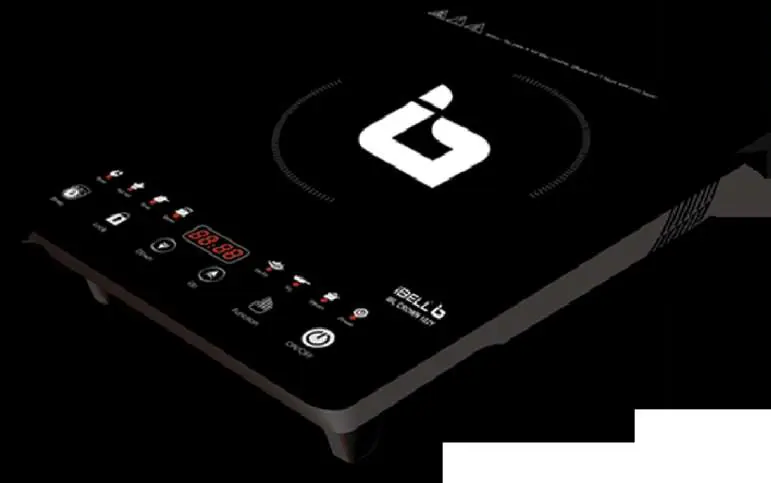
The cooktop features a control panel, cooling fan, and power line. It utilizes electromagnetic fields to heat the cookware directly. The device includes automatic functions for soup, porridge, milk, tea, and manual adjustable functions for stir-frying and frying.
Operation
Using the Cooktop:
- Place the cookware in the center of the plate.
- Connect the plug to a 220V power socket.
- Press the ON/OFF button to turn the unit on.
- Select the desired function (Automatic or Manual) using the control panel.
- After cooking, press the ON/OFF button again to turn off the unit, then unplug it.
Cookware Compatibility
Compatible Cookware: Use only magnetic steel or iron pots with a flat bottom, sized between 12cm and 20cm.
Non-Compatible Cookware: Do not use aluminum, glass, ceramic, or pots with uneven bottoms. Do not use cookware with a bottom size smaller than 12cm.
Safety and Maintenance
Safety Notices:
- Do not use the cooktop on metal surfaces.
- Keep away from gas stoves or other heat sources.
- Do not use if the power cord is damaged.
- Do not place empty pots on the cooktop.
- Keep out of reach of children.
Cleaning: Always unplug the device before cleaning. Use a soft cloth with mild detergent. Do not use water directly on the unit or submerge it.
Troubleshooting
If the cooktop malfunctions, check the following error codes:
- E0: Pot not on plate or not suitable.
- E1: Voltage too low.
- E2: Voltage too high.
- E3: Sensor open circuit.
- E4: Sensor short circuit.
- E5: Overheating (IGBT).
- E6: Overheating (Pot).
- E7: Thermostat failure.
Manufacturer information
iBELL Home Appliances
Practical help
Common problems
Cooktop does not turn on or has no sound
Check if the power supply is connected, the fuse is intact, and the socket is working.
Error code E0 displayed
Ensure the pot is placed on the plate and is made of compatible magnetic material.
Error code E5 or E6 displayed
The unit is overheating. Turn it off and allow it to cool down before using again.
Before use
- Ensure the power supply is 220V.
- Use only magnetic steel or iron cookware.
- Ensure the cookware bottom is flat and 12-20cm in diameter.
- Place the unit on a flat, stable surface.
- Keep the unit away from gas stoves or other heat sources.
Show more Show less
Specs in practice
- Cookware Size
- Compatible pots must be between 12cm and 20cm in diameter.
Images and diagrams
- The control panel allows selection of functions and power/temperature adjustment.
- The cooling fan is located at the bottom; ensure it is not blocked.
Model compatibility
- Only use magnetic cookware (iron, magnetic steel).
- Do not use aluminum, glass, or ceramic pots.
- The bottom of the pot must be flat.

Manual page author
Emily Carter
User documentation editor