Home Appliances / Cooktops Hobs
User Manual for iBELL IBL Crown 200Y Induction Cooker
Quick guide for the iBELL IBL Crown 200Y induction cooker. Learn about compatible cookware, safety precautions, automatic functions, and troubleshooting error codes.
Table of contents
Quick guide from the manual
The iBELL IBL Crown 200Y is an induction cooker designed for efficient cooking. To ensure proper operation, always use compatible cookware and follow the safety guidelines regarding placement and electrical requirements. The unit features automatic functions for various cooking styles and a digital display for status and error reporting.
Compatible Cookware
Induction cooking requires specific cookware to function correctly. The base of the cookware must be flat and made of magnetic material.
- Compatible: Iron, stainless steel, iron pans.
- Not Compatible: Aluminum, glass, ceramic, copper, or pots with non-flat bottoms.
- Requirement: Bottom diameter should be between 12-20cm.
Using the Cooker
- Place the pot in the center of the cooking zone.
- Plug the unit into a 220V power supply.
- Press the power button to turn on the unit.
- Select the desired function (e.g., soup, porridge, milk, tea, fry, hot pot, barbecue, stew, stir-fry).
- After cooking, press the On/Off button to turn off the unit before unplugging.
Safety Precautions
- Maintain a distance of at least 10cm from walls to ensure proper ventilation.
- Do not use the cooker on gas or kerosene stoves.
- Do not place metal objects like knives, forks, or spoons on the cooking panel.
- Do not use the device if you have a pacemaker.
- Do not pull on the power cord.
Cleaning and Maintenance
Always unplug the unit and ensure it has cooled down before cleaning. Use a soft, damp cloth to wipe the surface. Do not immerse the unit in water or use harsh chemicals, as this may cause a malfunction.
Troubleshooting
If the cooker displays an error code, refer to the troubleshooting section to identify the issue. Common issues include voltage fluctuations, overheating, or incorrect cookware placement.
Manufacturer information
iBELL Home Appliances
Practical help
Common problems
Unit does not turn on
Check if the power plug is connected properly and the fuse is intact.
E0 Error
No pot detected. Ensure the pot is compatible and placed in the center of the cooking zone.
E1 / E2 Error
Voltage is too high (E1) or too low (E2). Check your power supply.
E3 / E5 Error
Overheating. Ensure the cooling fan is not blocked and the unit has proper ventilation.
Before use
- Ensure the power supply is 220V.
- Use only compatible cookware (iron, stainless steel).
- Ensure the pot bottom is flat and 12-20cm in diameter.
- Keep the unit at least 10cm away from walls.
- Ensure the cooling fan inlet and vent are not blocked.
Show more Show less
Specs in practice
- Wall Clearance
- Maintain 10cm distance from walls for proper ventilation.
Images and diagrams
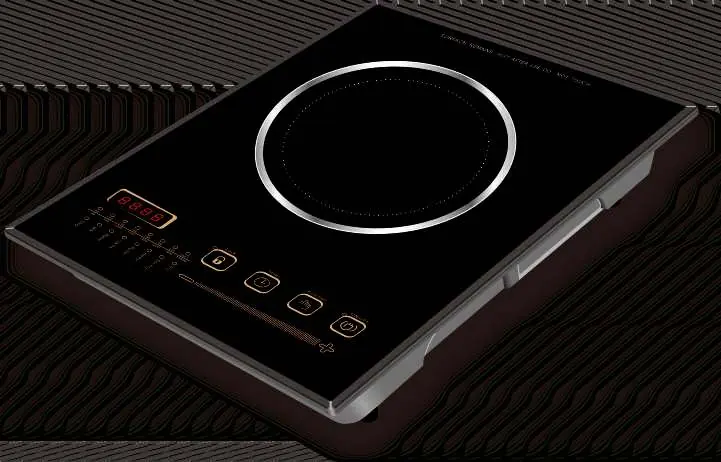
- The control panel allows selection of functions like soup, fry, and timer.
- The cooling fan vent is located on the side/back; ensure it is not obstructed.
Model compatibility
- Compatible: Iron, stainless steel, iron pans.
- Incompatible: Aluminum, glass, ceramic, copper, non-flat bottoms.

Manual page author
David Miller
Documentation analyst