Tools / Metalworking Tools
User Manual for VEVOR 23.6-inch Built-in Induction Cooktop
Quick guide for the VEVOR 23.6-inch built-in induction cooktop. Learn how to install, operate the touch control panel, use safety features, and troubleshoot common error codes.
Quick answers from the manual
Quick answer
- The VEVOR induction cooktop operates at 120V with 1300W per burner. It features touch controls, a child lock, and a timer. Ensure proper ventilation (30-50mm) during installation and use only magnetic, flat-bottomed cookware. p. 2, 3, 4
Key actions
- Power on and select furnace area p. 2
- Adjust firepower p. 2
- Set timer p. 3
First start
- Plug in the power, the buzzer will sound once, and the indicator light above the switch button will be on. p. 2
Show 4 more answers Show less
Problems and fixes
E0
No pot detected.
p. 3
E5
IGBT overtemperature or fan damage.
p. 3Error codes
| Code | Meaning | Action | Pages |
|---|---|---|---|
| E0 | No pot | Place a compatible pot on the surface. | p. 3 |
| E1 | Voltage lower than 60V | Check power supply. | p. 3 |
| E2 | Excessive voltage (higher than 138V) | Check power supply. | p. 3 |
| E3 | Surface overtemperature or sensor short circuit | Allow to cool or contact service. | p. 3 |
| E4 | Surface sensor open | Contact service. | p. 3 |
| E5 | IGBT overtemperature or fan damage | Check ventilation/fan. | p. 3 |
| E6 | IGBT sensor open | Contact service. | p. 3 |
| E8 | Control board connection issue | Contact service. | p. 3 |
Technical specifications
| Parameter | Value | Meaning | Pages |
|---|---|---|---|
| Voltage | 120V | Operating voltage | p. 2 |
| Power | 1300W + 1300W | Rated power per burner | p. 2 |
| Product Dimensions | 600 x 360 x 78 mm | Overall size | p. 3 |
| Opening Size | 590 x 350 x 150 mm | Required cutout size | p. 3 |
Where to find it in the PDF
- Control Panel p. 2
- Installation p. 4
- Troubleshooting p. 3, 5
Table of contents
Manual images
Click an image to enlargeQuick guide from the manual
This induction cooktop is designed for built-in installation. It operates at 120V with a rated power of 1300W per burner. Key features include touch controls, a child lock, a timer function, and a high-temperature warning system. Ensure proper ventilation during installation to prevent overheating.
Control panel operation
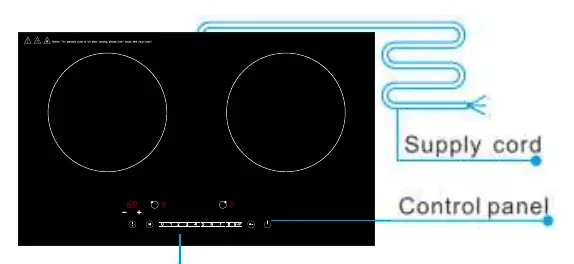
- Power: Touch the power button to enter standby mode. The display will show "-".
- Heating: Select a furnace area, then use the sliding area to adjust the power level from 1 to 9.
- Timer: In heating mode, press the timing button to set a shutdown time (up to 99 minutes).
- Child Lock: Long press the child lock button for 2 seconds to lock or unlock the controls.
- Pause: Touch the pause button to stop heating while maintaining current settings.
Installation requirements
Proper installation is critical for heat dissipation and safety:
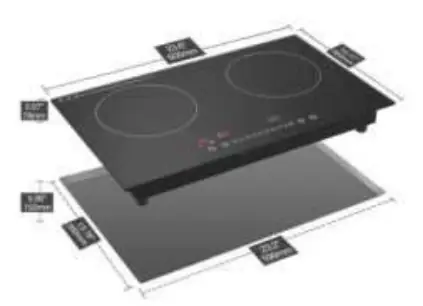
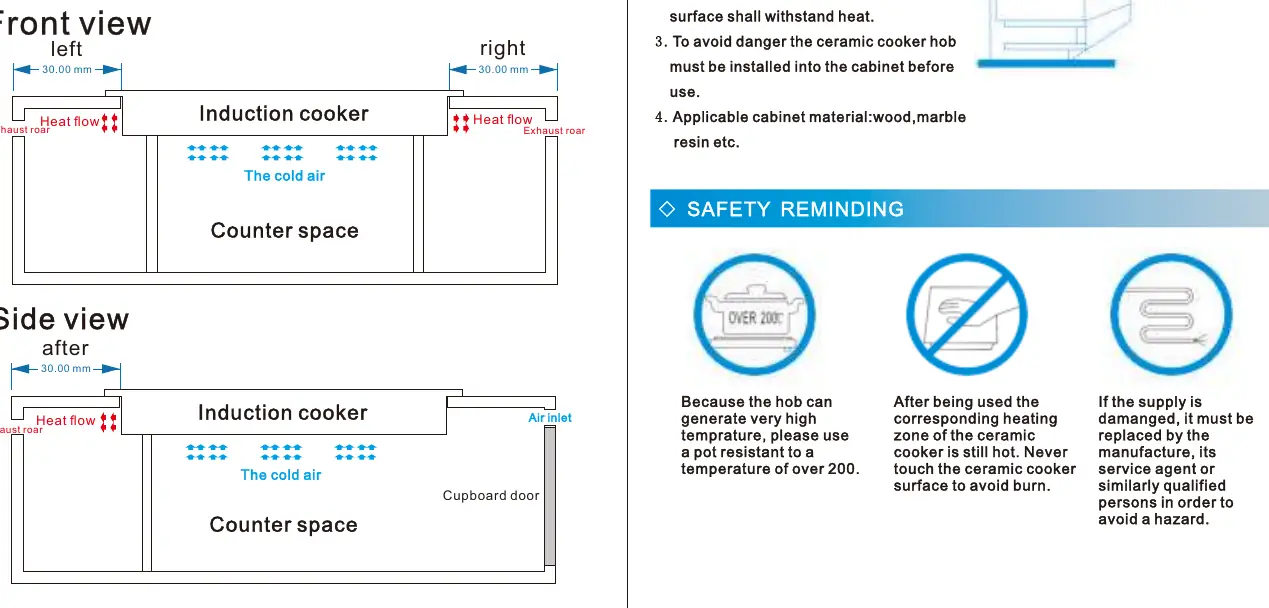
- Clearance: Leave 30-50mm of space on the left, right, and behind the unit for heat dissipation.
- Ventilation: Ensure the counter interior is large enough for cold air intake and that air inlets are separated from hot air outlets.
- Opening Size: The required opening size is 590 x 350 x 150 mm.
- Surface: Use high-temperature resistant, flame-retardant material for the countertop (e.g., marble).
Safety warnings
- High Temperature: The panel displays "H" if there is residual heat after use. Do not touch.
- Cookware: Use only flat-bottomed, magnetic (iron) pots. Do not exceed 4kg of food weight.
- Maintenance: Clean with a damp cloth and mild detergent. Do not use water directly on the unit or caustic cleaners.
Troubleshooting
If the unit displays an error code, refer to the following:
- E0: No pot detected.
- E1: Voltage lower than 60V.
- E2: Voltage higher than 138V.
- E3: Surface overtemperature or sensor short circuit.
- E4: Surface sensor open.
- E5: IGBT overtemperature or fan failure.
- E6: IGBT sensor open.
- E8: Control board connection issue.
Manufacturer information
VEVOR
Practical help
Common problems
No indicator light when power is on
Check if the cable/terminal block is loose, the circuit is broken, or the fuse is blown.
Buzzing noise and 'on/off' light flashes, no heating
Ensure the pot is compatible (magnetic) and centered on the ceramic plate.
Appliance suddenly stops heating
Check if air vents are blocked, the unit is overheated, or the timer has finished.
Before use
- Ensure the countertop material is heat-resistant and flame-retardant.
- Verify that the power supply is 120V.
- Check that there is 30-50mm of clearance around the unit for ventilation.
- Use only flat-bottomed, magnetic (iron) cookware.
- Ensure the total weight of food does not exceed 4kg.
Show more Show less
Specs in practice
- Product Size
- 600 x 360 x 78 mm.
- Opening Size
- 590 x 350 x 150 mm.
Model compatibility
- Requires flat-bottomed, magnetic (iron) pots.
- Do not use non-magnetic cookware.
- Maximum food weight limit is 4kg.

Manual page author
David Miller
Documentation analyst