Power / Batteries Chargers
Imperii Electronics 13000MAH Portable Charger User Guide
Quick guide for the Imperii Electronics 13000MAH portable charger. Learn how to charge the power bank, use it to charge your devices, and understand safety features and maintenance.
Table of contents
Manual images
Jump to the sectionQuick guide from the manual
This document provides essential instructions for operating the Imperii Electronics 13000MAH portable charger. It covers the two primary charging methods for the power bank, how to charge external devices, and important safety and maintenance guidelines to ensure the longevity of the battery.
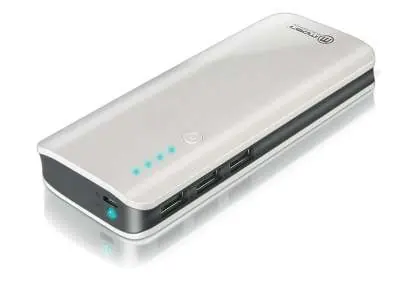
Charging the portable charger
Before the first use, the device must be fully charged. The four indicator lights will illuminate after approximately 20 minutes of charging.
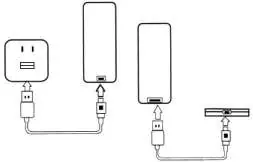
- Method 1: Connect to Computer: Disconnect all devices from the charger. Use the provided cable to connect the charger's DC-IN port to a computer's USB port. The battery indicator will blink during charging and turn off when complete.
- Method 2: USB Adapter: Disconnect all devices. Connect the charger's DC-IN port to a 5V USB power adapter plugged into a wall outlet. The indicator will blink during charging and turn off when complete.
Charging other devices
The charger is compatible with mobile phones, tablets, GPS, and other digital devices that support a 5V DC input. To charge a device, simply connect it to the charger using a cable with the appropriate connector for your device.
Operation and LED indicators
Press the power button to check the battery level. If the pilot light is blue, there is sufficient charge to use the device. If the light does not turn on, the battery level is low and requires recharging. During the charging process of another device, if the blue indicators stop blinking, it means the portable charger is running out of battery and needs to be recharged.
Safety and Maintenance
- Keep the charger in a dry place, protected from moisture, rain, and corrosive liquids.
- Do not place the device near heat sources, as high temperatures can damage electronic components and the battery.
- Do not drop, knock, or attempt to disassemble/repair the charger yourself.
- When the connected electronic device is fully charged, unplug it from the portable charger to avoid unnecessary battery loss.
- The device features integrated protection against overcharging, discharging, short circuits, and overloads.
Manufacturer information
Imperii Electronics
Practical help
Common problems
Indicator lights do not turn on when the power button is pressed.
The battery level is low; the device needs to be recharged.
Blue indicators stop blinking while charging another device.
The portable charger is running out of battery and needs to be recharged.
Before use
- Ensure the device is fully charged before the first use.
- Check that the charging cable is compatible with your device.
- Verify that the connection between the charger and the device is secure.
- Disconnect all devices from the charger before recharging the power bank itself.
Specs in practice
- Input Voltage (DC 4.5V – 20V)
- The internal chip ensures safe charging as long as the input voltage remains within this range.
- USB 5V Output
- Standard output designed to be compatible with most mobile phones, tablets, and digital devices.
Images and diagrams
- The simplified charging scheme illustrates two scenarios: (1) Recharging the portable charger via a wall adapter or computer, and (2) Using the portable charger to power mobile phones and other digital devices.
Model compatibility
- Compatible with any digital device that supports a 5V DC input current (e.g., iPhone, Samsung, MP3/MP4 players, GPS, tablets, digital cameras).

Manual page author
David Miller
Documentation analyst
Organizes user manual content into clear summaries, with attention to model details, product context, and everyday usability.