Power / Batteries Chargers
Imperii 1300mAh Portable Charger User Manual
Quick guide for the Imperii 1300mAh portable charger. Learn how to charge the device, use it to power your electronics, and understand the LED status indicators and safety features.
Table of contents
Quick guide from the manual
This document provides instructions for the Imperii 1300mAh portable charger. It covers two primary charging methods, safety precautions, and an explanation of the LED indicator system used to monitor battery levels and charging status.
How to charge the device
You can charge the portable charger using one of two methods:
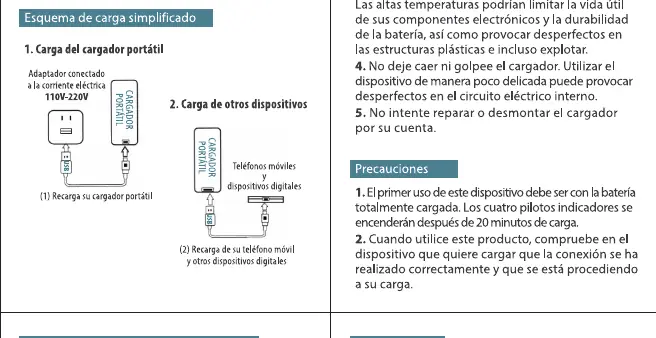
- Method 1: Computer connection: Connect the charger to a computer using the provided cable. The LED indicator will blink while charging and turn off once the device is fully charged.
- Method 2: USB adapter: Connect the charger to a wall outlet using a standard USB power adapter.
How to charge other devices
The portable charger is designed to charge mobile phones and other digital devices that support a 5V DC input. Simply connect your device to the charger using the appropriate cable. The charger will automatically detect the connection and begin supplying power.
Safety and maintenance
To ensure the longevity and safety of your device, follow these guidelines:
- Keep the charger in a dry place, away from moisture, rain, and corrosive liquids.
- Do not expose the device to direct heat sources or high temperatures.
- Do not drop, knock, or disassemble the charger.
- Ensure the device is fully charged before its first use.
Technical specifications
The charger features an integrated intelligent protection system against overcharging, discharging, and short circuits. The output is a standard 5V USB port, compatible with most smartphones, tablets, GPS units, and gaming consoles. The input voltage is 4.5V to 20V.
LED indicators
The LED lights on the device serve to inform the user about the current charging status and the remaining battery level of the portable charger.
Manufacturer information
Imperii Electronics
Practical help
Common problems
LED indicator does not light up when connected to a computer.
Ensure the connection is secure and the computer is powered on. If the battery is completely depleted, it may take a few moments for the indicator to activate.
Device is not charging the connected phone.
Verify that the charging cable is functional and that the connected device supports 5V DC input charging.
Before use
- Ensure the portable charger is fully charged before the first use.
- Check that your device is compatible with 5V DC input.
- Use the provided charging cable or a high-quality equivalent.
- Keep the device away from water and high humidity.
Specs in practice
- Input Voltage
- 4.5V - 20V; the range of voltage the charger can safely accept to recharge its internal battery.
Images and diagrams
- The manual provides a simplified schematic showing the charger connected to a power source (computer or wall adapter) and the subsequent connection to a mobile device.
Model compatibility
- Compatible with mobile phones, GPS, tablets, and gaming consoles that accept 5V DC input.

Manual page author
Michael Turner
Technical manual editor
Reviews PDF manuals for structure, safety notes, and practical product details so readers can find the right information quickly.