Home Appliances / Small Kitchen Appliances
User Manual for Instant Infusion Brew Plus 12-Cup Coffee Maker
Quick guide for the Instant Infusion Brew Plus 12-Cup Coffee Maker (DCM-1100). Includes setup, brewing instructions, cleaning, descaling, and troubleshooting tips.
Table of contents
Manual images
Click an image to enlargeQuick Start Guide
Before using your Instant Infusion Brew Plus for the first time, ensure you have removed all packaging materials. Handwash the carafe, water reservoir, coffee filter, and brew basket with warm water and dish soap. Assemble the carbon filter, perform a test run with water only, and set your clock to ensure the machine is ready for use.
Components
The coffee maker includes the following main parts:
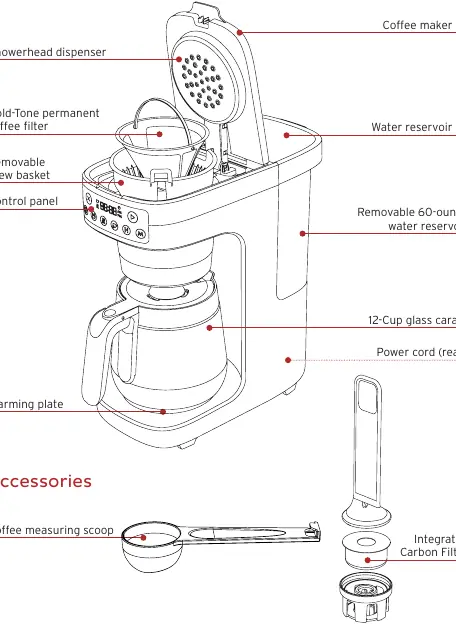
- Water Reservoir: Removable 60-ounce tank with lid.
- Brew Basket: Removable basket for coffee grounds.
- Gold-Tone Filter: Permanent filter for coffee grounds.
- Glass Carafe: 12-cup capacity.
- Integrated Carbon Filter: Helps remove impurities from water.
- Control Panel: Interface for settings and brewing.
Control Panel
The control panel allows you to customize your brew:
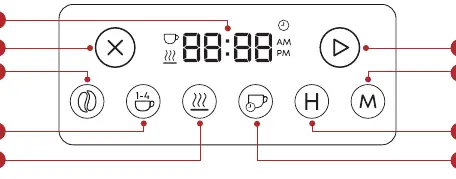
- Clock/Display: Shows current time and status.
- Cancel: Stops brewing or exits modes.
- Start: Begins the brewing cycle.
- Bold Setting: Increases brew time for a stronger flavor.
- Small Batch: Optimizes brewing for 1-4 cups.
- Warming Plate: Keeps coffee warm for up to 4 hours.
- Auto-Brew/Timer: Schedules brewing up to 24 hours in advance.
- Hours/Minutes: Used for setting the clock and timer.
Initial Setup
Setting the Clock: Ensure the unit is powered on. Press the H and M buttons until the correct time is displayed, then press the Start button to save.
Sound Settings: You can toggle reminder beeps on or off. Press and hold the Bold and Small Batch buttons simultaneously for 2 seconds. The display will show SOFF (sound off) or S On (sound on).
Integrated Carbon Filter
The carbon filter ensures cleaner, tastier coffee. It should be replaced every 60 days.
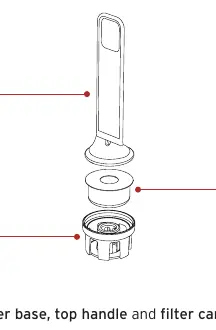
- Remove the filter base, top handle, and filter cartridge from packaging.
- Soak the filter cartridge in cool water for 10 minutes.
- Place the cartridge into the base and snap the top handle on.
- Install the assembled filter into the port at the bottom of the water reservoir.
Brewing Coffee
Preparation: Fill the water reservoir to the desired level (do not exceed the MAX line). Use a medium-fine grind for best results.
Brewing Process:
- Place the brew basket into the holder and insert the filter.
- Add ground coffee (see measurement chart in manual).
- Close the lid and select your preferences (Bold, Small Batch).
- Press the Start button to begin.
Auto-Brew: Press the Auto-Brew button, then use the H and M buttons to set your desired start time. Press Start to confirm.
Care and Cleaning
Daily Cleaning: Handwash the carafe, reservoir, and brew basket with warm water and dish soap. Wipe the base and control panel with a damp cloth. Do not use abrasive materials.
Descaling: After 90 cycles, the machine will remind you to descale. Use a mixture of cleaner and water (e.g., 1:4 ratio for household descaler). Fill the reservoir to the MAX line, place the carafe under the basket, and press and hold the H and M buttons for 3 seconds to start the cycle. Run a cycle with fresh water afterward to rinse.
Troubleshooting
- Sediment in coffee: Use a coarser grind or ensure the filter is properly seated.
- Coffee too weak/strong: Adjust the brew strength setting or the amount of coffee grounds used.
- Carafe overflowed: Ensure the carafe is empty before brewing and do not overfill the water reservoir.
- Brew cycle won't start: Check that the unit is plugged in, the lid is closed, the carafe is in place, and there is water in the reservoir.
Specifications
Model: DCM-1100Capacity: 60 oz / 1774 mLPower: 1400 W, 120V / 60HzWeight: 6.57 lb / 2.98 kg
Practical help
Common problems
Sediment or grounds in coffee
Use a slightly coarser grind and ensure the permanent filter or a paper filter is correctly in place.
Coffee is too weak
Try selecting the 'Bold' brew setting or use a darker roast/more coffee grounds.
Carafe overflowed during brewing
Ensure the carafe is empty before starting and do not fill the water reservoir above the MAX line.
Brew cycle will not start
Ensure the unit is powered on, the lid is closed, the carafe is correctly positioned, and there is water in the reservoir.
Before use
- Remove all packaging materials from the unit.
- Handwash the carafe, water reservoir, filter, and brew basket.
- Assemble and install the carbon filter in the water reservoir.
- Run a test brew cycle with water only to flush the system.
Specs in practice
- 60 oz / 1774 mL
- Maximum water reservoir capacity.
Images and diagrams
- Control Panel: Features buttons for Bold, Small Batch, Warming Plate, Auto-Brew, and time adjustment.
- Carbon Filter Assembly: Illustrates soaking the cartridge and snapping it into the base before installation.
Model compatibility
- Use only with 120V / 60Hz electrical systems.
- Not intended for commercial use; household use only.

Manual page author
Michael Turner
Technical manual editor
Reviews PDF manuals for structure, safety notes, and practical product details so readers can find the right information quickly.