Home Appliances / Small Kitchen Appliances
User Manual for Instant 12-Cup Rice Cooker + Steamer
Quick guide for the Instant 12-Cup Rice Cooker + Steamer. Learn how to use smart programs like CarbReduce, Steam, and Slow Cook, follow the grain cooking table, and troubleshoot common issues.
Table of contents
Manual images
Click an image to enlargeQuick Start Guide
Before using your Instant Rice Cooker + Steamer, ensure you have removed all packaging materials and accessories from the cooking chamber. Place the unit on a stable, level surface with at least 13 cm of space above and around all sides for proper air flow. Wash all accessories with hot water and dish soap before the first use. Plug the unit into an electric outlet to begin.
Important Safety Information
- Always operate the appliance on a stable, non-combustible, level surface.
- Do not place the appliance on or near hot gas or electric burners or heated ovens.
- Use oven mitts when handling the Cooking Pot and CarbReduce Basket, as they become extremely hot.
- Do not use the appliance without the removable Cooking Pot installed.
- Do not move the appliance while it is in use.
- Always unplug the unit when not in use and before cleaning.
- Do not use with power converters, adapters, or timer switches.
Device Overview
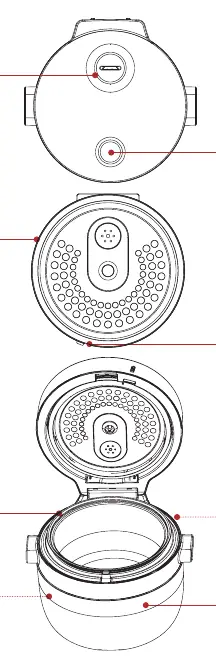
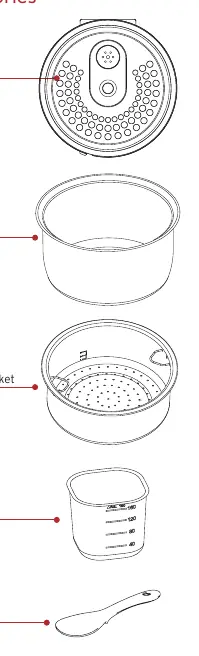
The appliance consists of a cooker base with a heating element and a condensation channel. The lid features a steam vent, an open button, and a removable inner lid cover. Accessories include a ceramic-coated non-stick cooking pot, a stainless steel steam basket, a measuring cup, and a rice spoon.
Using the Lid
To close the lid, push it down lightly until it clicks into place. To open, press the button on top of the lid. The Inner Lid Cover is removable for cleaning; ensure it is snapped into place before cooking. During operation, steam condenses and collects in the channel of the base; clean this area after use.
Smart Programmes
The cooker features several smart programmes:
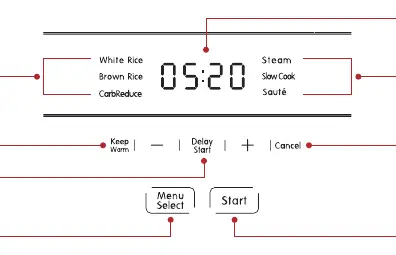
- White Rice & Brown Rice: Automatically adjusts cooking times. Keep Warm is ON by default.
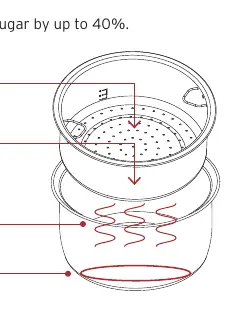
- CarbReduce: Uses special technology to reduce carbohydrates and sugar. Best for batches of 2 cups or less.
- Steam: Ideal for vegetables. Add water to the cooking pot, place food in the steam basket, and select the programme.
- Slow Cook: Suitable for simmering and stewing.
- Sauté: Use for browning ingredients before slow cooking. Keep Warm is OFF by default.
To use any programme, press Menu Select until the desired programme is highlighted, then press Start. You can use the Delay Start feature (10 minutes to 24 hours) by pressing Delay Start after selecting a programme.
Grain Cooking Reference
Use the included measuring cup (equivalent to 180 ml) for all measurements. Exceeding the maximum grain capacity may cause overflow. For 3-4 servings, typical ratios are:
- White Rice: 1 cup grain to 1.5 cups water (32 min).
- Brown Rice: 1 cup grain to 1.25 cups water (51 min).
- Quinoa: 1 cup grain to 1.5 cups water (34 min).
- Barley: 1 cup grain to 2 cups water (58 min).
- Oats: 1 cup grain to 2 cups water (12 min).
Steaming Reference
You can steam various foods using the steam basket. Common times include:
- Asparagus (226g): 10-12 minutes.
- Broccoli (226g): 12-14 minutes.
- Carrots (226g): 15-17 minutes.
- Salmon (226g): 18-20 minutes.
- White Fish (2pc): 18-20 minutes.
Cleaning and Maintenance
Always unplug the unit and let it cool before cleaning. Wash the rice spoon, measuring cup, and inner lid cover with hot water and mild dish soap or in the top rack of a dishwasher. The cooking pot and steam basket can be hand-washed or placed in the dishwasher. Wipe the cooker base and condensation rim with a barely-damp cloth. Do not immerse the power cord or cooker base in water.
Troubleshooting
- Difficulty closing lid: Close slowly or check if the inner lid cover is installed properly.
- Steam leaks: Ensure the inner lid cover is installed and the gasket is not damaged.
- Display blank: Check power connection and home circuit breaker.
- Clicking sound: Ensure the bottom of the cooking pot is dry before inserting it into the base.
Practical help
Common problems
Difficulty closing lid
Close the lid slowly. Ensure the inner lid cover is located in the positioning slot, is flat against the lid, and snapped in place.
Steam leaks from side of lid
Install the inner lid cover or replace it if the gasket is damaged. Ensure the lid is closed properly.
Display remains blank
Inspect the power cord for damage, check the home circuit breaker, or contact Customer Care.
Occasional clicking or cracking sound
Wipe the exterior surfaces of the Cooking Pot and ensure the heating element is dry before inserting the pot.
Before use
- Remove all packaging material from in and around the cooker.
- Remove all accessories from inside the cooking chamber.
- Wipe the interior with a damp cloth.
- Wash accessories with hot water and dish soap.
- Place on a stable, level surface away from combustible materials.
- Ensure at least 13 cm of space above and around the appliance.
Images and diagrams
- Control Panel: Features buttons for Menu Select, Start, Cancel, Delay Start, and Keep Warm.
- Inner Lid Cover: Removable component that must be in place during cooking.
- Condensation Channel: Located on the base to collect steam condensation; clean after use.
Model compatibility
- Use only accessories authorized by Instant Brands.
- Do not use with power converters, adapters, timer switches, or separate remote-control systems.

Manual page author
David Miller
Documentation analyst
Organizes user manual content into clear summaries, with attention to model details, product context, and everyday usability.