Furniture / Tables Desks
Invicta Interior Makassar Office Desk Console 100cm Assembly Guide
Comprehensive assembly and care instructions for the Invicta Interior Makassar 100cm Sheesham wood office desk console.
Table of contents
Product Overview
The Invicta Interior Makassar Office Desk Console is a premium piece of furniture crafted from high-quality Sheesham wood. Known for its distinct grain patterns and durability, this 100cm console desk offers a minimalist yet elegant design suitable for modern home offices or entryways. Please ensure you have all components before beginning the assembly process to avoid any delays.
Assembly Preparation
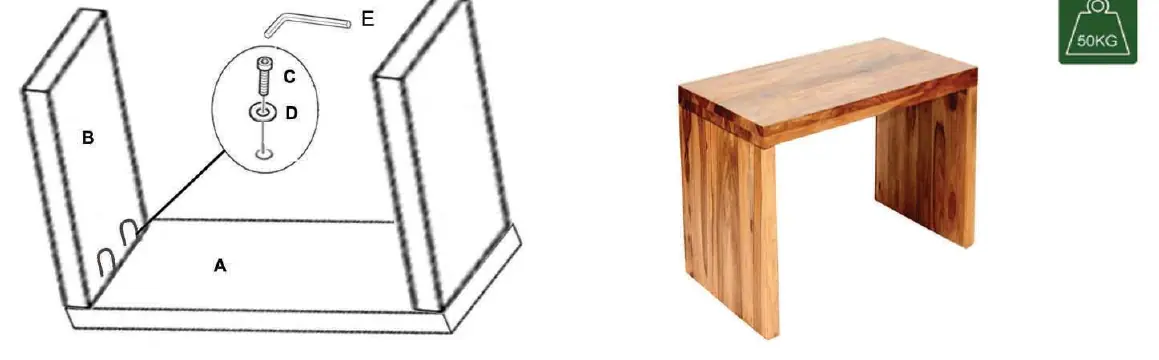
Before starting, clear a spacious area on a soft surface, such as a rug or the shipping cardboard, to prevent scratching the wood finish. Verify that you have all parts listed: one main tabletop (A), two side support panels (B), eight 50x8mm screws (C), eight 8x25mm dowels (D), and one 6mm Allen key (E). Do not use power tools, as they may damage the natural wood material.
Assembly Steps
The assembly process is straightforward and designed for quick setup. First, insert the wooden dowels (D) into the pre-drilled holes on the side panels (B). Align the side panels with the main tabletop (A). Once aligned, insert the screws (C) through the pre-drilled holes and tighten them securely using the provided Allen key (E). Ensure all connections are firm but avoid over-tightening, which could cause the wood to split. Once assembled, carefully lift the desk into its upright position. The desk is designed to support a maximum weight capacity of 50kg.
Care and Maintenance
To maintain the beauty of your Sheesham wood desk, dust regularly with a soft, dry cloth. Avoid using harsh chemical cleaners or furniture polishes that contain silicone, as these can damage the natural finish over time. Keep the desk away from direct heat sources, such as radiators or fireplaces, to prevent the wood from warping or cracking due to extreme temperature fluctuations. If a spill occurs, wipe it up immediately with a damp cloth followed by a dry one. With proper care, your Makassar desk will remain a centerpiece in your home for years to come.
Safety and Stability
Always ensure the desk is placed on a level surface to maintain stability. Do not exceed the maximum weight limit of 50kg, as this could compromise the structural integrity of the console. If the desk feels wobbly, check that all screws are tightened correctly. If you encounter any issues during assembly or notice missing parts, please contact your dealer for assistance.
Manufacturer information
Invicta Interior GmbH & Co. KG
Practical help
Common problems
Desk feels unstable or wobbly
Ensure the desk is on a level floor and check that all eight screws are tightened securely.
Difficulty inserting screws
Ensure the dowels are fully seated in the holes and the panels are perfectly aligned before tightening.
Before use
- Clear a soft, flat workspace
- Verify all parts (A, B, C, D, E) are present
- Ensure you have the provided 6mm Allen key
- Check that the floor surface is level
Specs in practice
- Max Load Capacity
- The desk is designed to support a maximum weight of 50kg.
Images and diagrams
- The diagram shows the alignment of the side panels (B) with the tabletop (A).
- It illustrates the correct placement of screws (C) and dowels (D) into the pre-drilled holes.
- The use of the Allen key (E) is highlighted for securing the structure.
Model compatibility
- Designed for indoor use only.
- Keep away from direct heat sources to prevent wood warping.

Manual page author
Emily Carter
User documentation editor
Prepares concise manual descriptions and highlights the most useful setup, operation, and maintenance information for readers.