Electronics / Headphones Earbuds
JBL Vibe 200TWS True Wireless Headphones User Guide
Get started with your JBL Vibe 200TWS true wireless headphones. This guide covers pairing, button controls, charging, LED indicators, and technical specifications.
PDF source: Français · summary: English
Quick answers from the manual
Quick answer
- To pair your JBL Vibe 200TWS, turn on Bluetooth on your device and select 'JBL VIBE200TWS' from the list. The earbuds support both stereo and mono modes. p. 1
Key actions
- Factory Reset p. 1
First start
- Try different eartips, then pair via Bluetooth settings. p. 1
Show 4 more answers Show less
Problems and fixes
Factory Reset
Use the manual control sequence (Tap x 2, Hold 5s on L/R).
p. 1Maintenance and reset
- Fully charge at least once every 3 months to prolong battery life. p. 2
Technical specifications
| Parameter | Value | Meaning | Pages |
|---|---|---|---|
| Driver size | 8 mm | Dynamic driver | p. 1 |
| Bluetooth version | 5.0 | Bluetooth version | p. 1 |
Where to find it in the PDF
- Quick Start Guide p. 1
- Technical Specifications & Regulatory p. 2
Table of contents
Manual images
Click an image to enlargeQuick Start Guide
This guide provides essential information for setting up and using your JBL Vibe 200TWS headphones. For optimal performance, ensure the earbuds are fully charged before first use.
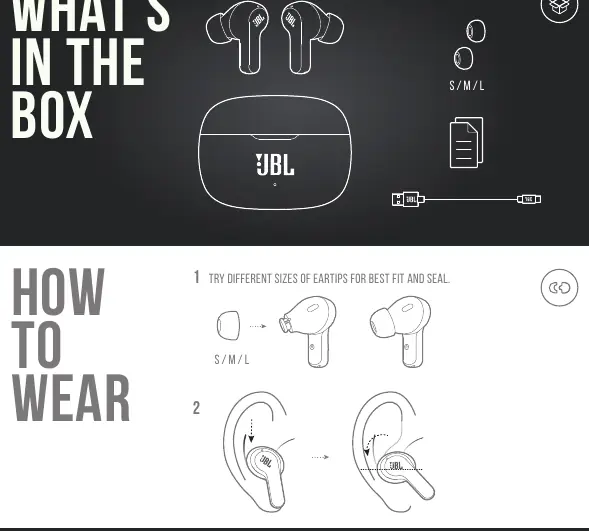
What's in the Box
- JBL Vibe 200TWS Earbuds
- Charging Case
- Eartips (S, M, L sizes)
- Charging Cable
Wearing the Earbuds
For the best fit and sound seal, try the different sizes of eartips provided. A proper seal is crucial for audio quality and noise isolation.
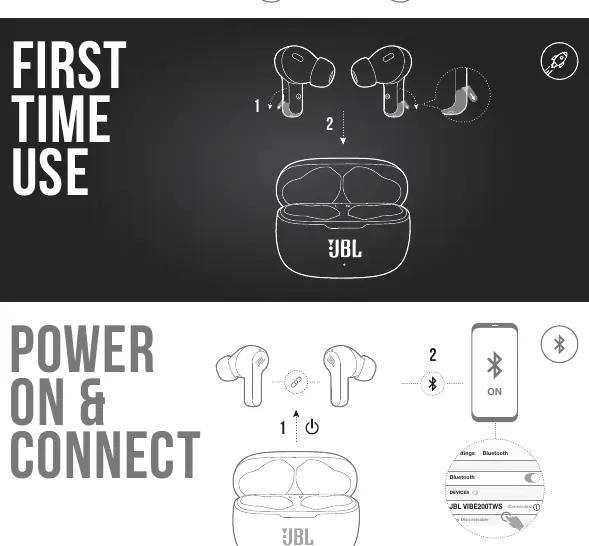
Power and Connection
To connect for the first time, enable Bluetooth on your mobile device and select "JBL VIBE200TWS" from the available devices list. The earbuds support Dual Connect, allowing you to use them in Stereo mode (both earbuds) or Mono mode (single earbud).

Button Controls
The earbuds feature touch-sensitive controls:
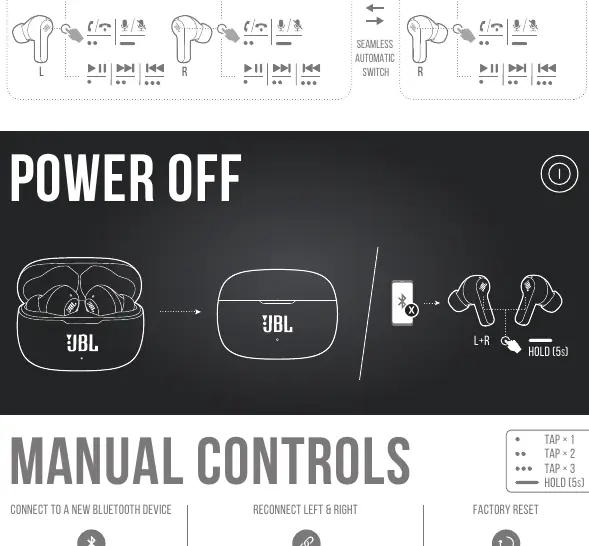
- Tap x 1: Play/Pause or Answer/End Call
- Tap x 2: Next Track
- Tap x 3: Previous Track
- Hold (2s): Activate Voice Assistant (Siri, Google Assistant, Bixby)
- Hold (5s): Power Off
Charging and LED Indicators
Place the earbuds in the charging case to charge. A full charge takes approximately 2 hours. LED indicators provide status updates:
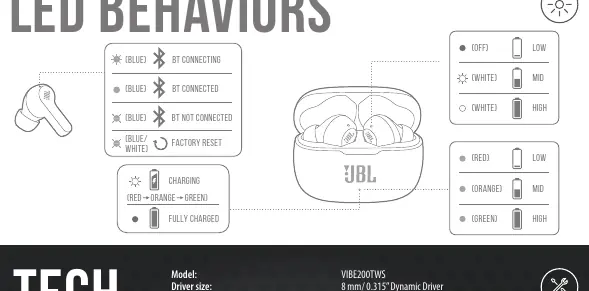
- Blue: Bluetooth connecting or connected
- Red/Orange/Green: Charging status
- White: Battery level indicators
Battery Maintenance
To prolong battery lifespan, fully charge the device at least once every 3 months. Battery life varies based on usage and settings.
Manufacturer information
JBL
Practical help
Common problems
Earbuds not connecting
Ensure Bluetooth is enabled on your device and select 'JBL VIBE200TWS'. If issues persist, try a factory reset.
Earbuds not charging
Ensure the earbuds are seated correctly in the charging case and the case has sufficient battery.
Before use
- Charge the case and earbuds fully
- Try different eartip sizes for the best fit
- Enable Bluetooth on your source device
Show more Show less
Specs in practice
- Charging time
- 2 hours from empty to full
- Music playtime
- Up to 5 hours with Bluetooth on
Images and diagrams
- The manual includes visual guides for touch control sequences (tap/hold).
- LED behavior charts explain connection and charging status.
Model compatibility
- Compatible with Bluetooth devices supporting A2DP V1.3, AVRCP V1.6, and HFP V1.7.

Manual page author
Emily Carter
User documentation editor