Home Appliances / Coffee Equipment
User Manual for De'Longhi Magnifica S ECAM 21.117.B Coffee Machine
Comprehensive user guide for the De'Longhi Magnifica S ECAM 21.117.B automatic coffee machine. Includes setup instructions, coffee preparation, cappuccino making, cleaning, descaling, and troubleshooting.
Quick answers from the manual
Quick answer
- The De'Longhi Magnifica S ECAM 21.117.B is an automatic coffee machine. To start, fill the water tank, turn on the main switch, and follow the initial rinse procedure. Use the control panel to select coffee type, adjust grind settings, and manage maintenance tasks like descaling. p. 5, 7, 10, 11
Key actions
- Adjusting grind size p. 7
- Cleaning the infuser p. 10, 11
- Descaling p. 11, 12
First start
- Fill water tank, turn on main switch, place container under cappuccino device, turn steam knob to 'I' to release water, then back to 'O'. p. 5
Problems and fixes
Coffee flows too slowly
Adjust grind setting to be coarser (clockwise).
p. 7, 13, 15
Coffee grounds container full light flashing
Empty and clean the grounds container and drip tray.
p. 10, 13Maintenance and reset
- Descaling is required when the descaling indicator flashes. p. 11, 13
Technical specifications
| Parameter | Value | Meaning | Pages |
|---|---|---|---|
| Voltage | 220-240 V~ 50/60 Hz | Power supply requirements | p. 12 |
| Power | 1450W | Power consumption | p. 12 |
| Pressure | 15 bar | Pump pressure | p. 12 |
Where to find it in the PDF
- Safety Warnings p. 2, 3
- Description of Parts p. 4
- Installation & First Start p. 5
- Coffee Preparation p. 7, 8
- Cleaning & Maintenance p. 10, 11
- Descaling p. 11, 12
- Troubleshooting p. 13, 14, 15
Table of contents
Quick Start Guide
To get started with your De'Longhi Magnifica S ECAM 21.117.B, follow these steps:
- Installation: Fill the water tank to the MAX level. Connect the machine to power and turn on the main switch at the back.
- First Use: Place a container under the cappuccino device. Turn the steam knob to 'I' to release water, then back to 'O'.
- Making Coffee: Ensure the machine is on. Place cups under the spouts. Press the button for the desired coffee type (espresso or long coffee).
- Maintenance: Regularly empty the coffee grounds container and drip tray when the indicator lights signal.
Description of the Appliance
The machine features a control panel with buttons for espresso, long coffee, steam, and descaling. Key components include the bean hopper, water tank, adjustable coffee spout, cappuccino device, and the removable infuser unit.
Installation
Ensure the machine is placed on a flat surface with at least 3 cm of space on the sides and back, and 15 cm above. Connect only to a grounded outlet. For optimal performance, test your water hardness using the provided test strip and program the machine accordingly.
Coffee Preparation
You can use coffee beans or pre-ground coffee. To adjust the aroma, use the selection knob. To adjust the grind size, turn the grind adjustment knob only while the coffee mill is in operation. Turn clockwise for a coarser grind (if coffee flows too slowly) or counter-clockwise for a finer grind (if coffee is too weak).
Cappuccino and Hot Water
To make a cappuccino, fill a container with cold milk. Press the steam button, wait for the light to flash, then turn the steam knob to 'I'. Immerse the frother in the milk. For hot water, place a container under the cappuccino device and turn the steam knob to 'I'.
Cleaning and Maintenance
Regular maintenance is essential for machine longevity:
- Drip Tray & Grounds Container: Empty and clean regularly. The machine will signal when the grounds container is full.
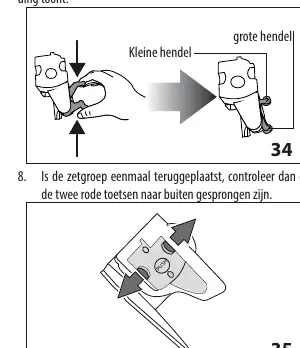
- Infuser: Clean at least once a month. Turn off the machine, open the service door, press the red release buttons, and pull the infuser out. Rinse with water (no detergents).
- Descaling: Perform when the descaling light flashes. Use the recommended De'Longhi descaler. Follow the procedure to run the solution through the cappuccino device.
Troubleshooting
If the machine displays alarms, refer to the indicator lights section. Common issues like slow coffee flow can often be resolved by adjusting the grind setting. If the machine does not turn on, check the main switch at the back.
Practical help
Common problems
Coffee is not hot
Preheat cups with hot water or rinse the internal circuit by pressing the rinse button before brewing.
Coffee flows too slowly or drops
Turn the grind adjustment knob one click clockwise (coarser) while the mill is running.
Milk has large bubbles
Use cold, semi-skimmed or skimmed milk. Ensure the cappuccino device is clean.
Machine does not turn on
Check if the plug is inserted and the main switch at the back is set to 'I'.
Before use
- Check that the main switch at the back is set to 'I'.
- Fill the water tank to the MAX level.
- Test water hardness with the provided strip and program the machine.
- Perform the initial rinse cycle as described in the manual.
- Install the water softener filter if available.
Specs in practice
- Pump Pressure
- 15 bar, standard for espresso extraction.
- Water Tank Capacity
- 1.8 liters.
- Bean Hopper Capacity
- 250 grams.
- Power Consumption
- 1450W.
Images and diagrams
- Fig 13: Grind adjustment knob location.
- Fig 24: Drip tray and grounds container removal.
- Fig 30: Infuser removal process.
- Fig 33-35: Infuser cleaning and re-insertion steps.
Model compatibility
- Use only De'Longhi recommended descaler.
- Do not wash machine parts in the dishwasher.
- Use only coffee beans or pre-ground coffee; do not put other substances in the hopper.

Manual page author
Emily Carter
User documentation editor
Prepares concise manual descriptions and highlights the most useful setup, operation, and maintenance information for readers.