Power / Batteries & Chargers
User Manual for Mojogear Mini 10000mAh Power Bank
Quick guide for the Mojogear Mini 10000mAh power bank (model P167A). Learn how to charge the device, check battery status, and use the USB ports for charging your electronics.
Table of contents
Quick guide from the manual
The Mojogear Mini 10000mAh power bank allows you to charge up to three devices simultaneously using its USB and USB-C ports. You can recharge the power bank itself using either the Micro USB or USB-C input. The device features a power button to check the remaining battery level via LED indicators.
Overview
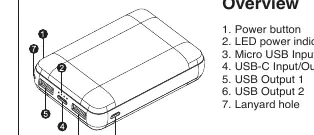
- 1. Power button
- 2. LED power indicator
- 3. Micro USB Input
- 4. USB-C Input/Output
- 5. USB Output 1
- 6. USB Output 2
- 7. Lanyard hole
Charging the power bank
There are two methods to charge the power bank:
- Micro USB: Use the included Micro USB cable to charge via the Micro USB port on the side.
- USB-C: Use a USB-C cable to charge via the USB-C port on the front.
Connect the charging cable to a USB outlet such as a wall charger or laptop. Depending on the charging speed, it takes approximately 4 to 8 hours to fully charge.
Charging your devices
Connect your charging cable to the USB or USB-C port on the power bank. For devices with a Micro USB port, you can use the included cable. You can charge up to three devices simultaneously using both USB ports and the USB-C port.
Power button & indicator
Press the power button once to turn on the power bank and check the remaining battery power. Press the power button twice to turn off the power bank.
Battery Status Indicators:
- One light on: ≤ 25%
- Two lights on: 25% - 50%
- Three lights on: 50% - 75%
- Four lights on: 75% - 100%
Technical details
- Model: P167A
- Battery capacity: 10000 mAh / 37Wh
- Battery type: Lithium polymer
- Micro Input: DC 5V-2.1A
- USB-C Input: DC 5V-2.1A
- USB-C Output: DC 5V-2.1A
- USB Output 1: DC 5V-1A
- USB Output 2: DC 5V-2.1A
- Efficiency: 85%
Safety instructions
- Do not use near explosive gases or flammable materials.
- Do not expose to excessive heat, such as sunshine or fire. Avoid abrupt changes in temperature.
- Do not use or store in humid or wet conditions.
- Do not throw, shake, vibrate, drop, crush, or mechanically abuse the power bank.
- Do not burn or incinerate.
- Do not cover with objects which may affect heat dissipation.
- Avoid contact with battery chemicals.
- Keep out of reach of children.
Practical help
Common problems
Power bank not charging
Ensure you are using a working wall charger or laptop USB port. Try both the Micro USB and USB-C input methods to rule out cable or port issues.
Device not charging
Ensure the cable is securely connected to the power bank and your device. Press the power button to activate the power bank if it does not start automatically.
Before use
- Check the battery level by pressing the power button.
- Ensure you have a compatible charging cable (Micro USB or USB-C).
- Verify the power bank is not in a humid or wet environment.
- Ensure the power bank is not covered by objects that could block heat dissipation.
Specs in practice
- USB-C Input/Output
- Supports both charging the power bank and charging your devices at 5V-2.1A.
- USB Output 1
- Standard USB port outputting 5V-1A.
- USB Output 2
- Standard USB port outputting 5V-2.1A for faster charging.
Images and diagrams
- The overview diagram identifies the power button, LED indicator, and all input/output ports.
- The LED indicator table helps interpret the battery status based on the number of lights illuminated.
Model compatibility
- Can charge up to three devices simultaneously using both USB ports and the USB-C port.

Manual page author
Emily Carter
User documentation editor
Prepares concise manual descriptions and highlights the most useful setup, operation, and maintenance information for readers.