Power / Batteries & Chargers
User Manual for Mojogear Mini Evo Power Bank
Quick guide for the Mojogear Mini Evo power bank. Learn how to check battery levels, charge the power bank, and charge your devices using the USB and USB-C ports.
Table of contents
Quick Guide
The Mojogear Mini Evo is a portable power bank designed to charge mobile devices. To check the remaining battery, press the power button. To charge the power bank itself, use the USB-C port connected to a wall charger or laptop. For optimal charging speed, use a power source that supports 3A or 18W.
Device Overview
The device features the following components:
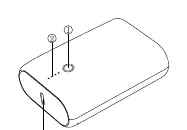
- Button: Used to check the remaining battery power.
- LED power indicator: Displays the current battery level.
- USB-C input/output: Used for charging the power bank or charging devices.
- USB output: Used for charging devices.
Battery Indicator
Press the power button to see the current battery status via the LED lights:
- One light on: ≤ 25%
- Two lights on: 25% ~ 50%
- Three lights on: 50% ~ 75%
- Four lights on: 75% ~ 100%
Charging the Power Bank
To charge the power bank, connect the included USB-C cable (or any compatible USB-C cable) to the USB-C port on the power bank and the other end to a USB outlet such as a wall charger or laptop.
Note: Depending on the charging speed of your power source, it can take between 2.5 to 8 hours to fully charge the power bank. Using a 3A or 18W output is recommended for maximum speed.
Charging Your Devices
You can charge your devices using the USB or USB-C ports on the power bank:
- Connect a charging cable to the USB or USB-C port on the power bank.
- Connect the other end of the cable to your device.
- You can charge two devices simultaneously by using both ports.
Practical help
Common problems
Slow charging of the power bank
Ensure you are using a wall charger or laptop output that supports 3A or 18W for maximum charging speed.
Power bank not charging
Check that the USB-C cable is securely connected to both the power bank and the power source.
Before use
- Check the battery level by pressing the power button.
- Ensure you have a compatible USB-C cable for charging the power bank.
- Verify your wall charger or laptop port supports 3A or 18W for optimal charging speed.
Specs in practice
- USB-C Input/Output
- A versatile port used for both recharging the power bank and powering external devices.
- Charging Time
- Takes 2.5 to 8 hours to fully charge, depending on the power output of the charger used.
Images and diagrams
- Overview: Identifies the button, LED indicators, and ports.
- Charging the power bank: Shows connection to a wall charger or laptop.
- Charging devices: Shows how to connect devices to the USB and USB-C ports.
Model compatibility
- Supports simultaneous charging of two devices using both ports.

Manual page author
Emily Carter
User documentation editor
Prepares concise manual descriptions and highlights the most useful setup, operation, and maintenance information for readers.