Power / Batteries & Chargers
User Manual for mophie Powerstation
Quick start guide and safety instructions for the mophie Powerstation. Learn how to charge your power bank, check battery levels, and charge your mobile devices safely.
Table of contents
Manual images
Click an image to enlargeQuick guide from the manual
This guide provides essential instructions for operating your mophie Powerstation. Please read all safety instructions before use to ensure proper operation and prevent damage.
Charging the Powerstation
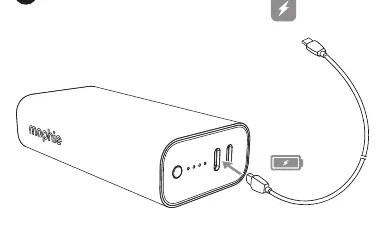
Before using your Powerstation for the first time, fully charge it. Connect the charging cable to the input port on the power bank and connect the other end to a power source.
Checking battery status
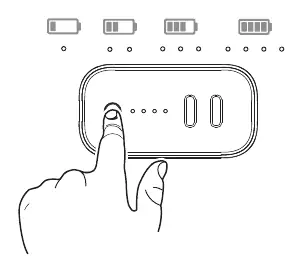
To check the remaining battery level, press the charge status button. The 4 status LEDs will light up to indicate the current charge level.
Charging your devices
You can charge your mobile devices using the output ports on the Powerstation:
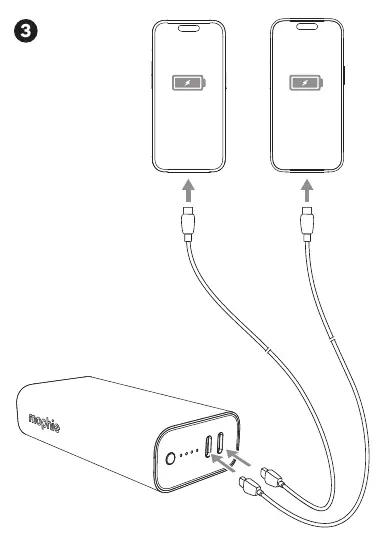
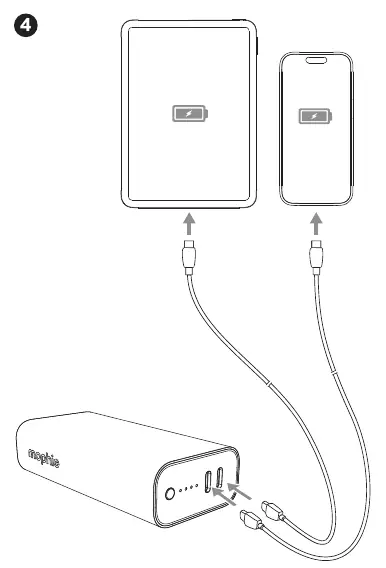
- Connect your device's charging cable to the output port on the Powerstation.
- Connect the other end of the cable to your device.
- The Powerstation will automatically begin charging your device.
- You can charge up to two devices simultaneously by using both output ports.
Important safety instructions
Warning: Improper use may result in product damage, overheating, toxic fumes, fire, or explosion.
- Ventilation: Operate only in open-air conditions. Do not use in enclosed, unventilated spaces like carrying bags, pockets, or purses.
- Temperature: Do not store in high-temperature environments, including intense sunlight or heat. Exposure to temperatures above 212°F (100°C) may cause an explosion.
- Handling: Do not disassemble, modify, or attempt to replace any parts. Avoid drops, bumps, or abrasions. If the device is damaged (dents, punctures, corrosion), discontinue use immediately.
- Moisture: Do not expose the device to rain or snow.
- Usage: Switch off the Powerstation when not in use. It will automatically switch off when disconnected from a device.
- Disposal: Never dispose of batteries in the garbage. Take used batteries to a local battery-recycling center.
Practical help
Common problems
Device not charging
Ensure the cable is securely connected to both the power bank and the device. Check if the power bank has sufficient charge by pressing the status button.
Power bank overheating
Stop use immediately. Ensure it is not being used in an enclosed, unventilated space like a pocket or bag.
Before use
- Fully charge the power bank before first use.
- Check for any physical damage like dents, punctures, or corrosion.
- Ensure the device is compatible with the power bank.
- Read all safety warnings provided in the manual.
Images and diagrams
- Step 1: Charging the power bank via USB cable.
- Step 2: Checking battery status via LED indicators.
- Step 3: Charging a single device.
- Step 4: Charging two devices simultaneously.
Model compatibility
- Consult your device packaging to determine compatibility.
- Use only with appropriate devices.

Manual page author
Emily Carter
User documentation editor
Prepares concise manual descriptions and highlights the most useful setup, operation, and maintenance information for readers.