Power / Batteries & Chargers
User Manual for Mophie 15W Charging Stand
Quick guide for the Mophie 15W Charging Stand. Learn how to assemble, connect, and safely use your wireless charger for optimal performance.
Table of contents
Manual images
Click an image to enlargeQuick guide from the manual
This guide provides essential instructions for setting up and using your Mophie 15W Charging Stand. Ensure you use only the recommended power supply to avoid damage or safety risks. The device is designed for indoor use and should be kept away from extreme heat, moisture, and fire.
Assembly and Setup
Follow these steps to prepare your charging stand for use:
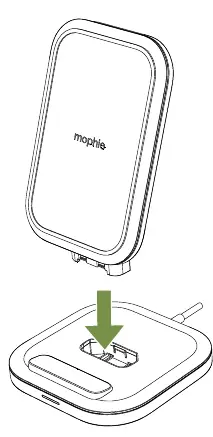
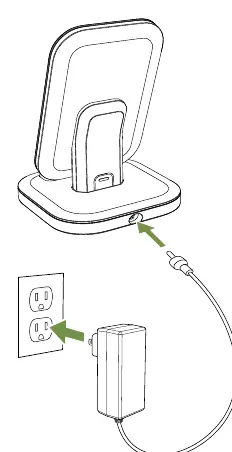
- Assembly: Align the charging stand with the base unit. Press the stand firmly into the base until it clicks into place.
- Power Connection: Connect the provided AC adapter to the power port located on the back of the charging base.
- Wall Outlet: Plug the AC adapter into a standard wall outlet. Ensure the outlet is easily accessible.
Charging Your Device
Once the stand is powered, you can charge your device:
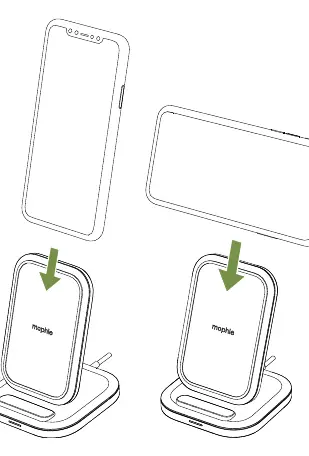
- Place your mobile device onto the center of the charging stand.
- The device can be placed in either portrait or landscape orientation.
- Ensure the device is properly aligned with the charging surface to initiate charging.
Safety Warnings
To ensure safe operation and prevent damage, observe the following precautions:
- Temperature: Do not store or use the device in high-temperature environments, including direct sunlight or near heat sources. Exposure to temperatures above 212°F (100°C) may cause an explosion.
- Environment: Keep the charger away from rain, snow, and moisture.
- Modifications: Do not disassemble, modify, or attempt to repair any part of the device.
- Usage: Use only power supplies recommended by Mophie. Overloading the output may result in fire or injury.
- Interference: To comply with FCC RF exposure requirements, maintain a separation distance of at least 20 cm from all persons during operation.
Technical Specifications
The Mophie 15W Charging Stand operates with the following specifications:
- Input Voltage: 115V / 230V
- Input AC Frequency: 60Hz / 50Hz
- Output Voltage: 19.0V
- Output Current: 1.3A
- Output Power: 24.7W
Warranty and Customer Service
This product includes a 2-year warranty. For full details regarding terms, exclusions, and limitations, visit mophie.com/warranty. Keep your purchase receipt as proof of purchase and register your product at mophie.com.
If you require assistance, contact Mophie Customer Service:
- Telephone: 1-888-8mophie (1-888-866-7443)
- International: +1 (269) 743-1340
- Web: www.mophie.com/cs
Official resources from the manual
Practical help
Common problems
Device is excessively hot, emitting an odor, or deformed
Immediately stop all product use and contact the manufacturer.
Harmful interference with radio or television reception
Reorient or relocate the receiving antenna, increase separation between equipment and receiver, or connect to a different circuit.
Charging not working
Ensure you are using the recommended power supply and that the AC adapter is fully connected to both the stand and the wall outlet.
Before use
- Ensure the AC outlet is installed near the charging pad and is easily accessible.
- Verify that the charging stand is placed on a stable, flat surface.
- Check that the device is not exposed to rain, snow, or high temperatures.
- Ensure you are using the original, recommended power supply.
- Confirm that the device is not being used by a minor without adult supervision.
Specs in practice
- Output Power (24.7W)
- The total power capacity delivered by the charger to your device.
- Input Voltage (115V / 230V)
- Indicates the charger is compatible with standard global electrical grid voltages.
- Output Voltage (19.0V)
- The electrical potential supplied to the charging base.
Images and diagrams
- Assembly: Shows the stand being inserted vertically into the base.
- Power Connection: Illustrates the AC adapter cable connecting to the rear of the base and the plug into a wall socket.
- Charging: Demonstrates placing a phone on the stand in both vertical (portrait) and horizontal (landscape) positions.
Model compatibility
- Must be used with certified peripherals and shielded cables to comply with FCC Class B digital device limits.
- Operation with non-certified peripherals or non-shielded cables may result in radio interference.

Manual page author
Emily Carter
User documentation editor
Prepares concise manual descriptions and highlights the most useful setup, operation, and maintenance information for readers.