Smart Home / Smart Switches
User Manual for Immax NEO Smart Electronic Single Phase Circuit Breaker 07574L
Quick guide for the Immax NEO 07574L smart circuit breaker. Learn how to install on a DIN rail, wire the device, pair it with the Immax NEO PRO app, and monitor power consumption.
Table of contents
Quick Guide
To get started with your Immax NEO smart circuit breaker, ensure you have a 2.4GHz WiFi network available and Bluetooth enabled on your smartphone. The device is designed for DIN rail installation and requires connection to the Immax NEO PRO app for full functionality, including remote control and power monitoring.
Installation
The device must be installed on a DIN rail. Connect the power line wires from above:
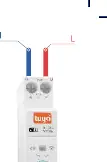
- Live wire (L): Connect to the L socket.
- Neutral wire (N): Connect to the N socket.
Ensure all cables are securely fastened before powering on the device.
App Pairing
- Download and install the Immax NEO PRO application from the App Store or Google Play.
- Create an account and log in.
- Ensure WiFi and Bluetooth are enabled on your mobile phone.
- Long press the button on the electronic circuit breaker until the LED indicator begins to flash (pairing mode).
- Open the Immax NEO PRO app and click the '+' icon to add a new device. If it does not appear automatically, select 'Other WiFi devices'.
- Enter your 2.4GHz WiFi network credentials and wait for the device to be added.
LED Indicators
- Solid blue: Successfully connected to the network.
- Blinking blue: Device is in pairing mode.
- LED Off: Device is not connected to the network (OFF GRID).
- Button LED On: Switch is in the ON state.
- Button LED Off: Switch is in the OFF state.
Power Monitoring
The device allows for real-time monitoring of current, voltage, and power. You can track consumption by day, month, or year within the application to better manage your energy usage.
Technical Specifications
- Protocol: WiFi
- Max Load: 26kW
- Current Protection: 1-63A (adjustable in app)
- Overvoltage Protection: 220-265V (adjustable in app)
- Undervoltage Protection: 76-240V (adjustable in app)
- Operating Temperature: -25°C to 70°C
- Protection Rating: IP20
- Dimensions: 82 x 18 x 66 mm
Practical help
Common problems
Device does not appear in the app during pairing.
Ensure your phone is connected to a 2.4GHz WiFi network (5GHz is not supported) and that Bluetooth is enabled. Verify the device is in pairing mode (blinking blue LED).
Device is offline (LED is off).
Check the network connection. If the LED is off, the device is disconnected from the network (OFF GRID).
Before use
- Ensure a 2.4GHz WiFi network is available.
- Enable Bluetooth on your smartphone.
- Download the Immax NEO PRO app.
- Verify DIN rail mounting space.
- Ensure power is disconnected before wiring.
Images and diagrams
- The wiring diagram illustrates the top-down connection method.
- The Live (L) wire connects to the terminal marked L.
- The Neutral (N) wire connects to the terminal marked N.
Model compatibility
- Requires 2.4GHz WiFi network.
- Supports Tuya ecosystem.
- Designed for DIN rail mounting.

Manual page author
Michael Turner
Technical manual editor
Reviews PDF manuals for structure, safety notes, and practical product details so readers can find the right information quickly.