Industrial / Electrical
User Manual for Immax NEO 07550L Smart Switch
Quick guide for the Immax NEO 07550L Smart Switch. Includes installation steps, wiring diagrams, pairing instructions with the Immax NEO PRO app, and technical specifications.
Table of contents
Quick guide from the manual
This document provides instructions for the Immax NEO 07550L Smart Switch. Key operations include installing the switch, connecting it to the electrical wiring, and pairing it with the Immax NEO PRO application via a Zigbee gateway.
Important Safety Warnings
- Installation must be performed by a qualified person in accordance with local regulations.
- Always disconnect the power supply before installation.
- Keep out of reach of children due to small parts.
- Do not disassemble the product to avoid electric shock.
Installation
Follow these steps to install the smart switch:
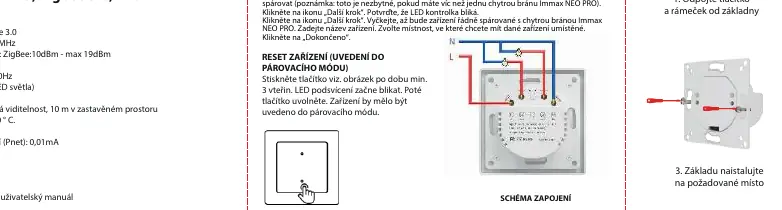
- Disconnect the button and frame from the base.
- Connect the switch according to the wiring diagram.
- Install the base in the desired location.
- Install the frame and then the button.
Pairing and App Setup
To pair the device with the Immax NEO PRO app:
- Ensure your mobile phone and smart gateway have an active internet connection.
- Scan the QR code to download the Immax NEO PRO app or search for it in the App Store or Google Play.
- Register or log in to your account.
- Open the app and tap the "+" icon to add a new device.
- Select the Immax NEO category and choose the device.
- Select the smart gateway you want to pair with.
- Follow the on-screen instructions to complete the pairing.
Resetting the Device
If the device fails to pair or needs to be reconfigured, reset it:
- Press the button shown in the diagram for at least 3 seconds.
- The LED backlight will start blinking, indicating the device is in pairing mode.
Maintenance
Protect the device from contamination. Wipe with a soft cloth. Do not use harsh or coarse materials, solvents, or aggressive cleaning agents.
Technical Specifications
- Protocol: ZigBee 3.0
- Frequency: 2400MHz~2483.5MHz
- Power Input: AC 100-240V 50/60Hz
- Max Load: 800W (max 2 LED lights)
- Max Current: 10A
- Wireless Range: 30m line of sight, 10m in built-up area
- Operating Temperature: -10°C to 40°C
- Protection Degree: IP20
Manufacturer information
Immax
Practical help
Common problems
Device not pairing
Ensure the LED is blinking quickly. If not, reset the device by holding the button for 3 seconds.
Installation issues
Installation must be performed by a qualified person in accordance with local regulations.
Before use
- Ensure your mobile phone and smart gateway have an active internet connection.
- Disconnect power before starting installation.
- Verify the wiring matches the provided connection diagram.
- Check that the load does not exceed 800W.
Specs in practice
- Max load 800W
- Maximum power capacity for connected lighting.
Images and diagrams
- Wiring Diagram: Shows the connection of L (Live) and N (Neutral) wires to the switch terminals.
Model compatibility
- Requires Immax NEO PRO smart gateway.
- Compatible with ZigBee 3.0 networks.

Manual page author
Michael Turner
Technical manual editor
Reviews PDF manuals for structure, safety notes, and practical product details so readers can find the right information quickly.