Industrial / Testing Equipment
User Manual for PCE-VE 100N / 300N Videoendoscope
Quick guide for the PCE-VE 100N and 300N videoendoscopes. Includes safety instructions, button functions, operating procedures, and technical specifications.
Table of contents
Manual images
Click an image to enlargeQuick Start Guide
The PCE-VE 100N and 300N are professional videoendoscopes designed for visual inspection. Before use, ensure the TF card is formatted and the battery is charged. The device features a flexible probe with a steering mechanism and a high-resolution display.
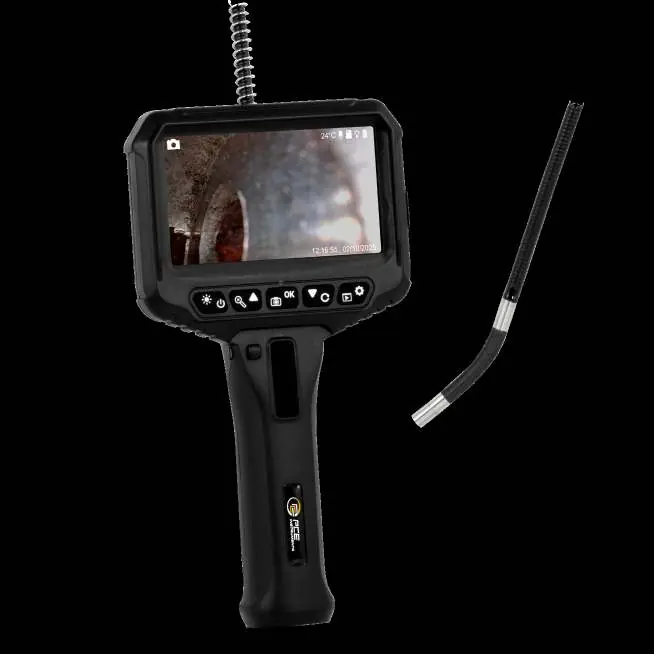
Safety and Protection
- Probe Handling: The camera probe is a high-precision electronic device. Do not pull on the cable or touch the probe tip excessively to avoid damage.
- Temperature Limits: The device is designed for ambient temperatures between -10 °C and 118 °C. Do not use in engines or environments where internal temperatures exceed safe limits; the device will automatically shut down if temperatures exceed 90 °C.
- Water Resistance: Only the camera probe is IP67 rated. The main unit is not waterproof. Avoid contact with liquids.
- Electrical Safety: Exposed metal parts are conductive. Avoid contact with live electrical circuits.
- Maintenance: Do not disassemble the device. Repairs must be performed by the manufacturer or authorized service provider.
Product Overview
The device features a main display unit with integrated controls:
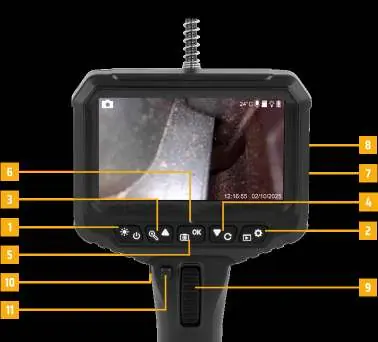
- Power/LED: Hold for 3 seconds to turn on/off. Click to adjust LED brightness (3 levels + off).
- Menu/Settings: Short press for menu, long press for album.
- Zoom/Up: Zoom in preview mode; move cursor up in menu.
- Rotate/Down: Rotate image 180° in preview; move cursor down in menu.
- Confirm: Take photo, start/stop video recording, or confirm menu selection. Hold 2 seconds to switch between photo/video mode.
- Steering: Use the steering wheel to adjust the camera angle. Use the lock/unlock buttons to fix or release the angle.
Operation
Charging: Use the Type-C port. The LED indicator flashes red while charging and turns blue when fully charged.
Storage: The device supports TF cards up to 32 GB. Format the card before the first use.
Steering: Use the steering wheel to manipulate the probe tip. Always return the wheel to the central position before removing the probe from an inspection area.
Technical Specifications
- Display Resolution: 480x272
- Camera Resolution: Up to 1920x1080 (JPG)
- Battery Life: Approximately 3 hours
- Operating Temperature: -10 °C to 50 °C
- Probe Rotation: Bidirectional 210°
- Field of View: 90° ± 3°
Recycling
Batteries contain toxic materials and must not be disposed of with household waste. Return the device to the manufacturer or an authorized recycling facility for proper disposal.
Practical help
Common problems
Device does not turn on or battery dies quickly
Check the charge status via the LED indicator (Red = charging, Blue = full). Ensure the device is charged via the Type-C port.
Probe is damaged or unresponsive
Ensure you are not pulling on the cable or bending the probe excessively. The probe has a limited flex cycle.
Device shuts down during inspection
The device has an automatic shut-off feature if internal temperatures exceed 90 °C. Allow the device to cool down before restarting.
Before use
- Format the TF card before the first use.
- Ensure the battery is fully charged (Blue LED).
- Check that the ambient temperature is within the -10 °C to 50 °C range.
- Ensure the steering wheel is in the central position before inserting or removing the probe.
- Verify the probe is not being used in live electrical circuits.
Specs in practice
- Bidirectional 210°
- The camera probe tip can be steered 210 degrees in two directions.
Images and diagrams
- The steering wheel (9) allows for precise control of the probe tip angle.
- The lock (11) and unlock (10) buttons are used to secure the probe angle during inspection.
Model compatibility
- Supports TF cards up to 32 GB.
- Menu languages are limited to English and German.

Manual page author
David Miller
Documentation analyst
Organizes user manual content into clear summaries, with attention to model details, product context, and everyday usability.