Tools / Measuring Tools
User Manual for PCE Instruments PCE-PQC Series Particle Counter
Comprehensive user guide for the PCE Instruments PCE-PQC series particle counter. Learn how to operate, configure settings, manage data, and perform measurements with this advanced handheld device.
Table of contents
Manual images
Click an image to enlargeQuick Start Guide
The PCE-PQC series particle counter is a handheld instrument designed for measuring particle concentrations in ambient environments. To begin, power on the device using the one-touch power/sample button located on the handle. Upon the first power-up, follow the on-screen prompts to set the date and time. Use the touch screen interface to navigate menus, start or stop sampling, and manage recorded data.
Safety Information
- Laser Safety: This device contains a Class 1 laser product. Do not disassemble the device, as exposure to harmful laser radiation can occur.
- Handling: Do not use near explosive, flammable, or reactive gases. Do not attach directly to pressurized gases or liquids.
- Inlet Care: Do not operate the instrument with the inlet capped or plugged, as this can damage the vacuum pump. Do not allow water or liquids to enter the inlet.
- Battery: Use only approved PCE Instruments chargers. Defective Lithium-Ion batteries must be recycled.
Operation
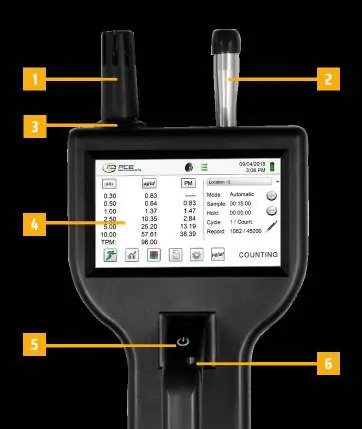
The device features a 4.3-inch color touch screen for operation. Key functions include:
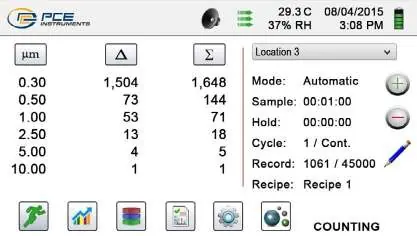
- Taking a Sample: Press the one-touch power/sample button on the handle or the Run icon on the display to begin sampling. Press again to stop.
- Real-Time Meter: Use the Real-Time Meter or Graphing screens to pinpoint particle sources. The bar graph visualization rises and falls with the concentration of particles.
- Data Management: The device stores up to 45,000 records. Use the Recorded Data icon to view, print, or save data to a USB thumb drive.
Settings and Configuration
Access the Settings menu to manage the instrument's configuration:
- Sampling Setup: Configure sample time, hold time, cycles, and mode (automatic/manual).
- Channel Management: Enable/disable channels, set custom channel sizes, and configure alarm thresholds.
- Communication: Configure Ethernet, USB, or optional Wi-Fi settings.
- Environment: Set units for barometric pressure and temperature, and configure alarms.
- Passwords: Set user and administrator passwords to prevent unauthorized access.
Software and Remote Operation
The instrument includes PC-based IMS software for real-time graphing, data downloading, and firmware updates. Additionally, the device can be accessed remotely via a web browser by entering the instrument's IP address on a local network.
Maintenance and Disposal
The device requires minimal maintenance. For shipping or annual calibration, use original packing materials. Dispose of batteries and electronic components in accordance with local regulatory requirements.
Practical help
Common problems
Flow error (red line through arrows)
Check the inlet for blockages or damage. Ensure the inlet is not capped or plugged.
Lost password
Contact PCE Instruments for a temporary password valid for the day of the request.
Device not connecting to PC
Ensure the USB cable is securely connected and the IMS software is installed and running on the PC.
Before use
- Charge the battery fully before first use.
- Ensure the inlet is clear and not obstructed.
- Set the correct date and time on the initial power-up screen.
- Verify the environment is free of explosive or reactive gases.
- Check that the battery is properly installed.
Specs in practice
- Buffer Memory
- Capacity to store up to 45,000 sample records including particle count, environmental data, and timestamps.
Images and diagrams
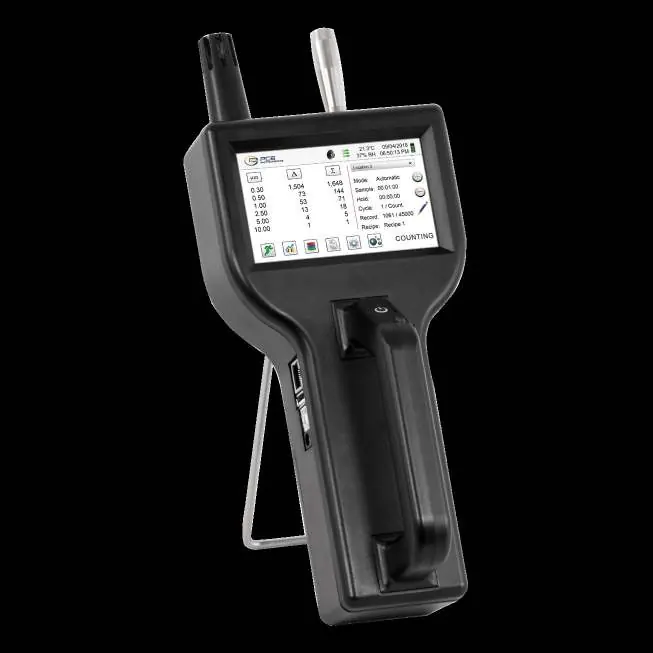
- The device features a touch screen, power/sample button, and various ports including Ethernet, USB-A, USB-B, and external power.
Model compatibility
- Optional Wi-Fi module required for wireless communication.
- Compatible with external thermal printer via USB port.

Manual page author
Michael Turner
Technical manual editor
Reviews PDF manuals for structure, safety notes, and practical product details so readers can find the right information quickly.