Electronics / Monitors
Philips 170X7 LCD Monitor User Manual
Comprehensive user guide for the Philips 170X7 LCD monitor, covering setup, operation, troubleshooting, and technical specifications.
Table of contents
Product Overview
The Philips 170X7 is a 17-inch LCD monitor designed for high-quality visual performance. It features SmartImage Lite technology for enhanced image and text clarity, a fast response time for smooth motion, and dual-input support (VGA and DVI-D with HDCP). The monitor includes integrated speakers, a built-in power supply, and a CableGuide system for organized cable management.
Setup and Installation
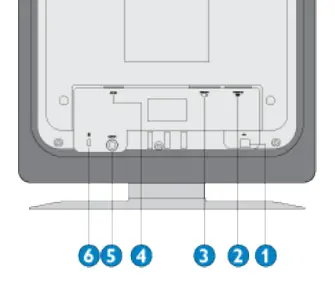
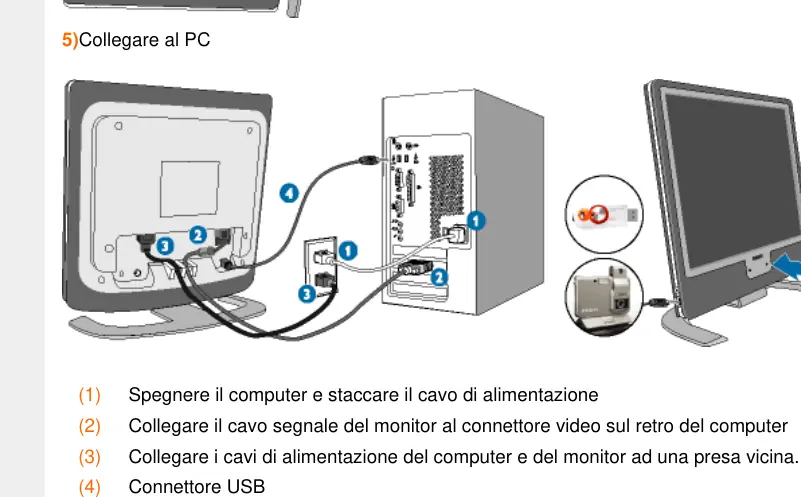
To set up the monitor, connect the power cable and the signal cable (VGA or DVI) to your computer. The monitor is Plug-and-Play compatible with Windows operating systems. For optimal performance, ensure the display resolution is set to 1280x1024 at 60Hz. The included CD-ROM contains the Flat Panel Adjust (FPadjust) program, which helps in fine-tuning contrast, brightness, and screen positioning.
Operation and OSD
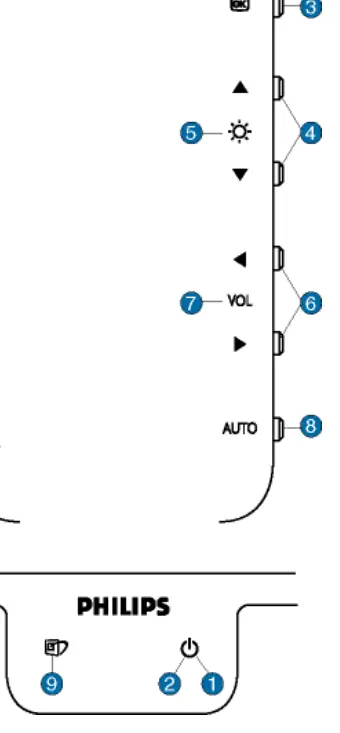
The On-Screen Display (OSD) menu allows you to adjust monitor settings directly. Use the buttons on the front panel to navigate the menu, confirm selections, and adjust parameters such as brightness, contrast, color temperature, and screen position. The SmartImage Lite feature can be enabled via a dedicated shortcut key to quickly switch between preset modes like Office Work, Internet, Image Viewing, Video Playback, and Gaming.
Maintenance and Safety
To clean the screen, use a soft, slightly damp cloth. Do not use alcohol, solvents, or ammonia-based liquids. Keep the monitor away from direct sunlight, heat sources, and excessive humidity. Always use a screensaver to prevent image ghosting. If the monitor is not functioning correctly, check all cable connections and ensure the computer is powered on. If problems persist, consult the troubleshooting section or contact Philips customer support.
Troubleshooting
- No image (Power LED off): Check power cable connection and ensure the monitor is switched on.
- No image (Power LED amber/yellow): Ensure the computer is on and the signal cable is securely connected.
- Image flickering or unstable: Use the Auto button to automatically adjust phase and clock settings.
- Image position incorrect: Use the OSD menu to adjust horizontal and vertical positioning.
Disposal
This monitor contains recyclable materials. Please follow local regulations for the disposal of electronic equipment to minimize environmental impact.
Related manuals
Related manuals from the same brand or category.
Electronics / Monitors
Philips 172B9T/00 B-line Monitor Quick Start Guide
PhilipsElectronics / Monitors
PHILIPS B Line 172B9 Monitor User Guide
PhilipsElectronics / Monitors
Philips 170X5FB 17-inch LCD Monitor
PhilipsElectronics / Monitors
Philips Brilliance CT 16-slice Configuration
Philips
Manual page author
Emily Carter
User documentation editor
Prepares concise manual descriptions and highlights the most useful setup, operation, and maintenance information for readers.