Electronics / Monitors
Philips 17S1 LCD Monitor User Manual
Comprehensive user manual for the Philips 17S1 LCD monitor, covering setup, operation, technical specifications, safety guidelines, and troubleshooting.
Table of contents
Product Overview
The Philips 17S1 is a 17-inch TFT-LCD monitor designed for high-performance visual quality. It features SmartImage technology, which dynamically optimizes contrast, color saturation, and sharpness for different content types, such as office work, image viewing, or entertainment. The monitor supports a native resolution of 1280x1024 at 60Hz.
Safety and Maintenance
To ensure longevity and safety, keep the monitor away from direct sunlight, heat sources, and excessive moisture. Do not block ventilation holes. When cleaning, use a soft, slightly damp cloth; avoid alcohol or ammonia-based cleaners. If the monitor gets wet, disconnect it immediately and contact a service center. Avoid applying excessive pressure to the LCD panel.
Installation and Setup
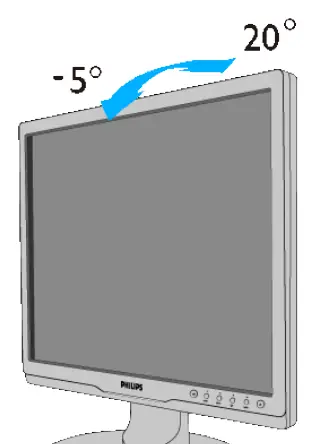
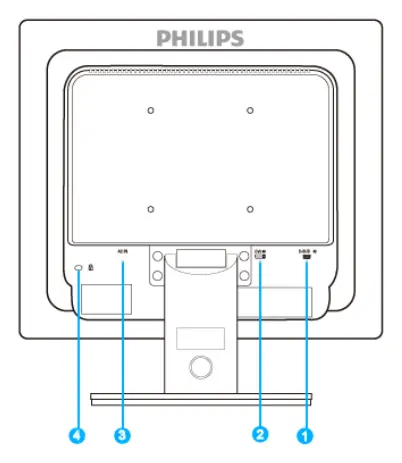
Connect the monitor to your PC using the provided VGA or DVI cables. Ensure the power cable is securely connected. For optimal performance, set your computer's display resolution to 1280x1024 at 60Hz. The monitor includes a stand that can be adjusted for tilt (-5/+20 degrees) and is VESA-compatible (100x100mm) for wall mounting.
Operation and OSD
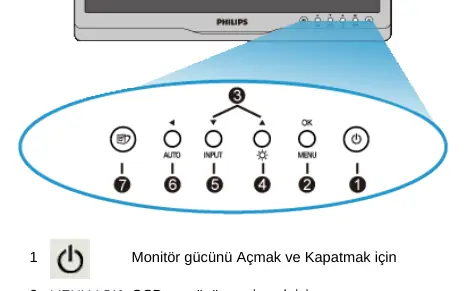
The On-Screen Display (OSD) menu allows you to adjust settings such as input source, brightness, contrast, color temperature, and language. Use the control buttons on the front of the monitor to navigate the menu. SmartImage can be toggled directly via the dedicated button on the front panel.
Troubleshooting
- No Picture (Power LED off): Check power cable connection and ensure the monitor is turned on.
- No Picture (Power LED blinking): Ensure the PC is on and the signal cable is properly connected. Check for bent pins on the cable.
- Image not centered: Press the 'Auto' button or adjust phase/clock settings in the OSD.
- Image flickering: Ensure the signal cable is securely connected to the graphics card.
- Ghosting/Burn-in: Always use a moving screen saver when the monitor is unattended.
Technical Specifications
- Panel Size: 17 inches
- Resolution: 1280x1024 @ 60Hz
- Brightness: 250 cd/m²
- Contrast Ratio: 800:1 (typical)
- Response Time: 5 ms
- Power Consumption:< 17.5 W (typical)
Related manuals
Related manuals from the same brand or category.
Electronics / Monitors
Philips 172B9T/00 B-line Monitor Quick Start Guide
PhilipsElectronics / Monitors
PHILIPS B Line 172B9 Monitor User Guide
PhilipsElectronics / Monitors
Philips 170X7 LCD Monitor User Manual
PhilipsElectronics / Monitors
Philips 170X5FB 17-inch LCD Monitor
PhilipsElectronics / Monitors
Philips Brilliance CT 16-slice Configuration
Philips
Manual page author
Emily Carter
User documentation editor
Prepares concise manual descriptions and highlights the most useful setup, operation, and maintenance information for readers.