Electronics / Monitors
PHILIPS B Line 172B9 Monitor User Guide
Comprehensive setup, operation, and maintenance guide for the Philips B Line 172B9 monitor, including connectivity, ergonomic adjustments, and OSD menu navigation.
Table of contents
Product Overview
The Philips B Line 172B9 is a professional-grade monitor designed for productivity and ergonomic comfort. It features a versatile stand that allows for tilt and height adjustments to suit various workspace configurations. The monitor includes an integrated USB hub for convenient peripheral connectivity and supports multiple input standards.
Setup and Connectivity
To begin using your monitor, connect the necessary cables to the rear interface. The monitor supports various inputs including HDMI, DVI, DP, and VGA. Ensure the power cable is securely connected to an AC/DC adapter. For data connectivity, utilize the USB A-B cable to enable the built-in USB hub functionality, which allows for easy connection of keyboards, mice, and other USB devices.
Ergonomic Adjustments
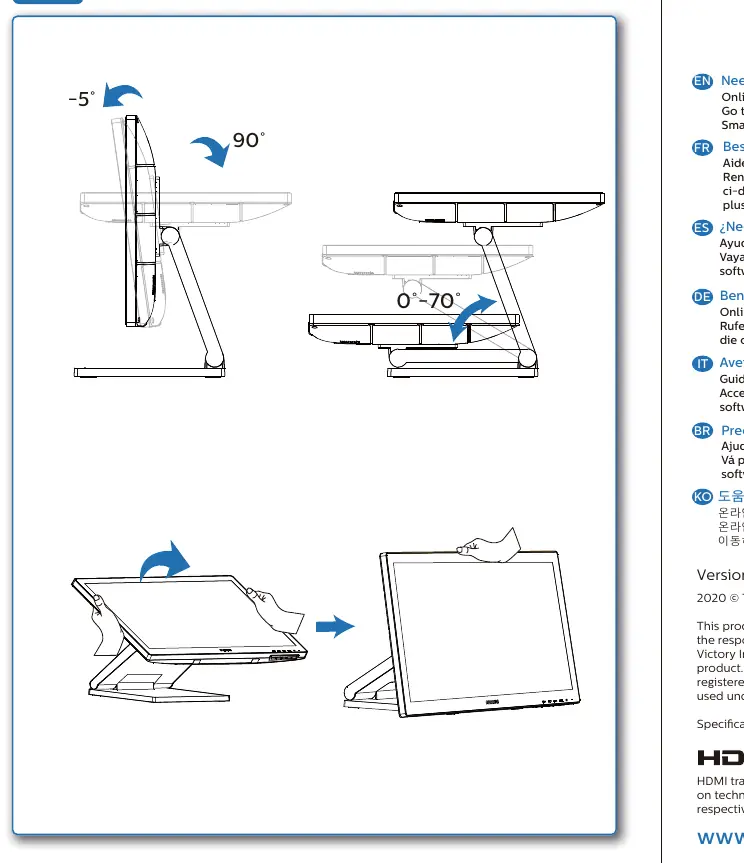
The monitor stand is engineered for flexibility. Users can adjust the tilt angle from -5 to 90 degrees and modify the height to ensure optimal viewing comfort. Proper adjustment helps reduce neck and eye strain during extended periods of use.
Operation and OSD Menu
The monitor is controlled via an intuitive On-Screen Display (OSD) menu located on the front panel. Use the navigation buttons to access settings such as brightness, contrast, input selection, and color temperature. The OSD allows for fine-tuning of the display performance to match specific lighting conditions or professional requirements.
Maintenance and Support
Keep the screen clean by wiping it gently with a soft, lint-free cloth. Avoid using harsh chemicals or abrasive materials. For software enhancements, including the latest SmartControl drivers, visit the official support website. If you encounter technical issues, ensure all cable connections are secure and verify that the correct input source is selected in the OSD menu.
Related manuals
Related manuals from the same brand or category.
Electronics / Monitors
Philips 172B9T/00 B-line Monitor Quick Start Guide
PhilipsElectronics / Monitors
Philips 170X7 LCD Monitor User Manual
PhilipsElectronics / Monitors
Philips 170X5FB 17-inch LCD Monitor
PhilipsElectronics / Monitors
Philips Brilliance CT 16-slice Configuration
Philips
Manual page author
David Miller
Documentation analyst
Organizes user manual content into clear summaries, with attention to model details, product context, and everyday usability.