Health / Medical Devices
User Manual for Philips DreamStation Cellular Modem
Quick guide for the Philips DreamStation Cellular Modem. Learn how to install, operate, troubleshoot connection errors, and maintain your device.
Table of contents
Manual images
Click an image to enlargeQuick Guide
The DreamStation Cellular Modem is designed to transfer data between your Philips Respironics therapy device and proprietary compliance software. It operates automatically but can be triggered manually if required by your provider. Ensure the device is installed correctly and kept away from other electronic devices to avoid interference.
Installing the Modem
- Ensure the therapy device is turned off.
- Open the accessory door on the therapy device.
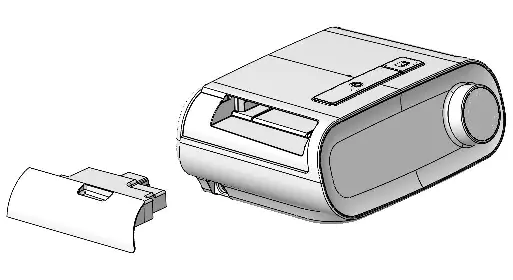
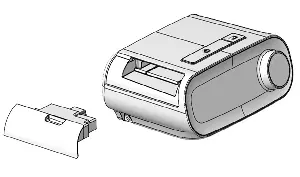
- Remove the accessory door by lifting and firmly sliding it to the left, then pulling the right side toward you until it pops out.
- Slide the modem into the accessory slot until it clicks into place.
Note: After powering on, it may take up to 30 seconds for the modem to be ready. The modem will automatically attempt to call within 5 minutes of installation if the blower is off.
Making a Call
The modem typically uploads data automatically at predetermined times. It will not make a call while the blower is on and therapy is being delivered. To manually initiate a call:
- Navigate to the My Provider menu on your therapy device.
- Select Upload.
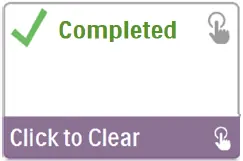
- The screen will display an animated Sending screen, followed by a Completed message.
Modem On/Off
You can temporarily disable the modem if necessary:
- Navigate to the My Setup menu.
- Select Modem Off. An airplane icon will appear on the upload screen.
- To re-enable, navigate to the My Setup menu and select Modem On.
Troubleshooting
If a connection or upload attempt fails, an error message with a number will appear on the therapy device screen. Common error codes include:
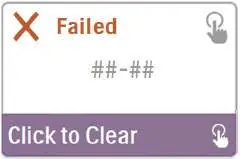
- 1-0, 1-1 (Carrier Network Issue): Power cycle the therapy device by unplugging the power cord, waiting 10 seconds, and plugging it back in. Try a manual upload.
- 2-0 to 2-5 (Internal Communication Error): Initiate a manual call via the My Provider menu.
- 3-0 to 3-2 (Software Configuration Error): Initiate a manual call via the My Provider menu.
- 4-0 to 4-3 (Invalid Device Configuration Error): Contact your provider for assistance.
Removing the Modem
- Ensure the therapy device is turned off.
- Gently pull the modem out of the accessory slot.
- Replace the accessory door by holding the right hook in place in the upper right side of the opening and firmly pushing the left hook into the left side until it clicks.
Specifications
- Operating Temperature: 41° to 95° F (5° to 35° C)
- Storage Temperature: -4° to 140° F (-20° to 60° C)
- Humidity: 15% to 95% non-condensing
- Expected Service Life: 5 years
- Operating Frequency: 746-756 MHz (Receive), 777-787 MHz (Transmit)
Manufacturer information
Philips
Practical help
Common problems
1-0, 1-1 (Carrier Network Issue)
Unplug the power supply cord from the therapy device, wait 10 seconds, plug it back in, and try a manual upload.
2-0 to 2-5 (Internal Communication Error)
Initiate a manual call by navigating to the My Provider menu on the therapy device and selecting 'Upload'.
3-0 to 3-2 (Software Configuration Error)
Initiate a manual call by navigating to the My Provider menu on the therapy device and selecting 'Upload'.
4-0 to 4-3 (Invalid Device Configuration Error)
Contact your provider; they need to check the Philips Respironics proprietary compliance software.
Before use
- Ensure the therapy device is turned off before installation.
- Allow the modem to reach room temperature if it was exposed to extreme heat or cold.
- Use ESD precautionary procedures (e.g., avoid touching connector pins).
- Keep the device away from pacemakers (minimum 6 inches separation).
- Ensure the device is not used in gas stations, fuel stores, or chemical plants.
Specs in practice
- Operating Temperature
- 41° to 95° F (5° to 35° C)
- Storage Temperature
- -4° to 140° F (-20° to 60° C)
- Expected Service Life
- 5 years
- Operating Frequency
- 746-756 MHz (Receive), 777-787 MHz (Transmit)
Images and diagrams
- The modem installs into the accessory slot on the back of the therapy device.
- The accessory door must be removed by sliding it to the left and pulling it out.
Model compatibility
- Designed for use with select Philips Respironics therapy devices.
- Not suitable for use on airlines.

Manual page author
Emily Carter
User documentation editor
Prepares concise manual descriptions and highlights the most useful setup, operation, and maintenance information for readers.