Home Appliances / Cleaning Robots
User manual for Sencor SBD 0900WH digital blood pressure monitor
Quick guide for the Sencor SBD 0900WH digital blood pressure monitor. Learn how to set up, measure blood pressure correctly, interpret error codes, and maintain your device.
Table of contents
Manual images
Click an image to enlargeQuick guide from the manual
To ensure accurate blood pressure measurements, follow these essential steps:
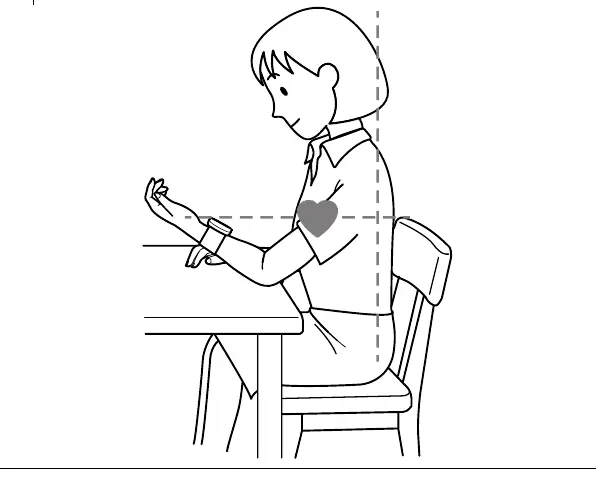
- Rest: Remain still for at least 5 minutes before taking a measurement.
- Preparation: Avoid coffee, tea, or smoking 30-45 minutes before measurement. Do not eat or drink for one hour prior.
- Posture: Sit in an upright position, feet flat on the floor, do not cross legs.
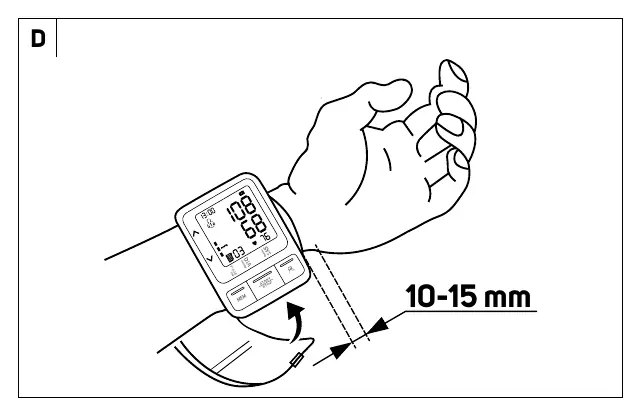
- Cuff Placement: Place the cuff on the wrist, leaving a 10-15 mm gap from the edge of the wrist. The palm must be turned upwards.
- During Measurement: Sit calmly, do not talk, and do not move.
Description of the device
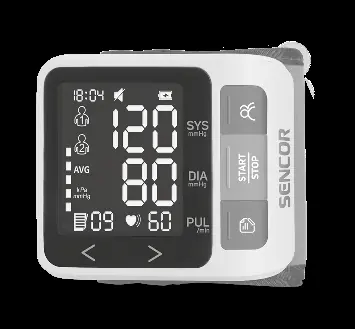
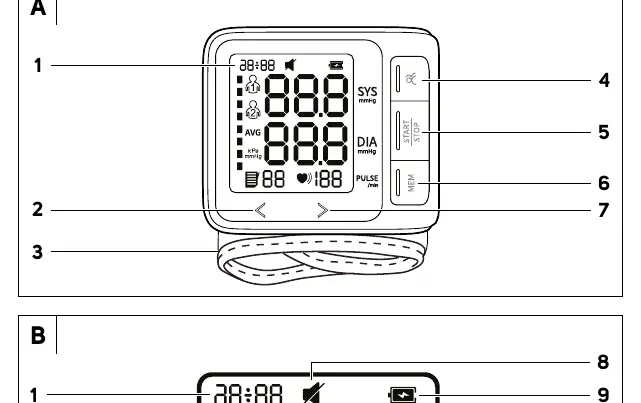
The device features a digital display (A1), wrist cuff (A3), On/Off button (A5), Memory button (A6), and a Select user/settings button (A4). The display shows systolic and diastolic pressure, pulse rate, user icons, and memory indicators.
Preparation for use
The device is powered by 2x AAA batteries. Ensure correct polarity when inserting them. Before first use, set the date and time by holding the user/settings button until the year flashes, then use the arrow buttons to adjust. You can also select between two users by pressing the user button after turning the device on.
Measuring blood pressure
After attaching the cuff correctly, press the START/STOP button. The device will automatically pressurize the cuff and display the results. If the device detects cardiac arrhythmia, a specific symbol will appear on the display. If this happens frequently, consult your doctor.
Memory function
The device automatically saves up to 99 sets of measurements for each of the two users. Press the MEM button to view the average of the last 3 measurements. Pressing it again will show individual stored values.
Troubleshooting and error codes
If an error occurs, the display will show a code:
- Er U: Pressure not achieved within 12 seconds. Repeat measurement.
- Er H: Inflation reached 295 mmHg; device will deflate automatically.
- Er 1: Pulse not detected. Check cuff fit and remain still.
- Er 2: Disruptive effects (movement/talking). Relax and repeat.
- Er 3: Abnormal result. Relax and repeat.
Safety and maintenance
Do not use this device on infants, children, pregnant women, or patients with implanted electronic devices. Do not wash the device or cuff under running water. Clean only with a soft, damp cloth. Store in a dry, well-ventilated place away from direct sunlight and extreme temperatures.
Manufacturer information
Sencor
Practical help
Common problems
Device does not turn on
Check that batteries are installed with correct polarity and are not depleted.
Measurement not occurring or improbable values
Ensure the arm and body remain still and do not talk during the measurement.
Air leaking from cuff
Check that the cuff is not fitted too tightly or incorrectly located on the arm.
High reading at home compared to doctor
Ensure correct seating posture and that the cuff is at heart level.
Before use
- Insert 2x AAA batteries.
- Set the current date and time.
- Select the correct user profile.
- Rest for 5 minutes before measuring.
- Avoid caffeine and smoking 30-45 minutes prior.
- Sit upright with feet flat on the floor.
Specs in practice
- Measurement range
- Systolic: 45-230 mmHg, Diastolic: 25-160 mmHg, Pulse: 40-199 pulses/minute.
- Memory capacity
- Stores 2 x 99 measurements.
- Protection level
- IP22 (protected against solid objects >12mm and vertically falling water drops).
- Automatic shut-off
- Turns off after 20 seconds of inactivity.
Images and diagrams
- Diagram A: Overview of device parts and display icons.
- Diagram C: Battery compartment access.
- Diagram D: Correct cuff placement (10-15 mm from wrist).
- Diagram E: Correct sitting posture for measurement.
Model compatibility
- Not intended for infants, toddlers, or children.
- Not suitable for pregnant women or patients with implanted electronic devices.
- Do not use in moving vehicles.
- Consult a doctor if you have cardiac arrhythmia.

Manual page author
David Miller
Documentation analyst
Organizes user manual content into clear summaries, with attention to model details, product context, and everyday usability.