Health / Medical Devices
User Manual for Philips Foot Control ACC2310, ACC2320, and ACC2330
Quick guide for Philips Foot Control models ACC2310, ACC2320, and ACC2330. Learn how to install the SpeechControl software, configure pedal functions, and operate your device.
Table of contents
Manual images
Click an image to enlargeQuick guide from the manual
This manual covers the operation and configuration of the Philips Foot Control series (ACC2310, ACC2320, and ACC2330). These devices are designed for professional dictation and require the Philips SpeechControl software for advanced configuration on Windows computers.
Product Overview
The foot control series includes three models:
- ACC2310: Three pedals (fast rewind, fast forward, playback).
- ACC2320: Three pedals (fast rewind, fast forward, playback).
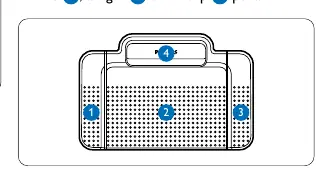
- ACC2330: Four pedals (left, middle, right, and top pedal).
Safety Information
- Do not expose the device to rain, water, or excessive heat.
- Protect cables from being pinched, especially at plugs and exit points.
- Always back up your files; the manufacturer is not responsible for data loss.
- Dispose of the product according to local regulations for electrical and electronic waste.
Installation
The foot control requires the Philips SpeechControl software (Windows only).
- Connect the foot control to a free USB port on your PC.
- Download the Philips SpeechControl software from www.dictation.philips.com/speechcontrol.
- Extract the downloaded file on your Windows computer.
- Double-click the .exe file and follow the on-screen instructions to install the software.
Note: Administrator rights are required to install the software.
Using the Foot Control
The behavior of the pedals can be customized. By default, the pedals are configured for fast rewind, fast forward, and playback.
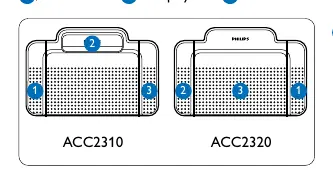
Playback Modes (ACC2310/ACC2320)
The playback behavior depends on the switch on the underside of the device:
- N (Neutral) position: Press and hold the right pedal for playback. Playback stops when the pedal is released.
- T (Toggle) position: Press and release the right pedal to start continuous playback. Press again to stop.
Using the ACC2330
The ACC2330 features four pedals:
- Left pedal: Fast forward.
- Middle pedal: Playback (start/stop).
- Right pedal: Fast rewind.
- Top pedal: Finish dictation.
Advanced Configuration
You can change pedal functions using the Philips SpeechControl software:
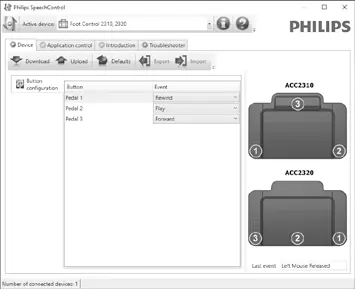
- Connect the device and start the software.
- Change the pedal functions according to your preferences.
- Click the Upload button to save the new settings.
You can reset the device to factory defaults by clicking the Defaults button, followed by the Upload button.
Technical Support and Warranty
No components are user-serviceable. Do not open the device. For support, contact your supplying dealer or visit www.philips.com/dictation. Unauthorized repairs or modifications will void the warranty.
Official resources from the manual
Manufacturer information
Philips
Practical help
Common problems
Software installation fails
Ensure you have administrator rights on your Windows PC.
Playback behavior is not as expected
Check the playback switch on the underside of the foot control. Ensure it is set to the desired mode (N for Neutral or T for Toggle).
Middle pedal not working (ACC2330)
If the middle pedal was disabled via software, check if it has been physically secured using the switch on the underside of the device.
Before use
- Connect the foot control to a free USB port on your PC.
- Download and install the Philips SpeechControl software from the official website.
- Ensure you have administrator rights for software installation.
- Verify the playback switch position on the underside of the device.
Specs in practice
- N (Neutral) position
- Press and hold the pedal for playback; release to stop.
- T (Toggle) position
- Press and release to start continuous playback; press again to stop.
Images and diagrams
- The underside of the foot control features a switch to toggle between N (Neutral) and T (Toggle) playback modes.
- The ACC2330 model includes an additional top pedal for finishing dictations.
Model compatibility
- Philips SpeechControl software is compatible with Windows only.

Manual page author
Emily Carter
User documentation editor
Prepares concise manual descriptions and highlights the most useful setup, operation, and maintenance information for readers.