General / Other Manuals
Pisen Mini Mirror 10000mAh Power Bank (TP-D24LS) User Manual
Comprehensive user guide for the Pisen Mini Mirror 10000mAh Power Bank, covering technical specifications, safety instructions, and product operation.
Table of contents
Product Overview
The Pisen Mini Mirror 10000mAh Power Bank (model TP-D24LS) is a compact and portable charging solution designed to keep your mobile devices powered on the go. Featuring a sleek design and a built-in LED display, this power bank provides a reliable energy source for smartphones and other USB-powered electronics. It is engineered for efficiency and safety, ensuring your devices receive the appropriate charge while protecting against common electrical hazards.
Technical Specifications
The device is built with high-quality components to ensure longevity and performance. Key specifications include a capacity of 10000mAh (37Wh), which is sufficient for multiple charges for most modern smartphones. The input is rated at 5V=2A, and the output is also 5V=2A, allowing for stable charging. The unit measures 67x67x27mm and weighs approximately 210g, making it highly portable. It operates effectively within a temperature range of -10 to 35 degrees Celsius. Please note that the device requires a 5V/2A charger for optimal charging speed, which typically takes between 4 to 5 hours to reach full capacity.
Safety Instructions
To ensure safe operation and prevent injury or damage to the device, please adhere to the following guidelines. Do not expose the power bank to rain, moisture, or extreme temperatures, as this may cause fire or explosion. Avoid dropping, disassembling, or modifying the unit, as these actions can lead to internal damage and void the warranty. Keep the device away from children and ensure it is used under supervision if necessary. Always use the power bank in a well-ventilated area and avoid placing it near heat sources or flammable materials. If the device appears damaged or is leaking, discontinue use immediately.
Operation and Maintenance
Using the Pisen Power Bank is straightforward. Connect your device to the appropriate output port using a compatible USB cable. The LED display will provide information regarding the current status of the power bank. To maintain the battery health, it is recommended to charge the device fully at least once every few months if it is not in regular use. Keep the ports clean and free of debris to ensure a solid connection. When cleaning the exterior, use a soft, dry cloth; avoid using harsh chemicals or abrasive materials that could scratch the surface.
Manufacturer information
Guangdong Pisen Electronics Co., Ltd.
Practical help
Common problems
Device not charging
Ensure the input cable is securely connected to a 5V/2A power source and check if the charging cable is functional.
Power bank not charging phone
Verify that the USB cable is properly connected to the output port and that the power bank has sufficient remaining capacity.
Before use
- Check the device for any physical damage.
- Ensure you have a compatible 5V/2A wall charger.
- Verify the charging cable is in good condition.
- Charge the power bank fully before the first use.
Specs in practice
- Input/Output
- 5V=2A ensures standard charging speed for most mobile devices.
- Operating Temperature
- -10 to 35 degrees Celsius is the safe range for battery performance.
Images and diagrams
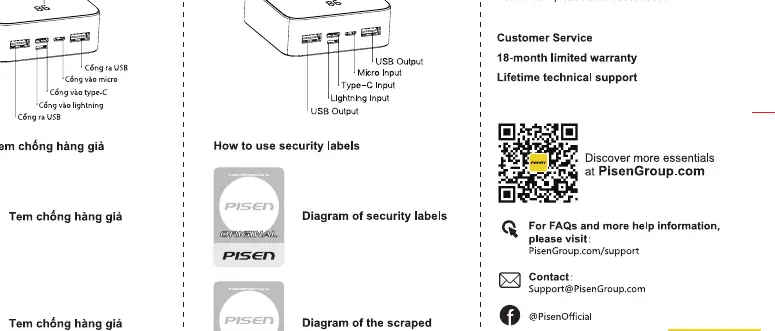
- The product structure diagram identifies the LED display, Micro input, Type-C input, Lightning input, and USB output ports.
- Security labels are provided to verify the authenticity of the Pisen product.
Model compatibility
- Compatible with most mobile devices that support 5V USB charging.
- Requires a 5V/2A power adapter for optimal charging of the power bank itself.

Manual page author
Emily Carter
User documentation editor
Prepares concise manual descriptions and highlights the most useful setup, operation, and maintenance information for readers.