Power / Batteries Chargers
PISEN MagiPi 10000mAh Wireless Powerbank (TP-D101) User Manual
Comprehensive user guide for the PISEN MagiPi 10000mAh Wireless Powerbank, covering specifications, operation, safety guidelines, and maintenance.
Table of contents
Product Overview
The PISEN MagiPi 10000mAh Wireless Powerbank (Model TP-D101) is a versatile portable charging solution designed for modern mobile devices. It combines high-capacity battery storage with wireless charging capabilities and wired output options, making it an essential accessory for users on the go. The device features a sleek, compact design with an integrated LED digital display to monitor battery status, ensuring you always know how much power remains.
Technical Specifications
The powerbank is engineered for efficiency and compatibility. It supports a variety of charging protocols to ensure fast and safe power delivery. The input supports Type-C connections with 5V/3A, 9V/2A, and 12V/1.5A configurations. For output, it provides Type-C charging and wireless charging options up to 15W. The total battery capacity is 10000mAh (5000mAh x 2), providing a rated capacity of 5800mAh. The device weighs approximately 216g and has dimensions of 105 x 67 x 20mm, making it highly portable.
Operating Instructions
Using the PISEN MagiPi is straightforward. To start the output, simply click the power button. If you need to turn off the output, double-click the button. The device also includes a specialized low current output mode for smaller accessories. To activate this mode, hold the power button for three seconds while the output is active. To exit this mode, hold the button again for three seconds. Always ensure the device is charged using a compatible 30W charger for optimal performance.
Safety and Maintenance
To ensure the longevity of your powerbank and maintain safety, please adhere to the following guidelines. Operate the device within a temperature range of 0°C to 35°C. Avoid exposing the powerbank to extreme heat, direct sunlight, or humid environments. Do not place the device on flammable surfaces like quilts or carpets while in use. Never attempt to disassemble, squeeze, or puncture the battery, as this poses a significant risk of explosion. Keep the device away from water and corrosive liquids. If you notice any swelling or signs of malfunction, discontinue use immediately. Store the device in a dry environment and keep it away from children.
Disposal and Recycling
When the powerbank reaches the end of its service life, please dispose of it responsibly according to local environmental regulations. Do not discard the unit in household waste. Utilize designated electronic waste collection points to ensure the lithium-ion battery is recycled correctly, preventing environmental contamination.
Manufacturer information
Guangdong Pisen Electronics Co., Ltd.
Practical help
Common problems
Device not charging
Ensure you are using a compatible 30W charger and that the cable is securely connected.
Powerbank feels hot
Stop using immediately, move to a cool area, and ensure it is not covered by flammable materials.
Swelling or deformation
Discontinue use immediately as this indicates a serious battery malfunction.
Before use
- Check that the powerbank is fully charged before first use.
- Ensure the charging environment is dry and between 0°C and 35°C.
- Verify that your device is compatible with wireless charging or the Type-C output.
- Inspect the unit for any physical damage or swelling.
Specs in practice
- Battery Capacity
- 10000mAh total capacity (5000mAh x 2 cells).
- Wireless Output
- Supports up to 15W wireless charging for compatible devices.
- Rated Capacity
- 5800mAh, representing the actual usable capacity after conversion losses.
- Operating Temperature
- The safe range for usage is 0°C to 35°C.
Images and diagrams
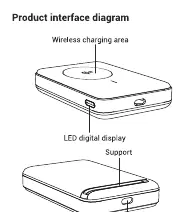
- The top surface features the wireless charging area for compatible devices.
- The front edge contains the LED digital display for battery level monitoring.
- The side includes the power button for controlling output modes.
- The bottom edge houses the Type-C port for both input and output.
Model compatibility
- Supports 30W charging input for faster replenishment.
- Compatible with devices requiring wireless charging up to 15W.
- Includes a low current mode for small accessories like wearables.

Manual page author
Michael Turner
Technical manual editor
Reviews PDF manuals for structure, safety notes, and practical product details so readers can find the right information quickly.