Home Appliances / Irons
Rowenta 2150WI Steam Iron User Manual
A comprehensive user guide for the Rowenta 2150WI steam iron, covering setup, operation, maintenance, and troubleshooting.
Quick answers from the manual
Quick answer
- The Rowenta 2150WI is a steam iron featuring an integrated anti-calc system, anti-drip function, and automatic shut-off. It is designed for domestic use with tap water. p. 1, 13
Key actions
- Perform Self Clean p. 9, 13
First start
- Heat up for 2 minutes without water p. 11
Show 3 more answers Show less
Problems and fixes
Iron remains cold
Check power supply, increase temperature, or move the iron.
p. 13Maintenance and reset
- Self Clean function p. 9, 13
Where to find it in the PDF
- Safety Instructions p. 11
- Troubleshooting p. 13
Table of contents
Manual images
Click an image to enlargeQuick guide from the manual
This manual provides essential instructions for operating your Rowenta 2150WI steam iron. Before first use, ensure the mains voltage matches the iron's specifications. Always use the iron on a stable surface and never leave it unattended while connected to power.
Description of the iron
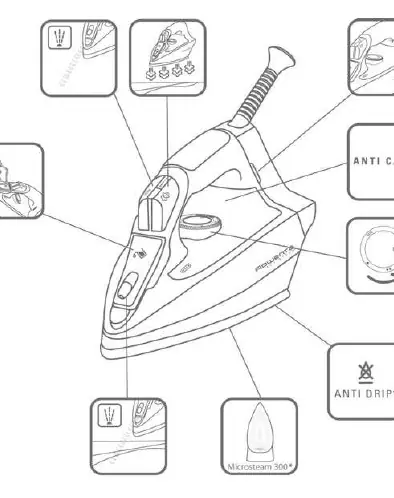
The iron features a soleplate, a water tank, a temperature control dial, a steam control, and a shot of steam button. Depending on the model, it may include an Anti-Drip system and an integrated Anti-Calc system for better performance.
Before use
Carefully remove any stickers or protective films from the soleplate before using the iron for the first time.
Starting up
For the first use, plug the iron into a power outlet, set the temperature control to maximum, and do not add water. Stand the iron on its heel and let it heat up in a vertical position for 2 minutes. A small amount of smoke or smell is normal and will disappear quickly.
Recommendations for use
- Water: Use untreated tap water. If your water is very hard, mix 50% tap water with 50% distilled or demineralized water. Do not use water from clothes dryers, scented or softened water, or water from refrigerators, batteries, or air conditioners.
- Ironing: Start with fabrics that require low temperatures. For mixed fabrics, set the temperature for the most delicate fiber.
- Automatic shut-off: If the iron is left inactive, it will automatically switch off after 30 seconds (if placed on the soleplate or side) or 8 minutes (if standing on its heel). Move the iron gently to switch it back on.
Maintenance
Use the Self Clean function approximately every 2 weeks. If your water is very hard, clean the iron weekly. Do not use descaling agents, as they can damage the steam chamber.
Troubleshooting
If the iron remains cold, check the power supply and temperature settings. If there is no steam, ensure the steam control is not set to the dry position and the water tank is filled. If the soleplate is dirty, use the Self Clean function and clean the soleplate with a non-metallic sponge.
Practical help
Common problems
Iron remains cold
Check the power supply, increase the temperature setting, or move the iron if the automatic shut-off is active.
No steam or low steam
Ensure the steam control is not set to the dry position and fill the water tank.
Brown streaks on linen
Use the Self Clean function, clean the soleplate, and ensure linen is rinsed properly.
Iron is leaking
Increase the soleplate temperature and allow more time between steam shots.
Before use
- Remove soleplate sticker or protective film
- Check mains voltage
- Ensure a stable ironing surface
Show more Show less
Images and diagrams
- Page 2: Overview of iron parts and features.
- Page 3: Filling the water tank and basic operation.
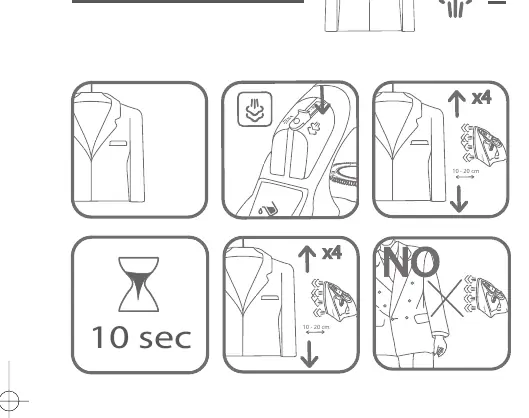
- Page 7: Vertical steaming instructions.
- Page 9: Self Clean procedure.
Model compatibility
- Use untreated tap water.
- If water is very hard, mix 50% tap water with 50% distilled/demineralized water.

Manual page author
David Miller
Documentation analyst