Home Appliances / Small Kitchen Appliances
Ariete 6215 Steam Iron User Guide
Quick guide for the Ariete 6215 steam iron. Learn how to fill the water tank, use steam and spray functions, perform vertical ironing, and maintain your iron with the self-clean system.
Quick answers from the manual
Quick answer
- The Ariete 6215 is a steam iron for domestic use. It features adjustable steam, spray, and vertical ironing capabilities, along with a self-clean system to maintain performance. p. 1
Key actions
- Fill the water tank using the measuring cup, ensuring not to exceed the MAX mark. p. 1
- Perform self-cleaning once or twice a month to prolong the life of the iron. p. 1
First start
- Remove labels, fill the tank, heat up, and test on an old piece of cloth. p. 1
Show 2 more answers Show less
Maintenance and reset
- Use the SELF CLEAN button to remove lime deposits. p. 1
Where to find it in the PDF
- Safety and Description p. 1
- Instructions and Maintenance p. 1
Table of contents
Manual images
Click an image to enlargeQuick guide from the manual
This manual provides instructions for the Ariete 6215 steam iron. Key operations include filling the water tank, selecting the correct temperature for different fabrics, using steam and spray functions, and performing regular self-cleaning to prevent lime buildup.
Description of the appliance
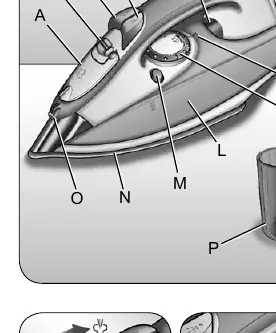
The iron features a water tank filling cover (A), steam adjustment selector (B), steam button (C), spray button (D), temperature control lamp (E), temperature adjustment knob (F), iron stand (H), self-clean button (M), and soleplate (N).
Instructions for use
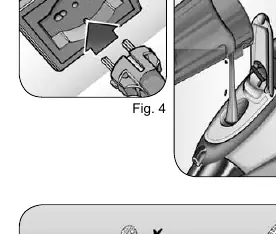
Filling the tank: Ensure the iron is unplugged. Set the steam selector (B) to 0. Open the cover (A) and fill the tank to the MAX level using the provided measuring cup (P). Do not add vinegar or descalers.

Turning on: Rest the iron upright on its stand (H). Plug it in. The temperature lamp (E) will turn on. Select the desired temperature using the knob (F). When the lamp turns off, the iron has reached the set temperature.
Ironing modes
- Steam ironing: Possible only at high temperatures. Set the temperature knob to (•••) or higher. Once the lamp turns off, move the steam selector (B) to the desired position.
- Shot of steam: Press the steam button (C) if the temperature is set to (•••) or higher.
- Spray button: Press the spray button (D) to dampen the fabric.
- Dry ironing: Set the steam selector (B) to 0.
- Vertical ironing: Set the temperature past (•••). Hold the iron vertically and press the steam button. Do not press more than three times in a row.
Cleaning and maintenance
Self-clean system: Perform this once or twice a month. Fill the tank one-fourth full. Heat the iron to MAX until the lamp turns off twice. Unplug and hold the iron horizontally over a sink. Press the SELF CLEAN button (M) and move the iron back and forth until the tank is empty.
Cleaning the soleplate: Do not use abrasives. Clean with a cloth soaked in a vinegar/water solution.
Manufacturer information
Ariete
Practical help
Common problems
White powder leaks from soleplate
Normal during first use; will disappear after a few steam jets.
Delay in steam formation
Normal during first use as water circulates; press steam/spray buttons a few times.
Soleplate sticking
Avoid contact with metal objects; clean with vinegar/water solution.
Before use
- Remove all labels and protections from the soleplate.
- Unwind the power cord completely.
- Ensure the iron is unplugged before filling.
- Use the provided measuring cup to fill the tank.
- Do not exceed the MAX mark.
Show more Show less
Specs in practice
- Steam adjustment selector
- Controls steam output; set to 0 for no steam.
- Temperature control lamp
- Turns on/off to indicate the iron is maintaining the set temperature.
- Self-clean button
- Used to remove lime deposits from the soleplate.
Images and diagrams
- Fig 1: Parts diagram (A-P).
- Fig 5: Filling the water tank.
- Fig 7: Vertical storage position.
- Fig 8: Emptying the water tank.
Model compatibility
- If tap water is very hard, use natural demineralized water.
- Do not use sparkling (carbonated) water.

Manual page author
Emily Carter
User documentation editor