Home Appliances / Vacuum Cleaners
User Manual for Rowenta Dual Force 2-in-1 Cordless Vacuum
Quick guide for the Rowenta Dual Force 2-in-1 cordless vacuum. Learn how to assemble, charge, operate, and maintain your vacuum cleaner for optimal performance.
PDF source: Français · summary: English
Quick answers from the manual
Quick answer
- The Rowenta Dual Force 2-in-1 is a cordless vacuum. Charge it for 5 hours before first use. Use the ON/OFF button to start and toggle between Min and Boost modes. p. 1
Key actions
- Charge the vacuum p. 1
- Clean the dust container p. 2
First start
- Charge for 5 hours before first use. p. 1
Show 4 more answers Show less
Problems and fixes
Low suction
Clean the filter and empty the dust container.
p. 2Maintenance and reset
- Regularly clean the dust container and filter to maintain performance. p. 2
Technical specifications
| Parameter | Value | Meaning | Pages |
|---|---|---|---|
| Charging time | 5 hours | Time to fully charge the battery. | p. 1 |
Where to find it in the PDF
- Charging and Operation p. 1
- Maintenance and Warnings p. 2
Table of contents
Manual images
Click an image to enlargeQuick guide from the manual
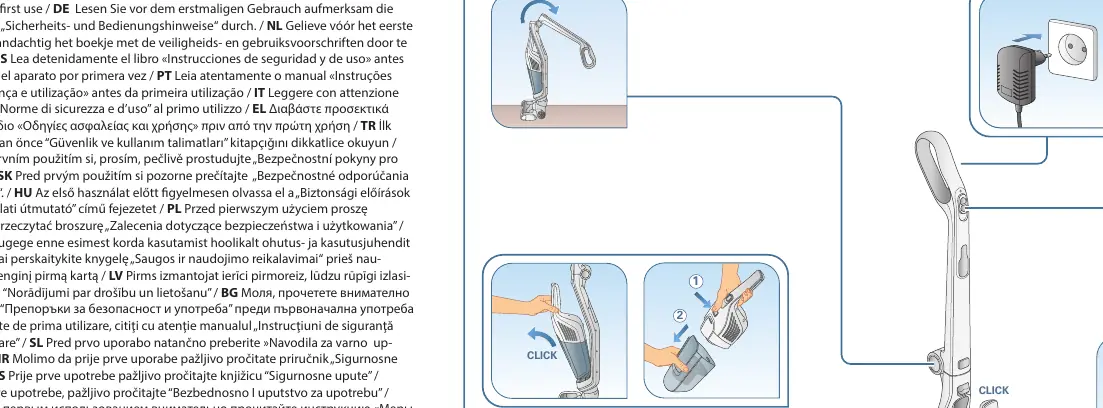
The Rowenta Dual Force 2-in-1 is a cordless vacuum cleaner designed for household use. Before using the device for the first time, it is essential to charge it fully.
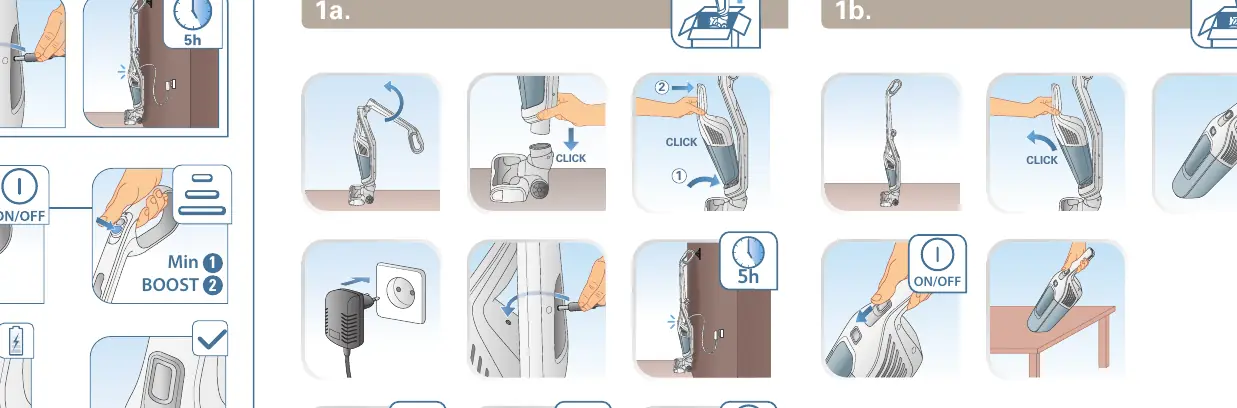
Charging
Connect the charger to the device. A full charge takes approximately 5 hours. Ensure the device is switched off during charging.
Operation
Use the ON/OFF button to start the vacuum. The device features two power modes: Min and Boost. Toggle between these modes based on your cleaning requirements.
Maintenance
Cleaning the dust container
To maintain suction power, empty the dust container regularly. Follow these steps:
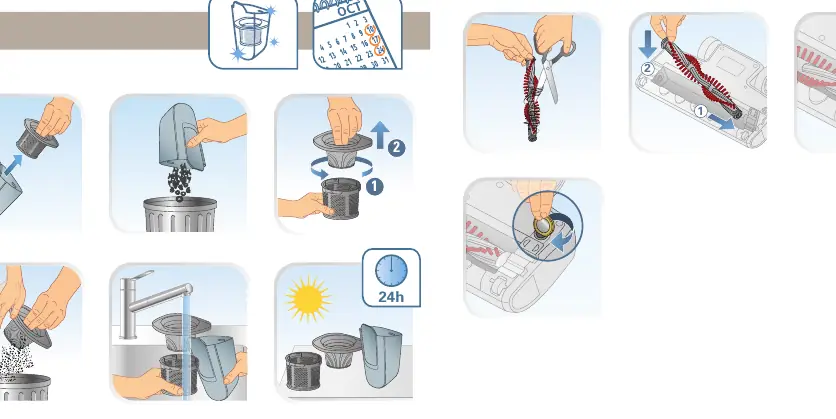
- Remove the dust container from the main unit.
- Empty the contents into a bin.
- Clean the filter and the container components as shown in the diagram.
- Ensure all parts are dry before reassembling.
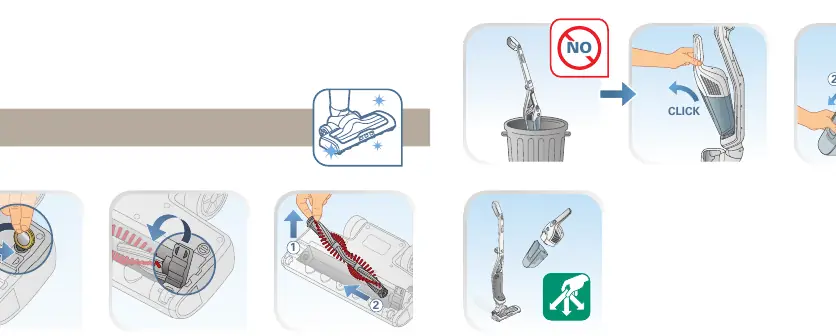
Cleaning the brush roll
If the brush roll becomes tangled with hair or debris, follow the maintenance steps to remove the brush roll, clean it, and reinsert it into the floor head.
Safety warnings
To ensure safe operation and longevity of your vacuum, observe the following:
- Do not vacuum water or any other liquids.
- Do not vacuum hot ash, sharp objects, or large debris.
- Do not use the device in extreme temperatures (keep within 0°C - 40°C).
- Do not use the device if the charger or cord is damaged.
Practical help
Common problems
Vacuum not charging
Ensure the charger is connected properly to the power outlet and the device is switched off.
Reduced suction power
Check if the dust container is full or if the filter is clogged and requires cleaning.
Before use
- Charge the device for 5 hours before the first use.
- Ensure the dust container is empty.
- Check that the brush roll is free of hair or debris.
- Verify the ambient temperature is between 0°C and 40°C.
Show more Show less
Images and diagrams
- 1a: Charging procedure.
- 1b: Operation (ON/OFF and mode selection).
- 3: Dust container maintenance and cleaning.
- 4: Brush roll maintenance and cleaning.
Model compatibility
- Runtime varies based on the model voltage (18V vs 21.6V) and selected power mode (Min vs Boost).

Manual page author
David Miller
Documentation analyst