Electronics / Cameras
User Guide for Sandberg USB Webcam 1080P Saver
Quick guide for the Sandberg USB Webcam 1080P Saver. Learn how to connect, mount, and adjust the focus of your webcam.
Table of contents
Manual images
Click an image to enlargeQuick guide from the manual
This guide provides essential instructions for the Sandberg USB Webcam 1080P Saver (model 333-96). It covers the basic setup, including connection, mounting, and focus adjustment to ensure optimal performance.
Overview
The webcam is designed with a foldable clip for easy storage and portability. Key components include:
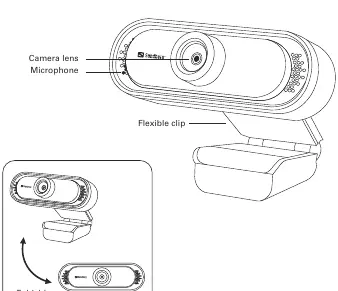
- Camera lens: The main optical sensor.
- Microphone: Built-in audio input.
- Flexible clip: Allows for stable placement on various surfaces.
Connection
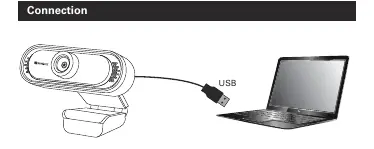
To connect the webcam to your computer, simply plug the integrated USB cable into an available USB port on your laptop or desktop computer.
Mounting
The flexible clip design supports two primary mounting configurations:
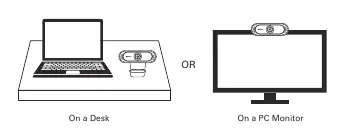
- On a Desk: Place the webcam on a flat surface using the clip as a stand.
- On a PC Monitor: Use the clip to attach the webcam securely to the top edge of your monitor.
Function
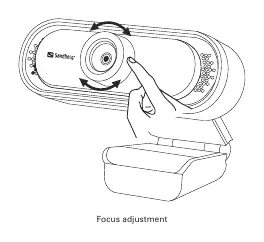
The webcam features manual focus adjustment. To sharpen the image, rotate the focus ring located around the camera lens until the desired clarity is achieved.
Disposal
For information on handling electronic waste, please visit www.sandberg.world/weee.
Official resources from the manual
Manufacturer information
Sandberg A/S
Practical help
Common problems
Image is blurry
Manually rotate the focus ring around the camera lens to adjust the image clarity.
Before use
- Ensure your computer has an available USB port.
- Check that the webcam is positioned securely on your desk or monitor.
- Verify the webcam is connected via the USB cable.
Images and diagrams
- The webcam features a foldable clip for versatile mounting.
- The focus ring is located around the camera lens for manual adjustments.

Manual page author
David Miller
Documentation analyst
Organizes user manual content into clear summaries, with attention to model details, product context, and everyday usability.