Electronics / Cameras
Sandberg USB Webcam Autofocus 1080P HD
Comprehensive guide for the Sandberg USB Webcam Autofocus 1080P HD, covering setup, mounting options, and product overview.
Table of contents
Product Overview
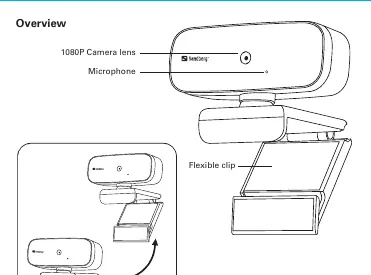
The Sandberg USB Webcam Autofocus 1080P HD is a high-quality camera designed for clear video communication. The device features a 1080P camera lens capable of autofocusing to ensure your image remains sharp during video calls or recordings. It also includes a built-in microphone to capture audio, eliminating the need for an external headset in many scenarios. The camera is built with a flexible, foldable clip, making it highly portable and easy to store when not in use.
Connection and Setup
Setting up the Sandberg webcam is straightforward and designed for plug-and-play convenience. To connect the device, simply plug the integrated USB cable into an available USB port on your computer or laptop. The system should automatically detect the camera as a standard video and audio input device. Once connected, you can select the Sandberg webcam within your preferred video conferencing or recording software settings.
Mounting Options
The versatile design of the Sandberg webcam allows for multiple mounting configurations to suit your workspace:
- On a Desk: The foldable clip can be adjusted to sit securely on a flat surface, such as your desk, providing a stable base for the camera.
- On a PC Monitor: The flexible clip is designed to hook over the top edge of most standard PC monitors or laptop screens, allowing you to position the camera at eye level for a more natural viewing angle.
- On a Tripod: For more professional setups or specific angles, the camera can be mounted onto a standard tripod using the integrated mounting point. This is ideal for stationary recording or streaming setups.
Safety and Maintenance
To ensure the longevity of your Sandberg webcam, keep the lens clean by using a soft, dry microfiber cloth. Avoid using harsh chemicals or liquids directly on the lens. When not in use, fold the clip to protect the device and store it in a safe, dry place. Ensure the USB cable is not bent or pinched, as this can damage the internal wiring. If you encounter any issues with the device, please visit the official Sandberg support portal for troubleshooting assistance. The product comes with a five-year warranty, provided it is registered correctly through the Sandberg website.
Manufacturer information
Sandberg A/S
Practical help
Common problems
Camera not detected by computer
Ensure the USB cable is firmly plugged into a working USB port and try a different port if necessary.
Image is blurry
The camera features autofocus; ensure there is sufficient light and that the lens is clean.
Before use
- Check that the USB cable is undamaged.
- Ensure your computer is powered on.
- Verify that your video software is updated.
- Clean the lens with a soft cloth.
Images and diagrams
- The overview diagram highlights the camera lens, microphone, and the flexible, foldable clip.
- The connection diagram shows the USB cable connecting the camera to a laptop.
- The mounting diagrams illustrate the three primary ways to position the camera: on a desk, on a monitor, or on a tripod.
Model compatibility
- Compatible with standard USB ports on PCs and laptops.
- Supports tripod mounting (e.g., Sandberg item no. 134-11).

Manual page author
Emily Carter
User documentation editor
Prepares concise manual descriptions and highlights the most useful setup, operation, and maintenance information for readers.