Electronics / Cameras
User Manual for Sandberg USB Webcam Flex 1080P HD
Quick guide for the Sandberg USB Webcam Flex 1080P HD. Learn how to connect, mount, and use your webcam with driver-less installation.
Table of contents
Manual images
Click an image to enlargeQuick guide from the manual
This document provides setup and usage instructions for the Sandberg USB Webcam Flex 1080P HD (Item no. 133-97). The camera is designed for easy, driver-less operation with most chat applications.
Overview
The webcam features a compact, foldable design. Key components include:
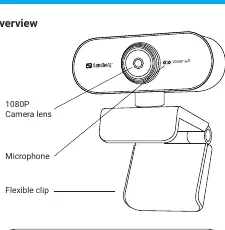
- Camera lens: 1080P HD resolution.
- Microphone: Integrated for audio capture.
- Flexible clip: Allows for versatile positioning and folding for storage.
Connection
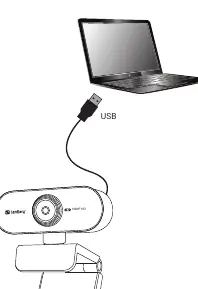
The device uses a standard USB connection. Simply plug the USB cable into an available port on your computer. The camera is driver-less and should be recognized automatically by your operating system and chat applications.
Mounting
The flexible clip allows for two primary mounting positions:
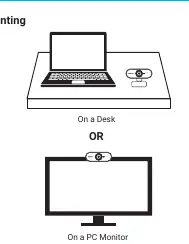
- On a Desk: Place the camera on a flat surface using the clip as a stand.
- On a PC Monitor: Use the clip to attach the camera securely to the top edge of your monitor.
Usage and Support
The camera is compatible with most chat applications. If you require additional video effects or image adjustments, you can find more information at www.sandberg.world/webcamguide. For technical support, visit http://helpdesk.sandberg.world. The product includes a five-year warranty; please register your purchase at www.sandberg.world/warranty.
Official resources from the manual
Manufacturer information
Sandberg A/S
Practical help
Common problems
Camera not detected by computer
Ensure the USB cable is securely connected to an active USB port on your computer.
Need advanced video effects
Visit www.sandberg.world/webcamguide for software options and image adjustments.
Before use
- Ensure your computer is powered on.
- Locate an available USB port.
- Check that the camera lens is clean and free of obstructions.
Images and diagrams
- The flexible clip allows the camera to be folded for compact storage or transport.
- The camera can be placed on a flat desk surface or mounted on top of a PC monitor.
Model compatibility
- Compatible with most chat applications.

Manual page author
Michael Turner
Technical manual editor
Reviews PDF manuals for structure, safety notes, and practical product details so readers can find the right information quickly.