Power / USB Chargers
Satechi 200W USB-C 6-Port PD GaN Charger User Guide
Quick guide for the Satechi 200W USB-C 6-Port PD GaN Charger. Learn how to set up, connect devices, and understand power output distribution for optimal charging.
Quick answers from the manual
Quick answer
- The Satechi 200W charger supports up to six USB-C devices. Connect the C5 power cable to the unit and a wall outlet. For 140W charging on PD1 or PD2, use a USB-C to MagSafe 3 cable. Use EMARK cables for any device requiring over 60W. p. 1, 2
Key actions
- Connect largest device to PD1 p. 1
- Use EMARK cables for >60W p. 1
First start
- Connect C5 power cable to charger and wall outlet. p. 1
Show 2 more answers Show less
Technical specifications
| Parameter | Value | Meaning | Pages |
|---|---|---|---|
| Total Max Output | 200W | Maximum combined power output | p. 1 |
| Operating Temperature | 150°F / 65°C | Standard operating temperature | p. 1 |
Where to find it in the PDF
- Quick Guide and Setup p. 1
- Charging Schematics p. 2
Table of contents
Quick guide from the manual
This guide covers the setup and operation of the Satechi 200W USB-C 6-Port PD GaN Charger. The device is designed to charge up to six USB-C devices simultaneously with a total maximum output of 200W.
Setup and installation
Follow these steps to prepare your charger for use:
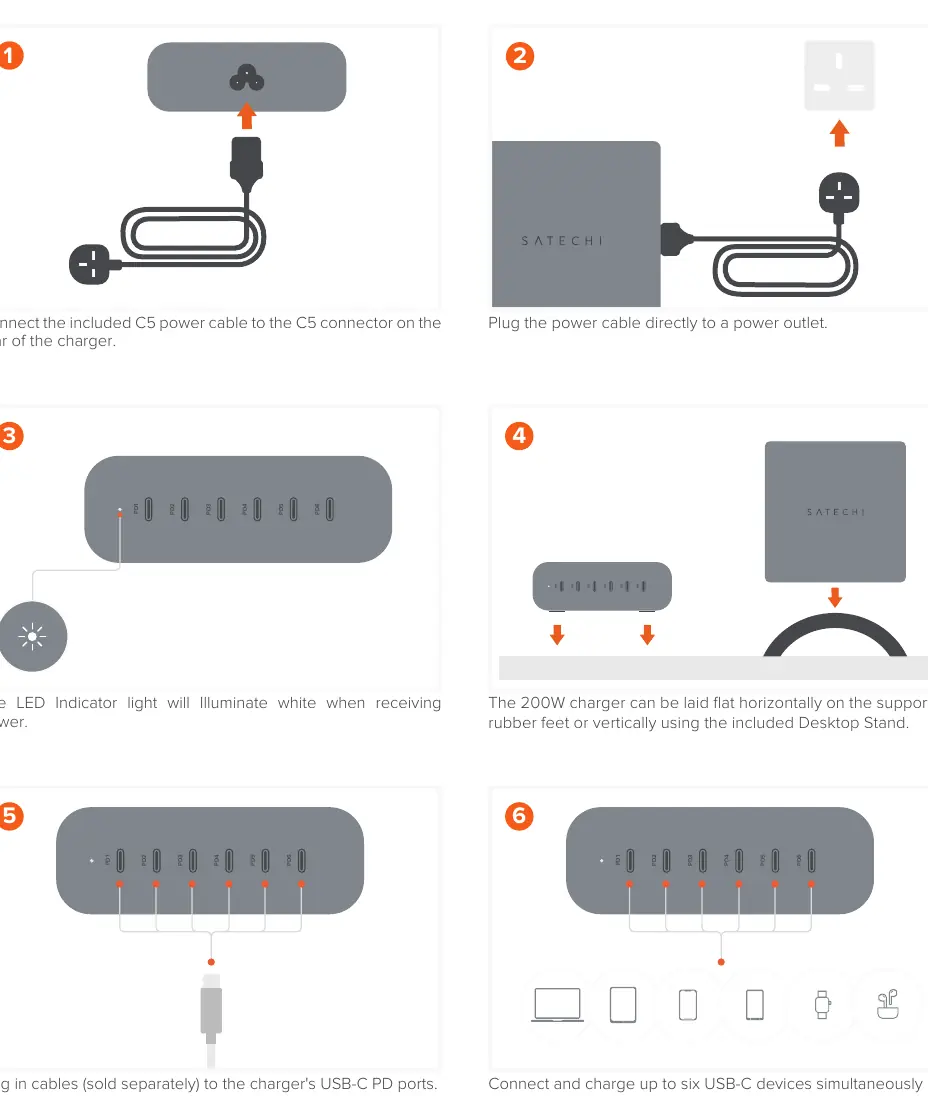
- Power Connection: Connect the included C5 power cable to the C5 connector on the rear of the charger.
- Wall Outlet: Plug the power cable directly into a power outlet.
- Indicator: The LED indicator light will illuminate white when the charger is receiving power.
- Orientation: The charger can be laid flat horizontally on the supported rubber feet or positioned vertically using the included Desktop Stand.
Charging and power distribution
To ensure optimal performance, please note the following charging guidelines:
- Cable Requirements: Always use certified charging cables. EMARK cables are required to reach wattage above 60W.
- Port Distribution: When connecting devices to all six PD ports, it is recommended to connect your largest device to the PD1 port.
- High Power Charging (PD1/PD2): When connected to PD1 or PD2, a supported device can charge with a max output of 140W. Note that only one device can be connected at a time to either port to achieve 140W charging, and a USB-C to MagSafe 3 Cable must be used.
- Mid Power Charging (PD3/PD4): When connected to PD3 or PD4, a supported device can charge with a max output of 100W.
- Low Power Charging (PD5/PD6): When connected to PD5 or PD6, a supported device can charge with a max output of 20W.
Technical specifications
Standard operating temperature: 150°F / 65°C.
Manufacturer information
Satechi
Practical help
Common problems
Device not charging at 140W
Ensure you are using a USB-C to MagSafe 3 Cable and that only one device is connected to either PD1 or PD2.
Charging speed is slow (below 60W)
Ensure you are using certified EMARK cables for high-wattage requirements.
Before use
- Connect the included C5 power cable to the rear of the charger.
- Plug the power cable directly into a power outlet.
- Verify the LED indicator is illuminated white.
- Use certified charging cables for all devices.
- Use EMARK cables for devices requiring more than 60W.
- Connect your largest device to the PD1 port when using all ports.
Show more Show less
Specs in practice
- Total Max Output
- 200W combined power across all ports.
- PD1/PD2 Output
- Max 140W (requires MagSafe 3 cable).
- PD3/PD4 Output
- Max 100W.
- PD5/PD6 Output
- Max 20W.
Images and diagrams
- Steps 1-2: Power connection instructions.
- Steps 3-4: LED indicator and orientation options (flat vs. vertical).
- Steps 5-6: Cable connection and port usage recommendations.
- Steps 7-9: Power output distribution schematics for specific ports.
Model compatibility
- Requires USB-C to MagSafe 3 Cable for 140W output on PD1/PD2.
- EMARK cables required for wattage above 60W.

Manual page author
Emily Carter
User documentation editor