Power / Wireless Chargers
Satechi OnTheGo 2-in-1 Charger User Guide
Quick guide for the Satechi OnTheGo 2-in-1 Charger. Learn how to set up, charge your phone and Apple Watch, and use Nightstand Mode.
Quick answers from the manual
Quick answer
- The Satechi OnTheGo 2-in-1 Charger requires a minimum 30W power adapter to function optimally. It features a foldable design with a 15W Qi2 charging pad for phones and a 5W module for Apple Watches. p. 1
Key actions
- Unfold the charger to access the charging modules. p. 1
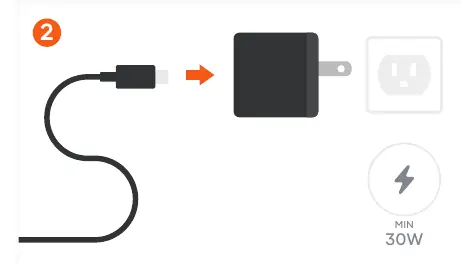
- Connect the device to a 30W+ power adapter. p. 1
First start
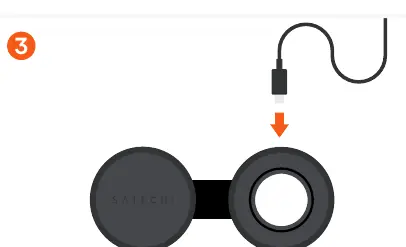
- Unfold the device, connect the USB-C cable to a 30W+ adapter, and plug it into the rear port. p. 1
Technical specifications
| Parameter | Value | Meaning | Pages |
|---|---|---|---|
| Qi2 Pad Output | 15W | Wireless charging power for phones | p. 1 |
| Watch Module Output | 5W | Charging power for Apple Watch | p. 1 |
Where to find it in the PDF
- Quick Guide p. 1
Table of contents
Manual images
Click an image to enlargeQuick guide from the manual
This guide provides instructions for setting up and using the Satechi OnTheGo 2-in-1 Charger. It is designed to charge both a Qi2-compatible phone and an Apple Watch simultaneously.
Setup and power requirements
To begin using the charger, follow these steps:
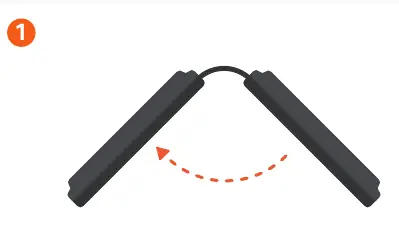
- Unfold: Unfold the charger to access the Qi2 and Apple Watch magnetic wireless charging modules.
- Power Adapter: Connect the included USB-C charging cable to a power adapter (not included). Important: A minimum 30W power adapter is required for optimal performance.
- Connect: Plug the USB-C charging cable into the USB-C port located on the rear of the charger.
Charging your devices
Once the charger is connected to power:
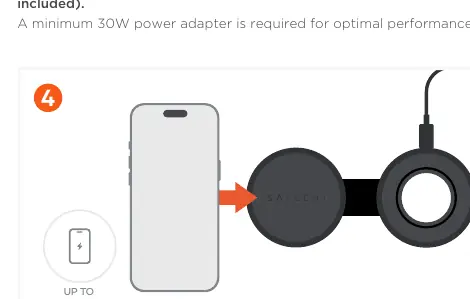
- Phone: Place a compatible phone on the Qi2 charging pad to begin 15W wireless charging.
- Apple Watch: Place the Apple Watch on the watch module to begin 5W charging.
Nightstand mode
You can flip the watch module up to enable Nightstand Mode on your Apple Watch, allowing you to view the time and alarm status while charging.
Compatibility
Please note the following compatibility requirements:
- Magnetic Mounting: Only iPhones that support MagSafe charging are compatible with the magnetic mounting feature. If using a non-MagSafe iPhone, a magnetic attachment or a compatible Qi2/MagSafe case (not included) is required.
- Fast Charging: Fast charging is supported on Apple Watch Series 7, 8, 9, and 10.
Manufacturer information
Satechi
Practical help
Common problems
Device not charging or charging slowly
Ensure you are using a power adapter with at least 30W output. Lower wattage adapters may not provide optimal performance.
Phone does not attach magnetically
Ensure your iPhone supports MagSafe. If it does not, you must use a magnetic attachment or a compatible Qi2/MagSafe case.
Before use
- Ensure you have a power adapter with at least 30W output (not included).
- Verify your phone supports MagSafe or has a compatible magnetic case.
- Unfold the charger to expose the charging modules.
Specs in practice
- Qi2 Charging Pad
- Provides up to 15W wireless charging for compatible phones.
- Watch Module
- Provides 5W charging for Apple Watch; supports fast charging on Series 7, 8, 9, and 10.
- Power Requirement
- Minimum 30W power adapter required for optimal performance.
Images and diagrams
- The charger features a foldable design to access charging modules.
- The USB-C port is located on the rear of the device.
- The watch module can be flipped up for Nightstand Mode.
Model compatibility
- Compatible with MagSafe iPhones.
- Non-MagSafe iPhones require a magnetic attachment or Qi2/MagSafe case.
- Fast charging supported on Apple Watch Series 7, 8, 9, and 10.

Manual page author
David Miller
Documentation analyst
Organizes user manual content into clear summaries, with attention to model details, product context, and everyday usability.