Power / USB Chargers
User Manual for Satechi 165W USB-C 4-Port GaN Charger
Quick guide for the Satechi 165W USB-C 4-Port GaN Charger. Learn how to connect your devices, understand power output configurations, and ensure safe usage with E-mark cables.
Table of contents
Quick Guide
The Satechi 165W USB-C 4-Port GaN Charger is designed to power multiple devices simultaneously. To begin using the charger:
- Connect the included C7 power cord to the charger.
- Plug the other end of the power cord into a wall outlet.
- Connect your USB-C devices to the available ports on the charger.
Components
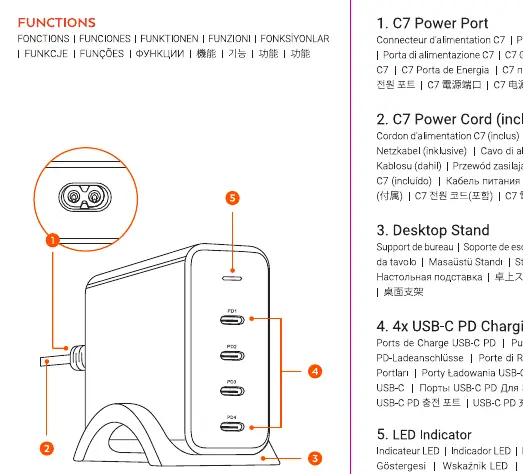
- USB-C Ports: Four ports capable of delivering high-speed power.
- LED Indicator: Shows the status of the charger.
- C7 Power Cord: Connects the charger to the power source.
- Desktop Stand: Provides stability for the charger on your desk.
Power Output Configurations
The charger supports a total output of 165W. Depending on the number of devices connected, the power distribution adjusts automatically:
- Single Port: Up to 100W per port (PD1, PD2, PD3, or PD4).
- Dual Port: 100W + 60W.
- Triple Port: 60W + 60W + 30W.
- Quad Port: 60W + 60W + 30W + 30W.
Important Safety Information
- E-mark Cables: You must use E-mark certified cables if your device requires more than 60W of power.
- Environment: Keep the charger away from water, liquids, and moisture to prevent damage or electrical hazards.
- Usage: Ensure the power cord is fully inserted into the charger and the wall outlet before use.
Manufacturer information
Satechi
Practical help
Common problems
Charging speed is slower than expected
Ensure you are using an E-mark certified USB-C cable if your device requires more than 60W of power.
Device is not charging
Verify that the C7 power cord is securely connected to both the charger and the wall outlet.
Before use
- Ensure the C7 power cord is fully inserted into the charger.
- Verify that your USB-C cables are E-mark certified if you need to draw more than 60W.
- Place the charger on the provided desktop stand for stability.
- Check that the wall outlet is functional.
Specs in practice
- 165W Total Power
- The maximum combined power output available across all four USB-C ports.
- E-mark Cable
- A specific type of USB-C cable required to safely deliver power above 60W.
Images and diagrams
- The diagram illustrates the connection of the C7 power cord to the charger and the wall outlet.
- The diagram identifies the four USB-C ports and the LED indicator location.
Model compatibility
- Compatible with devices requiring USB-C Power Delivery (PD).
- Requires E-mark cables for high-power charging (>60W).

Manual page author
Emily Carter
User documentation editor
Prepares concise manual descriptions and highlights the most useful setup, operation, and maintenance information for readers.