Power / Batteries & Chargers
User Manual for Schumacher 1000A Jump Starter and DC Power Source
Comprehensive user guide for the Schumacher 1000A Jump Starter and DC Power Source. Includes detailed instructions on jump-starting vehicles, charging the internal battery, using the air compressor, powering 12V DC devices, and...
Table of contents
Quick Guide from the Manual
This Schumacher 1000A Jump Starter is designed to provide portable power for jump-starting 12V vehicles and powering 12V DC accessories. Important: Charge the unit immediately after purchase, after every use, and every 30 days to maintain battery health and prolong its life. Always store the unit in a cool, dry place and ensure battery clamps are securely clipped to the storage holders when not in use.
Safety Precautions
- Explosive Gases: Lead-acid batteries generate explosive gases. Work in a well-ventilated area and avoid sparks, flames, or smoking near the battery.
- Eye Protection: Always wear complete eye protection and protective clothing when working near lead-acid batteries.
- Handling: Do not disassemble the unit. If service is required, consult a qualified professional.
- Usage: Use only on vehicles, boats, and garden tractors powered by a 12V DC battery system. Do not use for dry cell batteries.
Product Features
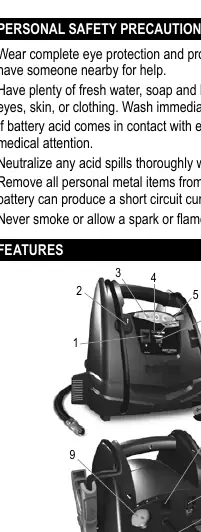
The unit includes a rotary switch for USB and jump start functions, a 12V DC power outlet, an air compressor with gauge, a built-in work light, and battery status indicators. Refer to the diagram on page 5 for the exact location of these components.
Charging the Internal Battery
You can check the battery level by pressing the Battery Status button. Red indicates less than 20% (charge immediately), Yellow/Orange indicates 20-80%, and Green indicates over 80%.
AC Charging:
- Flip the AC connector on the back of the unit down.
- Plug an 18 AWG or larger extension cord into the unit.
- Connect the cord to a 120VAC wall outlet.
- Charging may take up to 72 hours. The unit will enter maintain mode when fully charged (Green LED will light).
Charging While Driving:
- Ensure the car is running.
- Use a male-to-male charger cable (part number 94500109) to connect the unit's 12V DC outlet to the vehicle's lighter socket.
- Important: Do not charge for more than 30 minutes or leave unattended.
Operating Instructions
Jump Starting a Vehicle
- Turn the vehicle ignition OFF.
- Connect the POSITIVE (RED) clamp to the POSITIVE battery post.
- Connect the NEGATIVE (BLACK) clamp to the vehicle chassis or engine block, away from the battery.
- Turn the unit switch to ON.
- Crank the engine for no more than 8 seconds. If it fails to start, wait 2 minutes before trying again.
- Once started, turn the switch to OFF and disconnect the clamps.
Using the Air Compressor
- Ensure battery clips are secured.
- Remove the air compressor hose from the storage cleats.
- Thread the adapter onto the valve stem.
- Turn the compressor switch ON and inflate to the desired pressure.
- Turn the switch OFF and remove the connector.
Maintenance and Storage
After use, wipe the battery clips, cords, and case with a dry cloth to remove corrosion, dirt, or oil. Ensure all components are in good working condition. Store in a cool, dry place. Avoid storing the unit where battery acid leakage could cause damage.
Troubleshooting
If the unit fails to jump-start, check for poor connections, reversed clamps, or a discharged internal battery. If the 12V device won't power on, check the device, the battery charge, or the internal 20A fuse. If the compressor shuts off, it may be overheated; allow it to cool before retrying.
Practical help
Common problems
Unit won't jump start the vehicle
Check for poor connection to battery and frame. Ensure connection points are clean. Disconnect the unit and reverse the clamps. Press the Battery Status button to check charge. Have the vehicle's battery checked.
Unit won't power 12V device
Ensure the device is turned on. Check the battery charge status. If the device draws more than 20A, the internal fuse may have blown; contact a qualified service person.
Compressor shuts off
The compressor is likely overheated. Allow it to cool for a few minutes and try again.
Before use
- Charge the unit immediately after purchase.
- Charge the unit after every use.
- Charge the unit every 30 days to maintain battery life.
- Check battery status using the LED indicators (Red/Yellow/Green).
- Ensure battery clamps are securely clipped on the storage holders when not in use.
Images and diagrams
- The unit features a rotary switch for USB and jump start, a 12V DC outlet, air compressor gauge, and battery status indicators.
Model compatibility
- Compatible with 12V DC battery systems only.
- Do not use with dry cell batteries commonly used in home appliances.

Manual page author
Michael Turner
Technical manual editor
Reviews PDF manuals for structure, safety notes, and practical product details so readers can find the right information quickly.