Automotive / Jump Starters
Cobra 1000A Jump Starter User Manual
Quick guide for the Cobra 1000A Jump Starter. Learn how to safely jump start your vehicle, charge devices, use the LED flashlight, and understand status indicators.
Table of contents
Manual images
Click an image to enlargeQuick guide from the manual
The Cobra 1000A Jump Starter is designed to provide up to 1000 peak amps to start gasoline and diesel passenger cars and light-duty trucks. Important: Fully charge the unit before first use and every 12 months for optimal performance. Do not use the 12V jump start port to recharge the unit; use the USB-C port only.
Product Overview
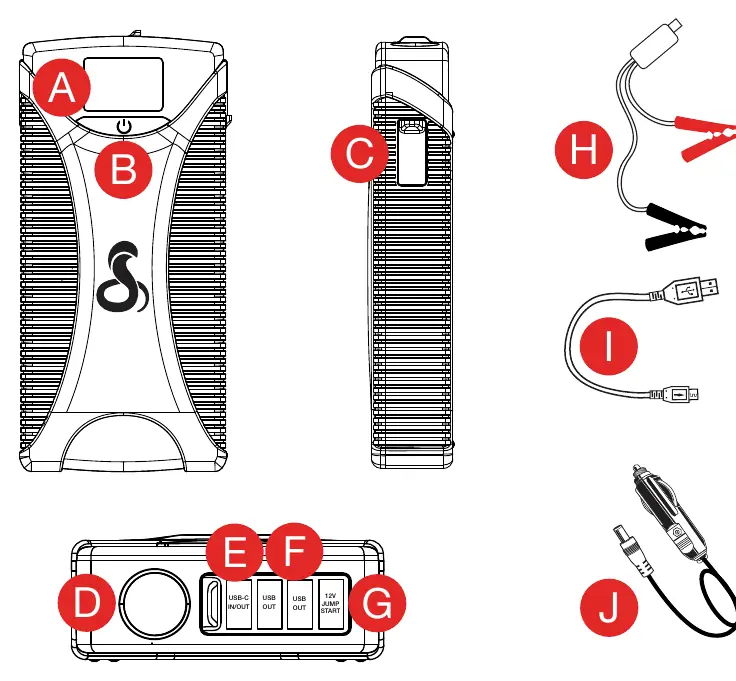
The device features an LED display, a power/flashlight button, a jump start connector, an LED flashlight, a USB-C fast charge input/output, and two USB-A fast charge outputs. It comes with battery clamps and a 12V jumper cable.
Safety Instructions
- Keep the unit clear of fire and water.
- Do not submerge in water or expose to rain, snow, or condensation.
- Do not open the unit; there are no user-replaceable parts inside.
- Operating temperature range: -10°C to +45°C (+14°F to +113°F).
- Do not use in environments with flammable fumes or gases.
- Do not crush or puncture the unit.
Charging the Jump Starter
Recharge the unit using the USB-C input/output port with the included cable or any compatible USB-C cable. The battery percentage will flash on the screen while charging and stop when fully charged. The display turns off 15 seconds after the cable is removed.
Jump Starting Your Vehicle (Direct-to-Battery)
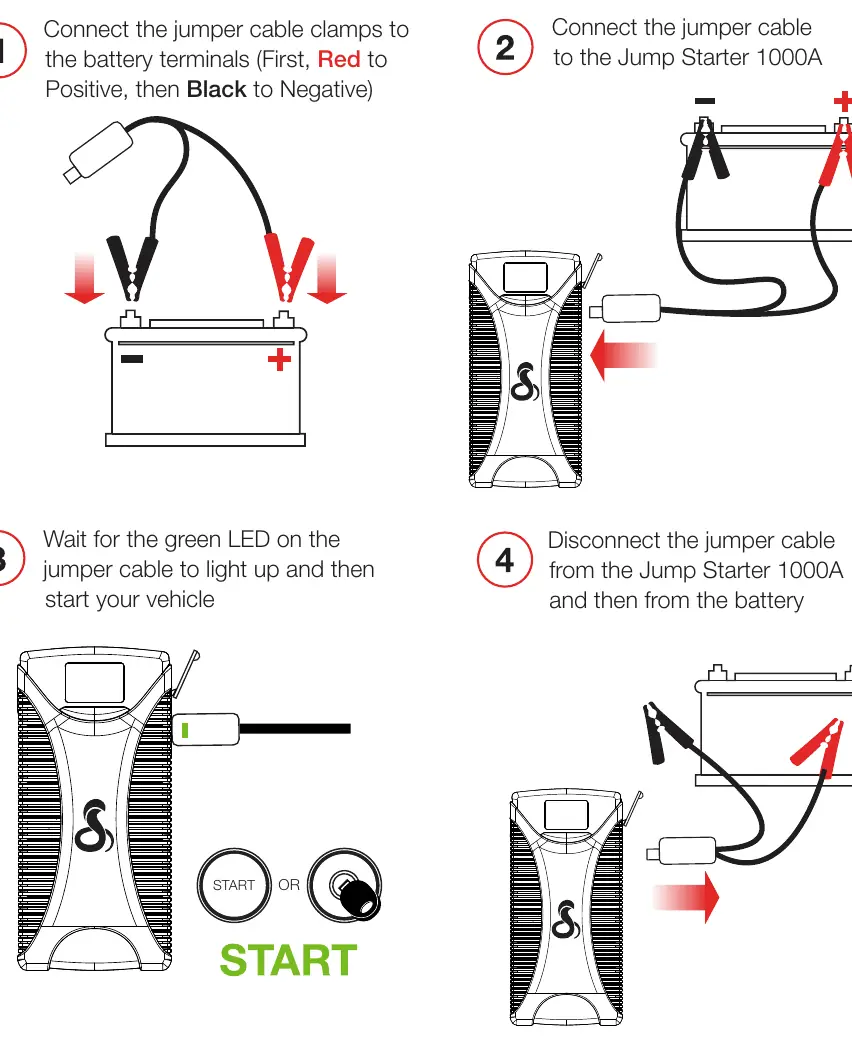
- Connect the jumper cable clamps to the battery terminals: Red to Positive (+), then Black to Negative (-).
- Connect the jumper cable to the Jump Starter 1000A.
- Wait for the green LED on the jumper cable to light up.
- Start your vehicle.
- Disconnect the jumper cable from the Jump Starter, then from the battery.
Jump Starting Your Vehicle (In-Car)
- Turn off all vehicle accessories and connect the jumper cable to the Jump Starter 1000A.
- Set the vehicle ignition to Accessory mode.
- Connect the jumper cable plug into the vehicle's 12V accessory port.
- Wait for the "Output Ready" message and 5 solid bars on the LED screen.
- Start your vehicle.
- Disconnect the cable and leave the engine running for at least 20 minutes to allow the vehicle's battery to recharge.
Charging Devices & Flashlight
To charge USB devices, connect the device cable to the USB-A or USB-C output and press the power button. To use the LED flashlight, press and hold the power button for 2 seconds. While the light is on, quickly press the button to cycle through Strobe and SOS modes.
Troubleshooting & Status LED
The status LED on the jump start cable indicates the connection status:
- No LED: Connection not detected or battery depleted.
- Solid Red: Reverse polarity. Reverse the clamps.
- Flashing Red: Over-current protection. Wait 30 seconds and retry.
- Solid Yellow: Solid contact established and charging.
- Flashing Yellow: Improper connection or unit too hot.
- Red and Green Flashing: Overheating from too many attempts. Wait a few minutes.
- Solid Green: Ready to jump start.
Manufacturer information
Cobra Electronics
Practical help
Common problems
Jumper cable LED does not turn on
Unplug the cable for 30 seconds, check the Jump Starter's battery level, and reconnect.
Solid Red LED on cable
Reverse polarity detected. Reverse the clamps on the battery terminals.
Flashing Red LED on cable
Over-current protection. Wait 30 seconds and retry the connection.
Red and Green flashing LED
Safety feature triggered by too many jump start attempts. Remove cable and wait a few minutes.
Before use
- Charge the unit fully before first use.
- Ensure the vehicle battery is not completely discharged.
- Verify the area around the battery is well-ventilated.
- Remove personal metal items like rings and watches.
- Check that the operating temperature is between -10°C and +45°C.
Specs in practice
- Starting/Peak Current
- 400 Amps / 1000 Amps - The power capacity available for starting engines.
Images and diagrams
- Page 5 details the port layout and button functions (A-J).
- Page 7 illustrates the 4-step direct-to-battery jump starting process.
- Page 8 illustrates the in-car jump starting process.
- Page 9 provides a table for interpreting the Tri-Color Status LED.
Model compatibility
- Designed for gasoline and diesel passenger cars and light-duty trucks.
- Not intended for use in commercial repair facilities.
- Cannot be recharged via the 12V jumpstart port.

Manual page author
David Miller
Documentation analyst
Organizes user manual content into clear summaries, with attention to model details, product context, and everyday usability.