Power / Batteries Chargers
Scosche BTFREQ PRO Wireless Hands-Free Car Kit
Enhance your driving experience with the Scosche BTFREQ PRO. This wireless hands-free car kit features Bluetooth 5.0 for seamless music streaming and calls, dual USB charging ports (USB-A and USB-C Power Delivery), and an FM transmitter to...
Table of contents
Product Overview
The Scosche BTFREQ PRO is a versatile wireless hands-free car kit designed to upgrade your vehicle's audio system. It allows for Bluetooth hands-free calling and music streaming, while also providing dual USB charging ports to keep your mobile devices powered on the go.
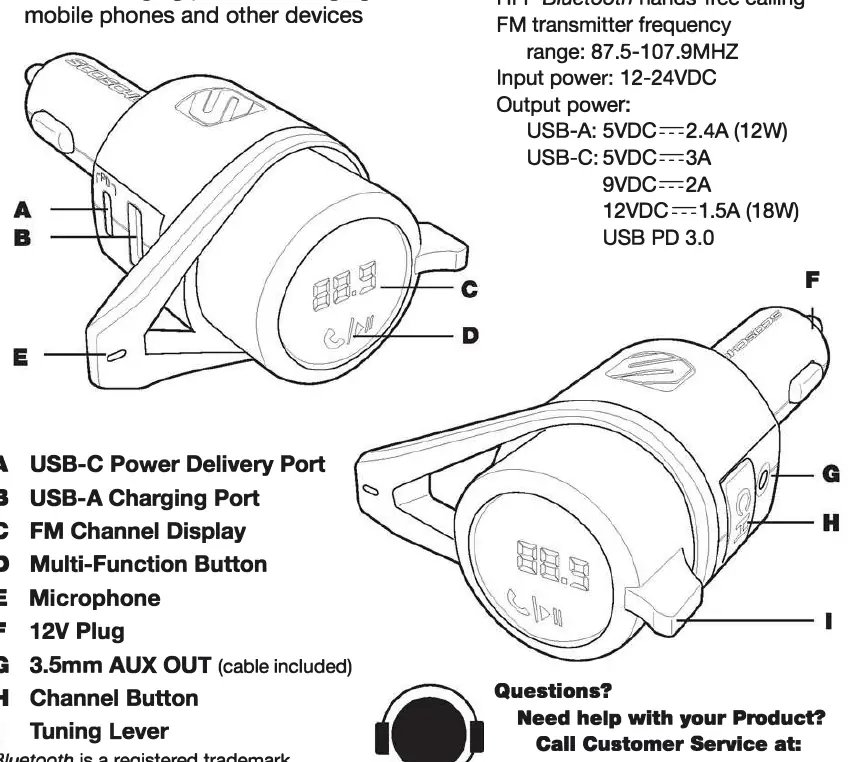
Technical Specifications
- Bluetooth: Version 5.0, Class II, range up to 33 ft (10m)
- Bluetooth Profiles: HFP, A2DP
- FM Transmitter Frequency: 87.5 - 107.9 MHz (200 KHz steps)
- Input Power: 12-24V DC
- USB-A Output: 5V/2.4A
- USB-C Output: 5V/3A, 9V/2.22A, 12V/1.67A (USB PD 3.0)
Power Up and Bluetooth Pairing
To begin using the device, plug the BTFREQ PRO into your vehicle's 12V power socket. Open the Bluetooth settings on your mobile device, enable Bluetooth, and select 'Scosche BTFMPD3' from the list of available accessories. Once connected, ensure your phone volume is set to maximum for the best audio quality.
Connecting to Your Car Stereo
The device uses an FM transmitter to broadcast audio to your car radio. Find a weak FM station with no active signal. Press the 'CH' button on the device, then use the tuning lever to match the frequency on the BTFREQ PRO to your car radio's frequency. If you experience interference, repeat these steps to find a different clear station.
Operation and Controls
The Multi-Function Button (MFB) and tuning lever provide easy control over your media and calls:
- Music: Tap MFB once for Play/Pause. Turn the tuning lever down for Track Forward and up for Track Back.
- Calls: Tap MFB once to answer or end a call. Double tap MFB to redial the last number. Press and hold MFB to reject an incoming call.
- Voice Assistant: Press and hold the MFB for 3 seconds to activate your smartphone's voice assistant.
Charging and AUX Connection
The device includes one USB-C and one USB-A port for charging devices. For non-Bluetooth devices, you can connect directly to the BTFREQ PRO using the included 3.5mm audio cable via the AUX OUT port.
Related manuals
Related manuals from the same brand or category.
Electronics / Monitors
Scosche Rhythm+ 2.0 Waterproof Armband Heart Rate Monitor User Guide
ScoschePower / Batteries Chargers
Scosche MagicMount Travel Folding 2-in-1 Wireless Charging Stand
ScoscheTools / Generators
Scosche 142PI100CL 100W Portable Power Inverter
ScoscheMobile / Smartphones