Home / Security
Security Brands Ascent M1 Cellular Gate Access Controller
Quick start guide for the Ascent M1 cellular gate and door access controller, covering installation, wiring, and system setup.
Table of contents
Product Overview
The Ascent M1 is a cellular-based access control accessory designed for gates and doors. It provides a secure way to manage entry points remotely. Please note that an uninterrupted cellular connection cannot be guaranteed, so an emergency egress or primary entry mechanism should always be installed alongside this unit.
Safety Information
Automatic gates pose a risk of serious injury or death. Always ensure the gate path is clear before operation. Safety devices, such as reversing sensors, must be used. The unit requires an activation process to function; it will not work out of the box until fully activated via the Summit Control platform.
Installation and Wiring
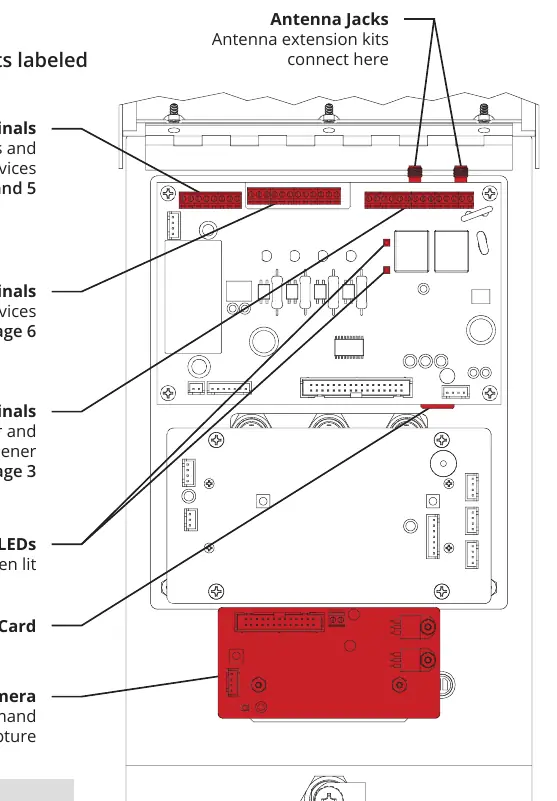
The unit should be mounted on a gooseneck pedestal using the provided hardware. If alternate mounting is used, a 4G LTE Antenna Extension Kit is required to maintain signal strength. When wiring, ensure the power source is compatible (12-24 VAC/DC). The unit features dedicated terminals for power, relays, gate status inputs, and Wiegand devices.
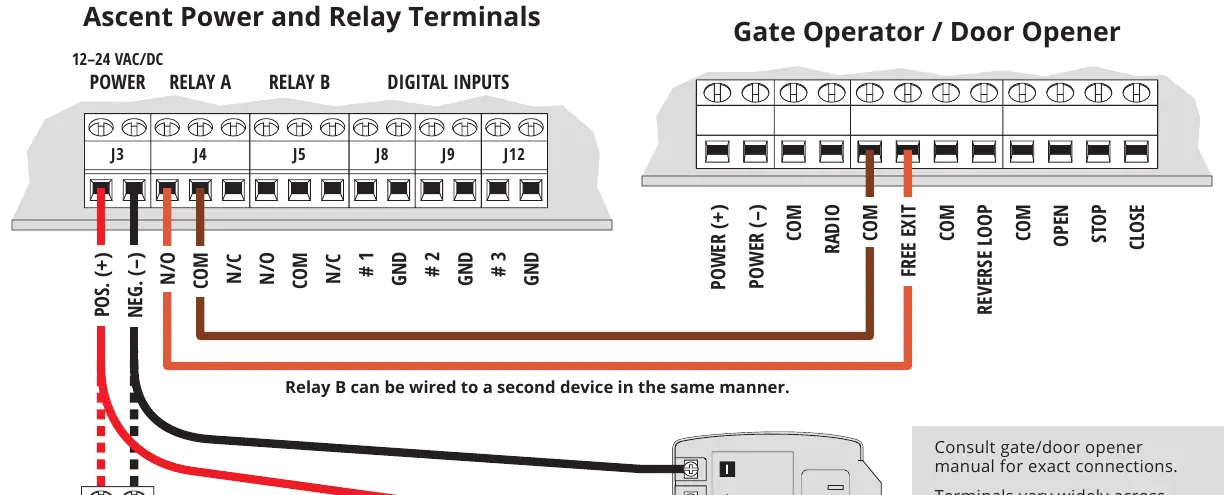
- Power: Connect to a 12-24 VAC/DC source. Do not exceed 24V.
- Gate Status: Use dry contacts for status monitoring. Do not exceed 3V on these terminals.
- Wiegand Devices: Always disconnect power before connecting card readers or other Wiegand accessories.
Operation and Maintenance
The unit is managed through the Summit Control platform. Adding or deleting access codes must be performed via the software, not the physical keypad. The front panel can be unlocked for maintenance or wiring adjustments. Ensure all enclosure openings are sealed after installation to prevent damage to internal components.
Troubleshooting
If the unit fails to operate, verify that the power source is within the specified range and that all wiring connections are secure. For technical assistance, contact Summit Control support.
Related manuals
Related manuals from the same brand or category.
Home / Security
SECURITY BRANDS 16-M4 Ascent M4 Cellular Multi-Tenant Entry System
Security BrandsHome / Security
Security Brands Remote 300 Instructions
Security BrandsHome / Security
Security Brands 14-RK10 Ridge ResKey User Guide
Security Brands
Manual page author
Michael Turner
Technical manual editor
Reviews PDF manuals for structure, safety notes, and practical product details so readers can find the right information quickly.