Home / Security
Security Brands Ascent M7 Cellular Gate Access Controller
Quick start guide for the Ascent M7 cellular gate and door access controller, covering installation, wiring, and system setup.
Table of contents
Product Overview
The Ascent M7 is a cellular-based access control unit designed for gates and doors. It features an integrated camera for photo capture and supports various peripheral devices including Wiegand card readers, request-to-exit buttons, and gate status limit switches. The unit requires an active cellular connection and must be activated through the Summit Control platform to function.
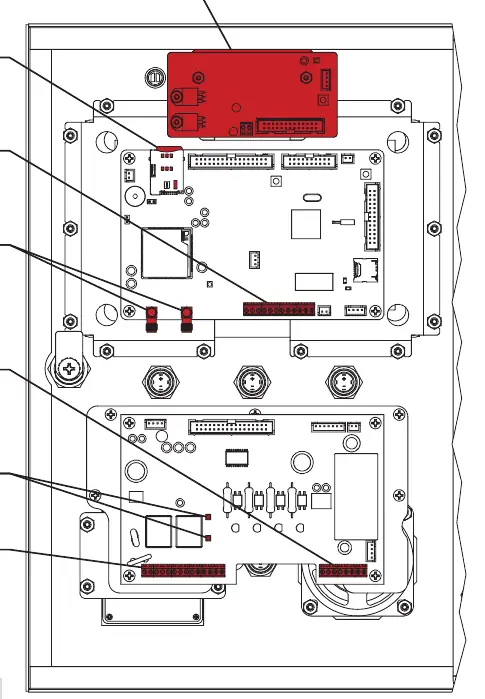
Safety and Warnings
Important: Automatic gates can cause serious injury or death. Always ensure the gate path is clear before operation. An emergency egress or primary entry mechanism, such as a mechanical release or fire box, should always be installed as a backup. The unit is not intended for solar applications and requires a stable power source.
Installation and Mounting
- Mount the unit on a gooseneck pedestal using the four included carriage bolts and hex nuts.
- If using alternate mounting, a 4G LTE Antenna Extension Kit (Model 16-ANTX-1) is required to prevent signal loss.
- Ensure all enclosure openings are sealed to protect internal components.
- The unit must be activated via the provided activation process before it will operate.
Wiring and Power
The unit operates on 12-24 VAC/DC. When using a third-party power source, ensure it is compatible with the unit's electrical specifications (less than 690 mA at 12 VDC or 420 mA at 24 VDC). Caution: Do not exceed 24 VAC/DC, as this can damage the unit. Always verify polarity when connecting power; reverse polarity can cause permanent damage.
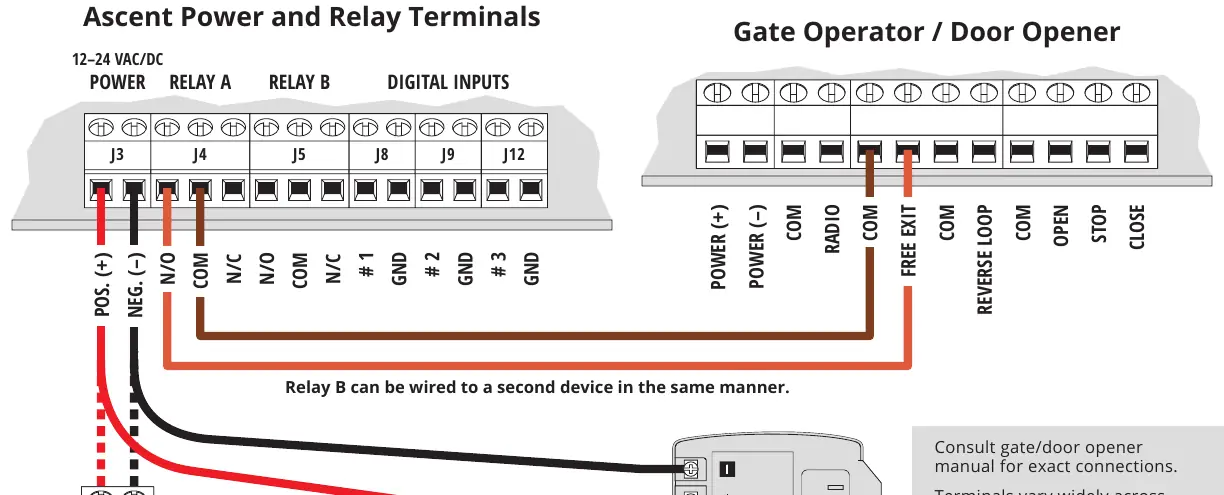
System Configuration
- Gate Status: Status terminals support dry contacts for limit switches. These terminals are designed for low voltage (3 V or less).
- Wiegand Devices: Disconnect power before connecting card readers to the Wiegand terminals.
- Testing: Once wired, enter the temporary code 2012 on the keypad to confirm the gate opens. All permanent user code management is handled through the Summit Control interface.
Maintenance and Support
Regularly check that the gate path is clear and that all safety devices are functioning. If the unit fails to operate, verify all wiring connections and power supply voltage. For technical assistance, contact Summit Control support.
Related manuals
Related manuals from the same brand or category.
Home / Security
Security Brands Ascent M1 Cellular Gate Access Controller
Security BrandsHome / Security
Security Brands Remote 300 Instructions
Security BrandsHome / Security
Security Brands 14-RK10 Ridge ResKey User Guide
Security Brands
Manual page author
Emily Carter
User documentation editor
Prepares concise manual descriptions and highlights the most useful setup, operation, and maintenance information for readers.