Electronics / Headphones Earbuds
User Guide for Sennheiser CX 120BT Wireless Headphones
Quick guide for the Sennheiser CX 120BT wireless neckband headphones. Learn how to pair, charge, adjust volume, and use music and call functions.
Table of contents
Manual images
Click an image to enlargeQuick guide from the manual
This guide provides essential instructions for operating your Sennheiser CX 120BT headphones. Before first use, ensure the device is fully charged (approximately 1.5 hours). To pair with a device, hold the power button for 4 seconds until the LED flashes, then select the headphones in your device's Bluetooth menu. The headphones feature a three-button remote for volume, music playback, and call management.
Getting started
The package includes the CX 120BT headphones, a USB charging cable, and silicone ear adapters in sizes S, M, and L. Choose the adapter size that provides the most comfortable and secure fit for your ears. To wear the headphones, place the neckband around your neck and insert the ear canal phones into your ears.
Operation
Switching on/off: Hold the power button for 2 seconds to turn on (3x blue flash) and 4 seconds to turn off (3x red flash).
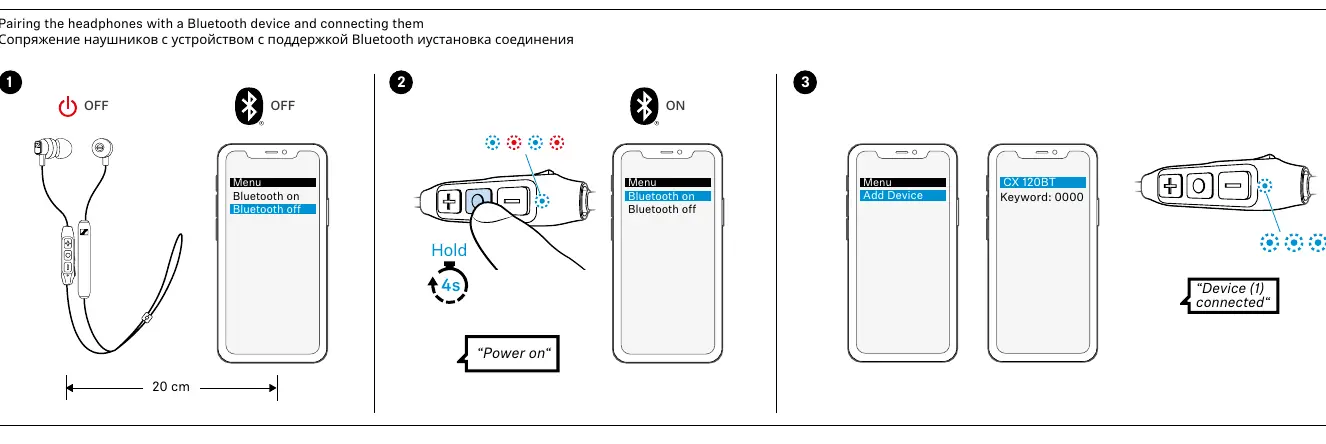
Pairing: Ensure the headphones are off. Hold the power button for 4 seconds to enter pairing mode. On your Bluetooth device, search for new devices and select 'CX 120BT'. If prompted for a keyword, enter '0000'.
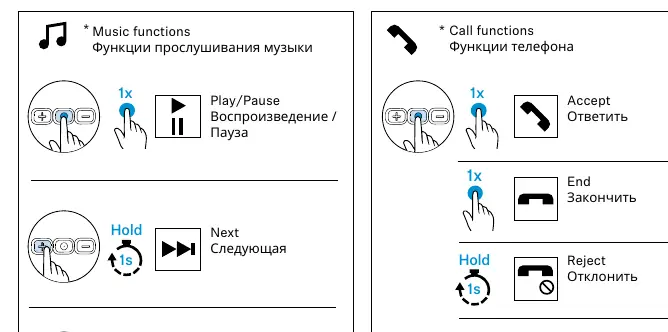
Volume and playback: Use the '+' and '-' buttons on the remote to adjust volume. Use the center button for music and call functions:
- Play/Pause: Press the center button once.
- Next track: Hold the center button for 1 second.
- Previous track: Hold the center button for 1 second (after the track starts).
- Accept call: Press the center button once.
- End call: Press the center button once.
- Reject call: Hold the center button for 1 second.
- Transfer call: Hold the center button for 1 second.
Maintenance
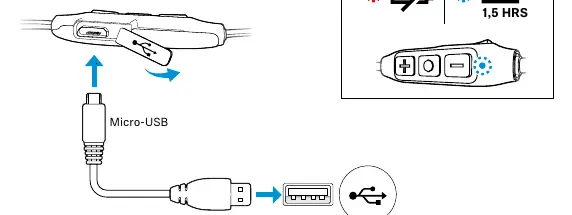
Charging: Connect the provided USB cable to the Micro-USB port on the headphones and the other end to a USB-A power source. A full charge takes approximately 1.5 hours.
Replacing ear adapters: Gently pull the existing silicone adapter off the earphone and push the new size onto the nozzle until it clicks into place.
Safety and compliance
Always keep the product dry and avoid exposure to extreme temperatures. Do not listen at high volumes for extended periods to prevent hearing damage. The product contains magnets; keep a distance of at least 10 cm (3.94 inches) from cardiac pacemakers or implanted defibrillators. Dispose of the product and batteries at designated collection points according to local regulations.
Manufacturer information
Sennheiser
Practical help
Common problems
Headphones will not pair
Ensure the headphones are off, then hold the power button for 4 seconds until the LED flashes to enter pairing mode.
Lost connection
Ensure the device is within range and Bluetooth is enabled. If the connection is lost, re-pair the device.
Before use
- Charge the headphones fully (1.5 hours).
- Select the correct size of silicone ear adapters (S/M/L).
- Ensure Bluetooth is enabled on your source device.
- Keep the device within 20 cm during the pairing process.
Specs in practice
- Frequency band
- 2400 – 2483.5 MHz (Standard Bluetooth frequency range).
- Transmit power
- 10 mW (maximum) for wireless transmission.
- Charging time
- 1.5 hours for a full battery charge.
Images and diagrams
- Pairing: Hold the power button for 4 seconds to initiate pairing mode.
- Controls: The center button handles play/pause and call functions; the side buttons handle volume.
- Charging: Connect via Micro-USB to a USB-A power source.
Model compatibility
- Compatible with Bluetooth-enabled devices.
- Requires Bluetooth pairing with keyword '0000' if prompted.

Manual page author
David Miller
Documentation analyst
Organizes user manual content into clear summaries, with attention to model details, product context, and everyday usability.