Electronics / Headphones Earbuds
User Manual for Sennheiser RS 120-W Wireless TV Headphones
Quick guide for the Sennheiser RS 120-W wireless TV headphones. Learn how to set up the transmitter, connect to audio sources, charge the headphones, adjust sound modes, and replace batteries.
Table of contents
Manual images
Click an image to enlargeQuick Start Guide
The Sennheiser RS 120-W is a wireless TV headphone system. To get started, connect the transmitter to a power source and your audio device (TV, hi-fi, or home cinema). Insert the provided rechargeable NiMH batteries into the headphones. Charge the headphones for at least 24 hours before the first use. Once charged, switch on the transmitter and the headphones to begin listening.
Package Contents
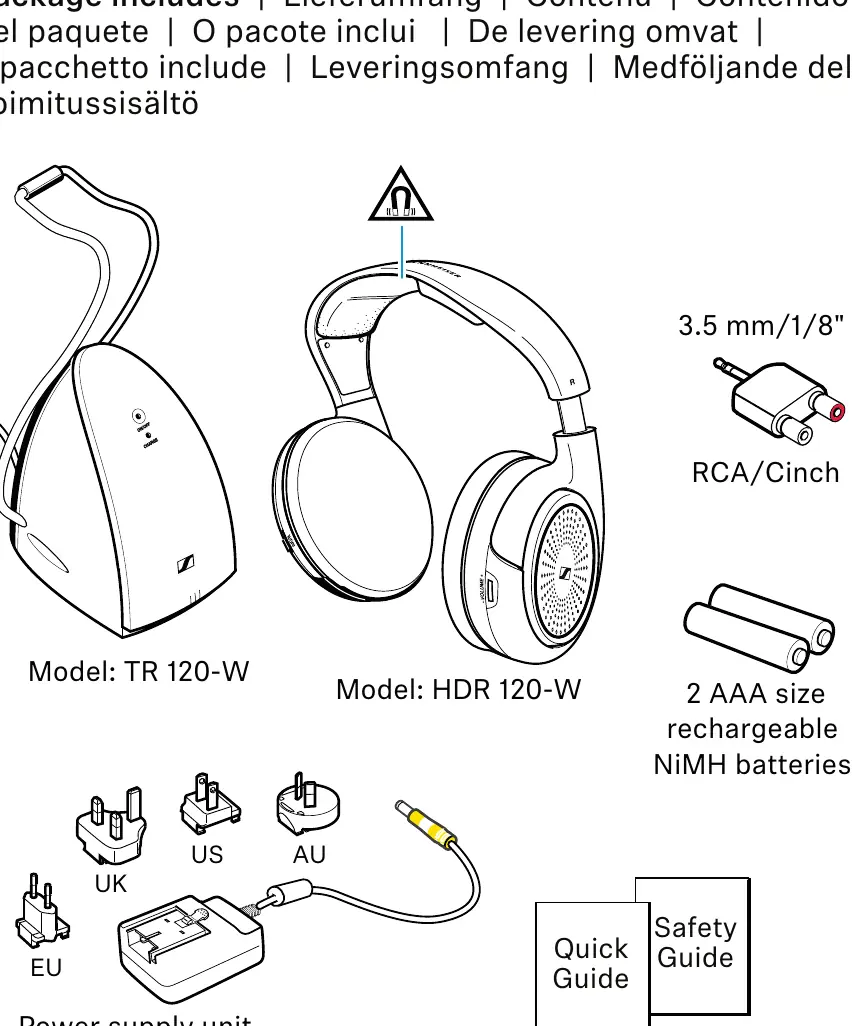
- Headphones (Model: HDR 120-W)
- Transmitter (Model: TR 120-W) with stereo RCA audio cable
- Power supply unit (Model: NT9-3AW) with multi-country adapters
- Two rechargeable NiMH batteries (AAA)
- Adapter for 3.5 mm audio connection
Product Overview
Headphones
The headphones feature an adjustable headband, volume control on the right ear cup, and an ON/OFF switch. The battery compartment is located under the left ear pad.
Transmitter
The transmitter serves as both a signal source and a charging cradle. It includes an ON/OFF LED, a CHARGE LED, a sound mode switch, and connections for power and audio.
Getting Started
Setting up the Transmitter
Place the transmitter near your audio source. Ensure it is at least 50 cm away from other wireless devices and not near metal structures to maintain signal range. The transmitter can be wall-mounted at a maximum height of 2 meters.
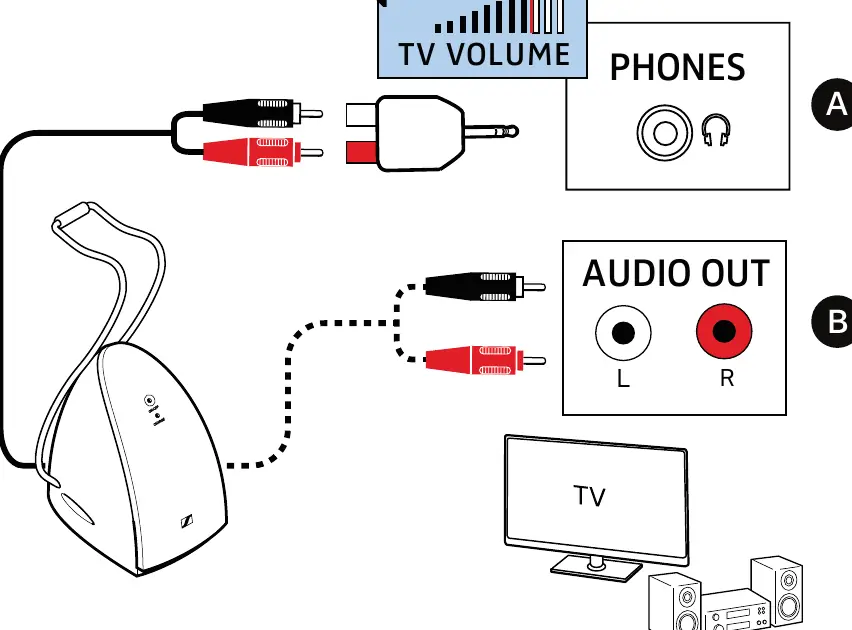
Connecting to an Audio Source
The transmitter connects via RCA cables. If your device only has a 3.5 mm jack, use the included adapter. If your device only has digital optical output, an analog-to-digital converter (not included) is required.
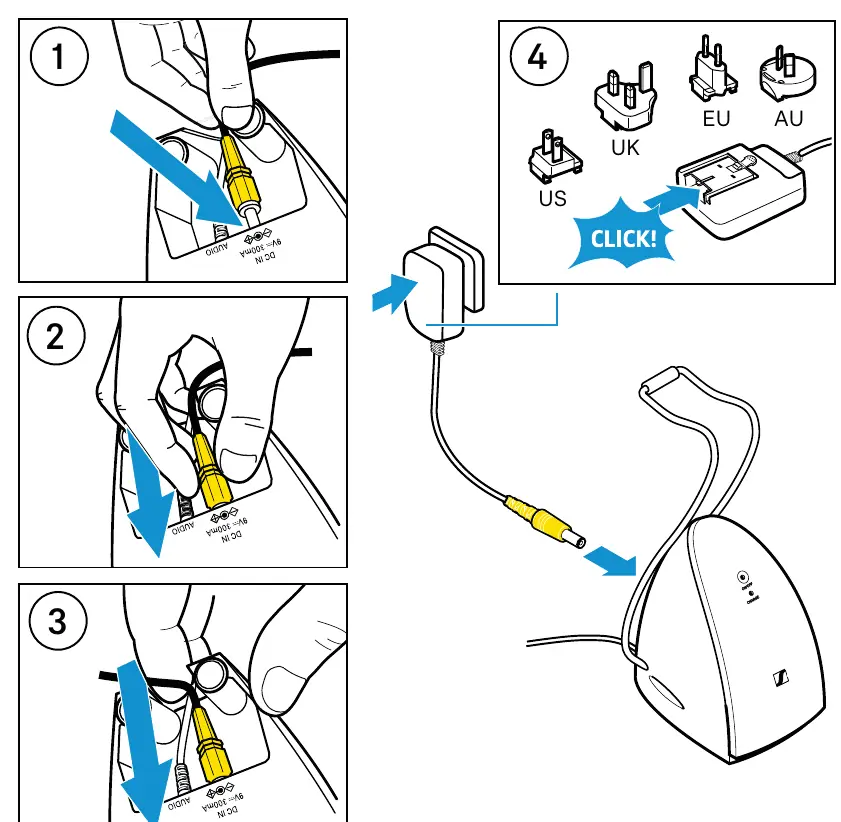
Connecting to Power
Attach the appropriate country adapter to the power supply unit, connect it to the transmitter, and plug it into a wall socket. The ON/OFF LED will light up green when an audio signal is present.
Batteries and Charging
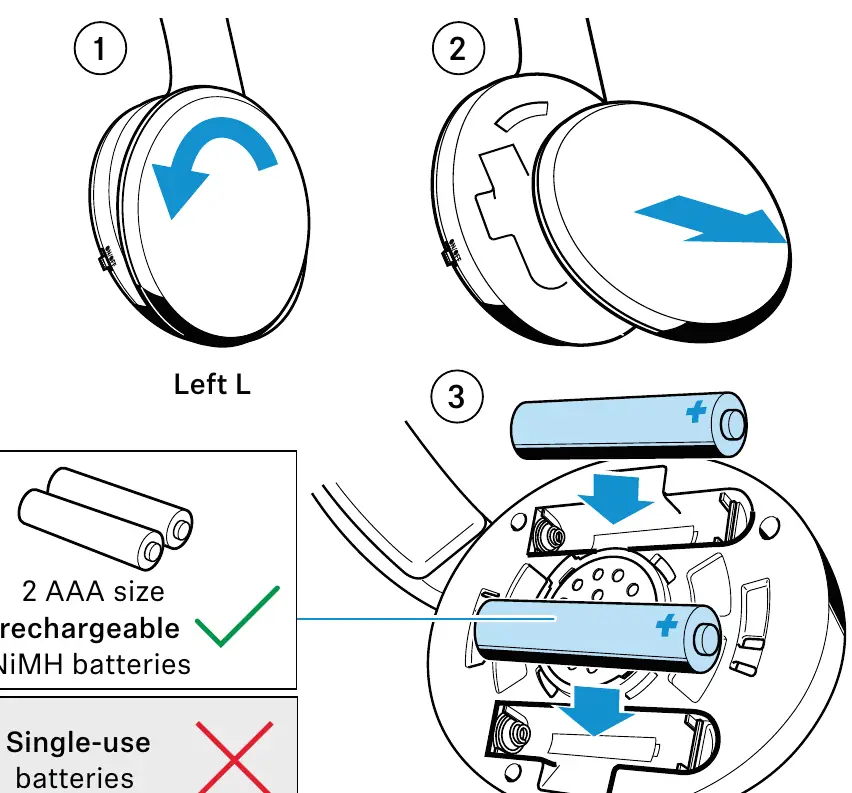
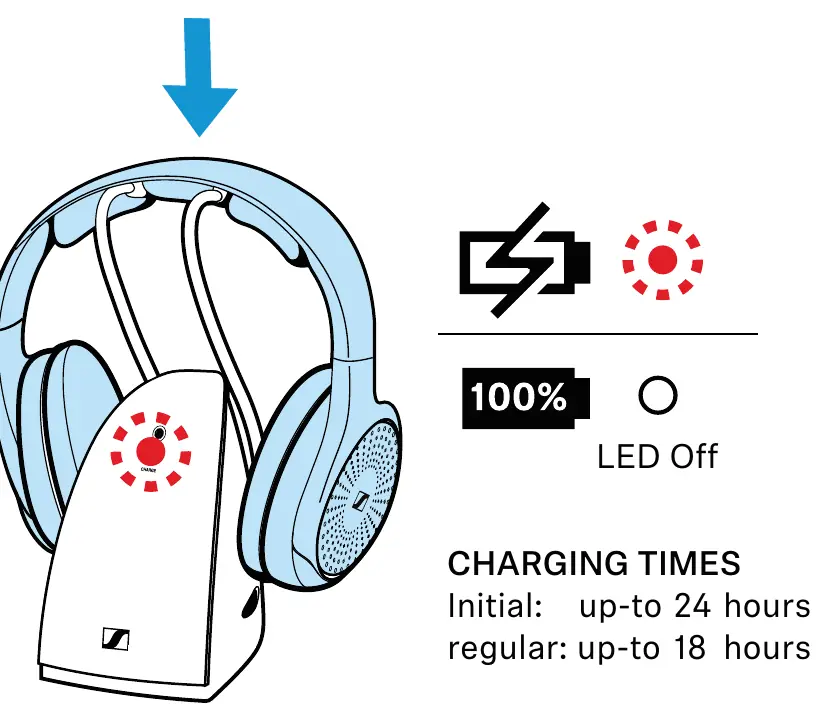
To insert or replace batteries, twist the left ear pad counterclockwise to remove it, insert two AAA NiMH rechargeable batteries observing correct polarity, and twist the ear pad back on until it clicks. Place the headphones on the transmitter cradle to charge. A full charge takes up to 18 hours, but the initial charge should be 24 hours.
Using the Headphone System
Switching On/Off
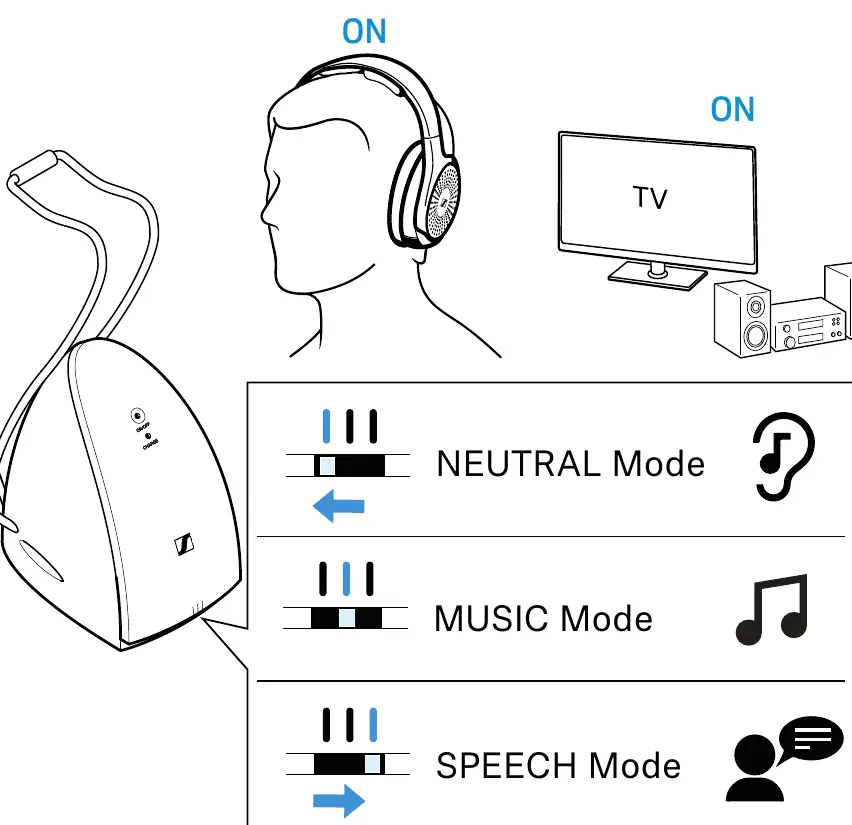
Switch the headphones on using the ON/OFF switch. If the audio source is off for 5 minutes, the system enters standby mode.
Pairing
The headphones and transmitter are factory pre-paired. To pair additional headphones, hold them within 30 cm of the transmitter while both are switched on.
Adjusting Volume and Sound Modes
Use the volume control on the right ear cup to adjust the level. Use the MODE switch on the transmitter to select between Neutral (unchanged), Music (boosted bass), or Speech (boosted frequency range for clarity) modes.
Care and Maintenance
Switch off and disconnect the transmitter before cleaning. Use only a soft, dry cloth. Clean charging contacts with a cotton swab. Replace ear pads periodically for hygiene; they can be twisted off and on in the same manner as the battery compartment cover.
Troubleshooting
If you experience issues, ensure the transmitter is connected to power and the audio source is active. If the sound quality deteriorates, you may be out of range (up to 60 meters). If the connection is lost, switch the headphones off and on again to re-establish the link.
Specifications
The system uses Bluetooth LE Audio technology with a range of up to 60 meters. The headphones provide up to 18 hours of operating time. The transmitter operates on 9V DC power.
Manufacturer information
Sennheiser
Practical help
Common problems
No sound
Ensure the transmitter is connected to power, the audio source is switched on, and the volume on the audio source is set to at least a medium level.
Headphones not charging
Ensure the headphones are placed correctly on the transmitter cradle and the charging contacts are clean.
Connection drops
Ensure you are within the 60-meter range and there are no major metal obstacles between the headphones and the transmitter.
Before use
- Charge batteries for at least 24 hours before first use.
- Ensure the transmitter is connected to a power outlet.
- Connect the transmitter to your audio source using RCA or 3.5mm cables.
- Insert the provided AAA NiMH rechargeable batteries into the headphones.
- Adjust the volume on your audio source to a medium level for better signal quality.
Specs in practice
- Transmission frequency
- 2.40 to 2.48 GHz (Bluetooth LE Audio).
- Operating time
- Up to 18 hours on a full charge.
- Charging time
- Up to 8.5 hours for a regular charge cycle.
Images and diagrams
- Transmitter connections: RCA and 3.5mm options are available.
- Battery insertion: Twist the left ear pad counterclockwise to access the battery compartment.
- Charging: Place the headphones on the transmitter cradle; the CHARGE LED will light up red.
Model compatibility
- Compatible with TV sets, hi-fi systems, and home cinema systems.
- Uses Bluetooth LE Audio wireless technology.
- Only compatible with HDR 120-W headphones.

Manual page author
Michael Turner
Technical manual editor
Reviews PDF manuals for structure, safety notes, and practical product details so readers can find the right information quickly.