Electronics / Headphones Earbuds
Sennheiser CX 150BT In-Ear Wireless Headphones User Manual
Quick guide for the Sennheiser CX 150BT wireless headphones. Learn how to pair via Bluetooth, charge the battery, control music and calls, and fit the ear adapters correctly.
Table of contents
Manual images
Click an image to enlargeQuick guide from the manual
The Sennheiser CX 150BT are in-ear wireless headphones designed for Bluetooth-enabled devices. Before first use, charge the battery fully. To pair, hold the multi-function button for 5 seconds until the LED flashes red and blue, then select 'CX 150BT' on your device. Ensure the ear adapters fit snugly for optimal sound quality.
Product overview
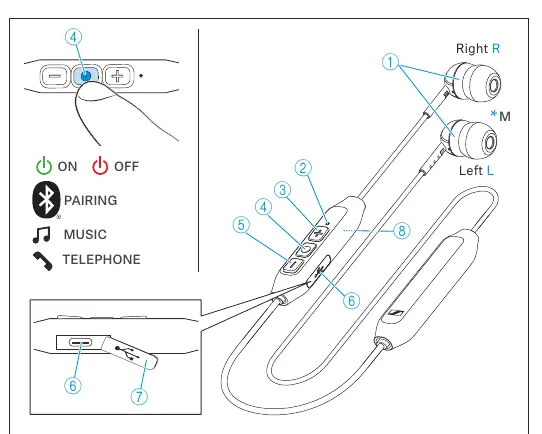
The headphones feature a multi-function button for power, pairing, and media control, along with volume up and down buttons. A USB-C socket is located on the control unit for charging. The LED indicator provides status updates on battery level and connection status.
Getting started
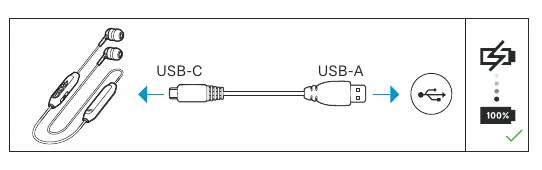
Charging: Connect the provided USB-C cable to the headphones and a USB power source. A full charge takes approximately 1.5 hours. The LED indicates charging status: red (charging), purple (75% charged), and blue (fully charged).
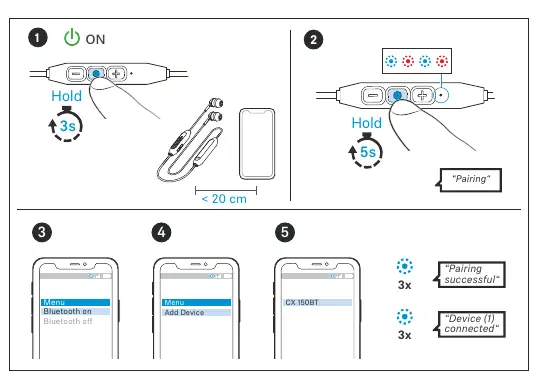
Pairing: Ensure the headphones are switched on. Hold the multi-function button for 5 seconds to enter pairing mode. Select 'CX 150BT' in your device's Bluetooth menu. The headphones can remember up to eight paired devices.
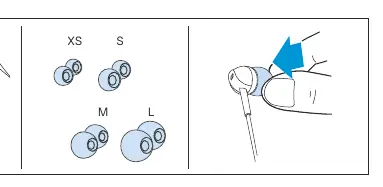
Ear adapters: The package includes four sizes (XS, S, M, L). Choose the size that provides the best seal in your ear canal for optimal bass and sound quality.
Using the headphones
Controls:
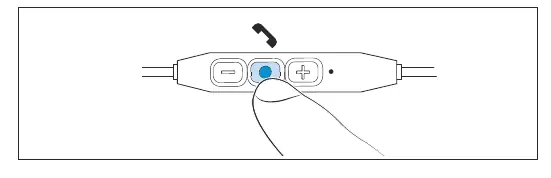
- Power on/off: Hold the multi-function button for 3 seconds.
- Play/Pause: Press the multi-function button once.
- Next track: Press the multi-function button twice.
- Previous track: Press the multi-function button three times.
- Volume: Use the + or - buttons.
Calls:
- Accept/End call: Press the multi-function button once.
- Reject call: Hold the multi-function button for 2 seconds.
- Mute microphone: Hold the volume - button for 2 seconds during a call.
Care and maintenance
Clean the headphones only with a soft, dry cloth. Keep liquids away from the product to prevent short-circuits. Replace ear adapters periodically for hygiene. If the battery appears defective, contact a Sennheiser partner.
Troubleshooting
If you encounter issues, check the following:
- Pairing failed: Ensure the headphones are in pairing mode (flashing red/blue) and within 20 cm of the device.
- Connection lost: Ensure you are within the 10-meter Bluetooth range.
- Reset: To clear the pairing list, switch on the headphones, hold the multi-function button for 3 seconds (pairing mode), then hold the volume + button for 3 seconds.
Specifications
The headphones support Bluetooth 5.0 with SBC and AAC codecs. They offer approximately 10 hours of playback time and have a frequency response of 20 Hz to 20,000 Hz. The operating temperature range is +5 °C to +40 °C.
Manufacturer information
Sennheiser
Practical help
Common problems
Headphones not pairing
Ensure the headphones are in pairing mode (flashing red and blue) by holding the multi-function button for 5 seconds.
Sound quality is poor or bass is weak
The ear adapter size may be incorrect. Try all four sizes (XS, S, M, L) to ensure a proper seal in the ear canal.
Connection drops frequently
Ensure you are within the 10-meter Bluetooth transmission range and there are no significant obstructions.
Battery not charging
Clean the charging socket and ensure the USB power source is active. A full charge takes 1.5 hours.
Before use
- Charge the headphones fully before the first use.
- Select the correct ear adapter size for a secure fit.
- Ensure Bluetooth is enabled on your smartphone or audio device.
- Keep the headphones within 20 cm of the device during initial pairing.
Specs in practice
- Bluetooth 5.0
- The wireless standard used for connection, supporting stable pairing and audio transmission.
- Operating time
- Up to 10 hours of music playback on a single charge.
- Charging time
- Approximately 1.5 hours for a full charge cycle.
Images and diagrams
- The multi-function button is the central control for power, pairing, and media playback.
- The LED indicator provides visual feedback for charging status and Bluetooth connection states.
- The USB-C port is located on the control unit for battery charging.
Model compatibility
- Compatible with Bluetooth-compliant devices.
- Supports AAC and SBC audio codecs.
- Can store connection profiles for up to eight devices.

Manual page author
David Miller
Documentation analyst
Organizes user manual content into clear summaries, with attention to model details, product context, and everyday usability.