Home Appliances / Cleaning Robots
Shenzhen 2020X580S6 Robotic Vacuum Cleaner User Manual
Quick guide for the Shenzhen 2020X580S6 robotic vacuum cleaner. Includes Wi-Fi setup, safety instructions, remote control operation, and charging procedures.
Quick answers from the manual
Quick answer
- The 2020X580S6 is a robotic vacuum cleaner controlled via remote or the WeBack app. It features multiple cleaning modes, automatic charging, and requires a clear floor area for optimal operation. p. 1, 4, 14, 17
Key actions
- Set up Wi-Fi p. 4
- Charge the robot p. 20
First start
- Switch on the robot using the power switch on the side. p. 19
Problems and fixes
Robot jamming
Remove objects thinner than 1.8cm from the cleaning area.
p. 16Technical specifications
| Parameter | Value | Meaning | Pages |
|---|---|---|---|
| Battery Capacity | 2600mAh | Capacity of the rechargeable battery. | p. 13 |
| Operating Duration | Approx. 100min | Runtime on a single charge. | p. 13 |
Where to find it in the PDF
- Wi-Fi Setup p. 4, 5
- Safety Instructions p. 6, 7, 8
- Product Components p. 9, 10, 11, 12
- Instructions for Use p. 15, 16, 17, 18
Table of contents
Manual images
Click an image to enlargeQuick guide from the manual
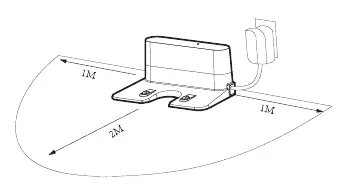
The Shenzhen 2020X580S6 is a robotic vacuum cleaner designed for indoor home use. To begin, ensure the charging base is placed against a wall on a flat floor with 1M clearance on the sides and 2M in front. Switch on the robot using the power switch on the side; the control button will light up white. You can control the robot using the included remote controller or the WeBack app.
Safety Instructions
- General: Do not use outdoors, in humid environments (bathrooms), or near open fires. Do not stand or sit on the product.
- Environment: Remove fragile items (glass, lamps) and entangling objects (wires, curtains) from the floor before use.
- Obstacles: Do not use in narrow places like thresholds to avoid missing areas. Ensure objects thinner than 1.8 cm are removed to prevent jamming.
- Battery: Use only the original power adapter. If the battery leaks or is deformed, stop use immediately. Remove the battery if the device will be out of service for a long time.
Product Components
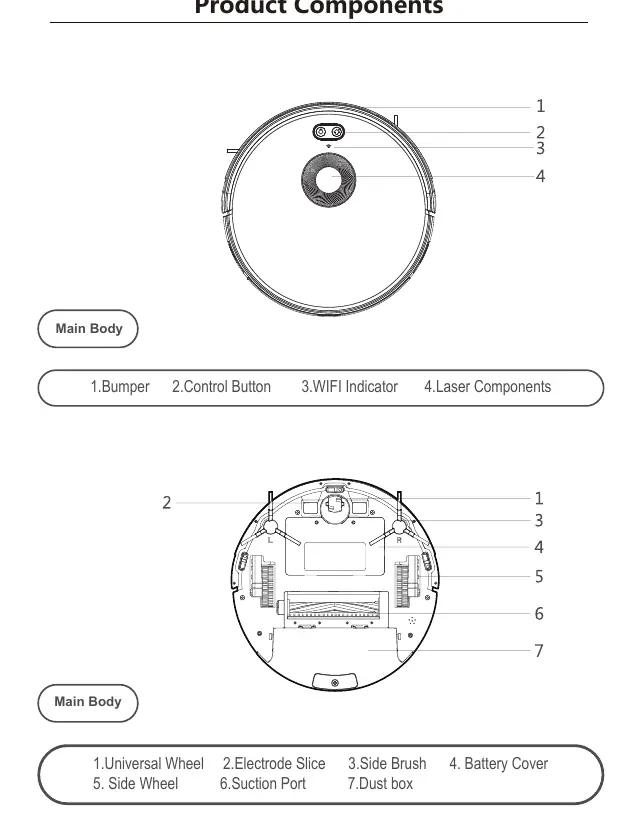
The package includes the main body, charging base, remote controller, power adapter, water tank component, side brushes, high-efficient filter, and mop. The main body features a bumper, control button, Wi-Fi indicator, and laser components.
Specifications
- Battery Capacity: 2600mAh
- Voltage: 14.8V
- Operating Duration: Approx. 100 minutes
- Charging Duration: 240-360 minutes
- Dust Box Capacity: 600ml
- Water Tank Capacity: 350ml
Instructions for Use
Wi-Fi Setup: Download the WeBack app by scanning the QR code on page 4. Log in or create a new account, then follow the app instructions to connect the robot.
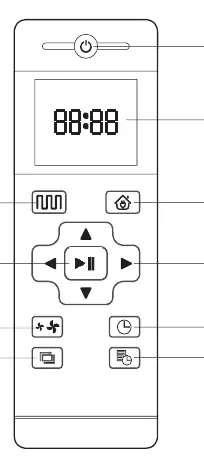
Remote Controller: Use the remote to switch cleaning modes (Smart, Edge), adjust suction power, set the clock, or schedule cleaning. Note that the remote may not work if the robot is too close to the charging base or a virtual wall.
Charging
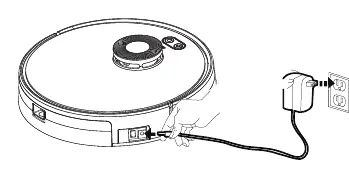
Charge Mode A: Plug the power adapter directly into the DC power jack on the robot.
Charge Mode B: Use the remote controller or app to command the robot to return to the charging base automatically.
Practical help
Common problems
Robot jamming
Ensure objects with a thickness of less than 1.8 cm are removed from the cleaning area.
Remote control not responding
Ensure the robot is not in the immediate vicinity of the charging base or a virtual protection wall, as these can interfere with the signal.
Wi-Fi connection issues
Ensure you are using the WeBack app and have followed the QR code setup process correctly.
Before use
- Remove fragile items like glass and lamps from the floor.
- Remove wires, curtains, and toys that may entangle the side brush.
- Ensure the dust box is empty.
- Check that the power adapter is connected to the socket.
- Roll up the edges of carpets if using the mopping function.
Specs in practice
- Operating Duration
- The robot can run for approximately 100 minutes on a full charge.
- Charging Duration
- It takes between 240 and 360 minutes to fully charge the battery.
- Battery Capacity
- The device is equipped with a 2600mAh rechargeable battery.
Images and diagrams
- The remote control diagram shows buttons for Plan Cleaning, Return for Auto Charging, Suction Setting, and Schedule Setting.
- The charging base placement diagram indicates a required clearance of 1 meter on the sides and 2 meters in front of the base.
Model compatibility
- Do not use the mopping function on carpets.
- The robot is for indoor home use only; do not use outdoors.

Manual page author
Michael Turner
Technical manual editor
Reviews PDF manuals for structure, safety notes, and practical product details so readers can find the right information quickly.