Wearables / Fitness Trackers
User Guide for Shenzhen 233621 Hush ANC Headphones
Comprehensive user guide for Shenzhen 233621 Hush ANC Headphones. Includes pairing instructions, touch control guide, noise cancellation settings, charging procedures, and technical specifications.
Quick answers from the manual
Quick answer
- To pair the 233621 Hush headphones, hold the power button for 2 seconds from the off state until the red and white lights flash, then select '233621 Hush' on your phone. p. 1
Key actions
- Power On/Off: Hold power button for 2 seconds. p. 1
- Factory Reset: Hold touch panel and power button for 5 seconds while on. p. 2
First start
- Charge the device, then hold the power button for 2 seconds to enter pairing mode. p. 1
Show 4 more answers Show less
Problems and fixes
Bluetooth disconnection
If out of range, it reconnects automatically within 10 minutes. After 20 minutes, it powers off.
p. 1Maintenance and reset
- Restore Factory Settings: Hold touch panel and power button for 5 seconds. p. 2
Technical specifications
| Parameter | Value | Meaning | Pages |
|---|---|---|---|
| Speaker size | 40mm | Driver size | p. 2 |
| Battery | 1200 mAh | Capacity | p. 2 |
| Usage time | 70H | Battery life with ANC ON | p. 2 |
| Weight | 225g | Product weight | p. 2 |
Where to find it in the PDF
- Quick Start Guide p. 1
- Specifications and Regulatory p. 2
Table of contents
Manual images
Click an image to enlargeQuick guide from the manual
The Shenzhen 233621 Hush headphones feature Active Noise Cancellation (ANC) and Ambient Mode. To power on, hold the power button for 2 seconds. To pair, hold the power button for 2 seconds from the off state until the red and white lights flash, then select '233621 Hush' on your device. The right earmuff features a touch panel for music and call control.
What's in the box
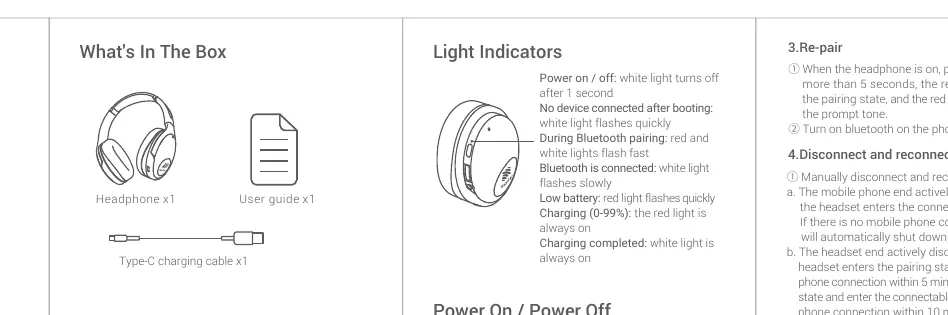
- Headphone x1
- User guide x1
- Type-C charging cable x1
Power and Pairing
Power On/Off: Press and hold the power button for 2 seconds.
First-time Pairing: With the headphones off, press and hold the power button for 2 seconds until the voice prompt 'Power on' is heard and lights flash red and white. Select '233621 Hush' in your phone's Bluetooth settings.
Re-pairing: With the headphones on, press the power button for more than 5 seconds until the red and white lights flash.
Disconnect/Reconnect: If the device goes out of range, it will automatically reconnect if back in range within 10 minutes. After 20 minutes of disconnection, the headphones will power off.
Right Earmuff Touch Controls
Music Control:
- Play/Pause: Double-tap the touch panel.
- Next Song: Triple-tap the touch panel.
- Previous Song: Single-tap the touch panel.
Call Control:
- Answer/Hang up: Double-tap the touch panel.
- Reject Call: Long press the touch panel.
- Volume Adjustment: Use the Function button (press once/twice).
Noise Cancellation and Ambient Mode
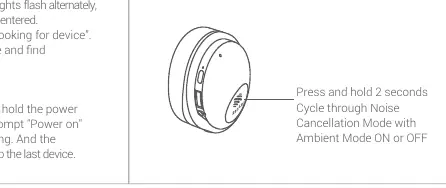
Cycle through Noise Cancellation and Ambient modes by pressing and holding the touch panel for 2 seconds. The system provides voice prompts for mode changes.
Charging
Charge the headphones using the provided Type-C cable. A full charge takes approximately 2 hours. The red light indicates charging, and the white light indicates a full charge. Use a 5V/1A charger.
Restore Factory Settings
To clear pairing records, turn the headphones on, then press and hold the right earmuff touch panel and the power button simultaneously for 5 seconds. The red and white lights will flash twice, and the indicator will go off.
Safety and Maintenance
- Do not use in dusty, humid, or dirty environments.
- Keep volume at a safe level to prevent hearing damage.
- Do not use while driving.
- Keep away from heat sources and open flames.
- Do not disassemble the device; battery replacement must be done by an authorized service center.
- Keep at least 15cm away from pacemakers.
Practical help
Common problems
Headphones will not pair
Ensure the headphones are in pairing mode (red and white lights flashing). If already on, hold the power button for 5+ seconds.
Low battery
Red light flashes quickly and voice prompt 'Battery is low' plays. Charge immediately using a 5V/1A charger.
Bluetooth disconnects
If out of range for more than 10 minutes, you must manually reconnect. If disconnected for 20 minutes, the device powers off.
Before use
- Charge the headphones fully (approx. 2 hours)
- Ensure Bluetooth is enabled on your mobile device
- Keep the device within range (no obstacles)
- Read safety warnings regarding pacemakers and volume levels
Show more Show less
Specs in practice
- Charging Time
- 2 hours via Type-C cable
- Bluetooth Version
- BT 5.0
Model compatibility
- Supports HSP v1.2, HFP v1.6, A2DP v1.2, AVRCP v1.4

Manual page author
Emily Carter
User documentation editor